



practical_Ray5C0E
Participant
Dec 30, 2022 5:12 AM UTC
Answered

Where is "Take a Snapshot" in Acrobat Pro DC version 22.0 ?

Hello all, trying to find the "Take a Snapshot" function with this latest update.  I can find it through search but would like to have it in the left nav bar or quick tools section.  Let me know if anyone has found it.  Thanks!
practical_Ray5C0E
practical_Ray5C0ECorrect answer
Participant
Jan 1, 2023 9:45 PM UTC

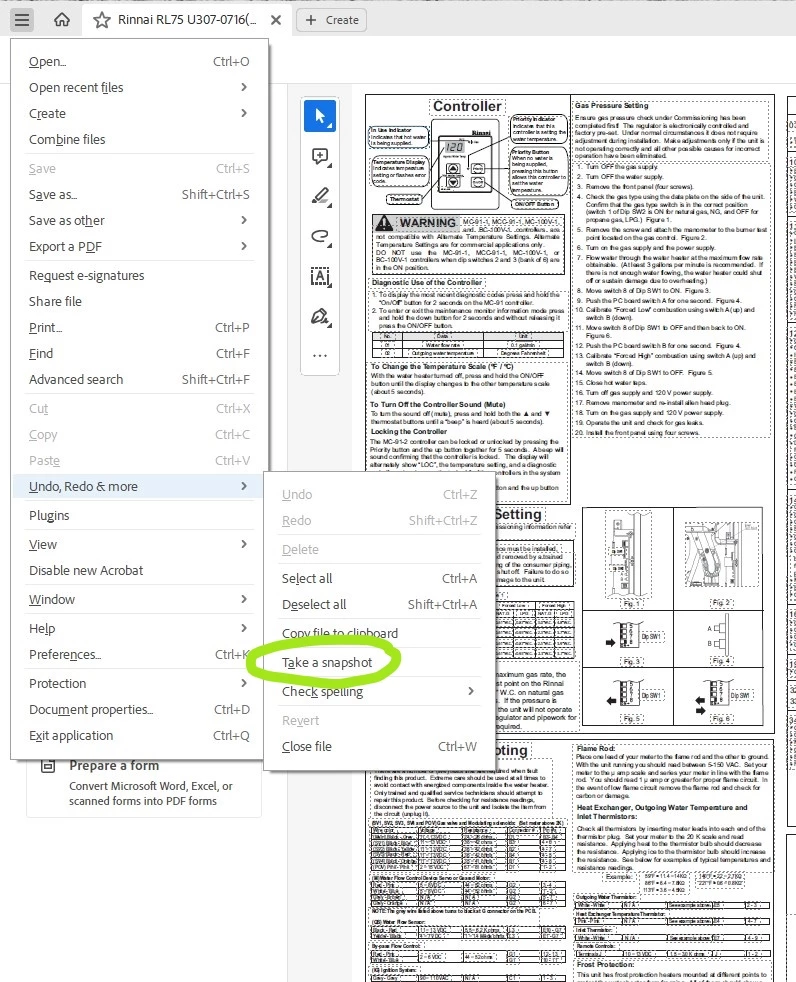
Found it...its under the hamburger (triple bar) icon > Undo, Redo & more > Take a snapshot 


26 replies

Participant
Apr 1, 2024 8:37 PM UTC

Right click on the PDF document in the window, select "take a snapshot", then select the window you want to "snapshot", boom! it selects it and the program does a "snapshot".  Right click on the blue highlighted window and print.

Translate
Participant
Sep 26, 2024 5:17 PM UTC

That's the right answer. Thanks.

Translate
Participant
Feb 1, 2024 9:26 PM UTC

Thank the fully it is easy to revert back to previous version, with all the familiar menus and leave comments on why you reverted!  Phew!  I feel like I am back home!  🙂

Translate
Participant
Feb 10, 2024 10:07 AM UTC

Ragazzi avevo lo stesso problema, ma in realtà è molto più semplice del previso.
Con lo strumento puntatore tracciate il riquadro all'immagine che volete copiare.
Vi appare poi un menù contestuale con delle funzioni disponibili, tra cui "copia immagine".
Molto più semplice di prima...

Translate
Legend
Sep 11, 2023 3:41 PM UTC

Just to avoid confusion. There is actually no "Acrobat Pro DC". The product name is "Adobe Acrobat", available as Standard or Pro. 

Next, the version 22 is only valid for a specific install. There are several issues, like Acrobat for Enterprise or 32 Bit, 64 Bit etc. I also have the latest Acrobat Pro, but it's not version 22.


Translate
Participant
Jan 19, 2024 4:40 AM UTC

Why make it so complicated and hide the command that people often used.  Garbage. 

Translate
Participant
Jul 10, 2023 8:23 PM UTC

Any way to pin it to a toolbar permanently? I use it a lot and it is a pain to click through several menus to grab it every time.

Translate
glhelton
Participant
Jul 25, 2023 6:24 PM UTC

Any updates on pining this in the newest version?  This is driving me nuts.

Translate
Participant
Oct 5, 2023 11:20 AM UTC

Adobe please fix the snapshot!  I use this hundreds of times a day.  What is the design philosophy at Adobe?  I understand that everyone uses this product differently, but for every workflow I have this tool is now much slower and more frustrating.  What is the point in changing the menus and location on something like this.  It's like if Ford decided to make the steering wheel work opposite, and move the turn signal lever to the back seat.  Who is making and approving these massive changes, with no apparent benefit.  It's like throwing money away on redesign.  Is Adobe just trying to justify the annoying subscription pricing?


I plan to start looking for an alternate product.

Translate
Bernd Alheit
Community Expert
Community Expert
Dec 30, 2022 8:26 AM UTC

It is at Edit > More > ...

Translate
practical_Ray5C0E
Participant
Jan 1, 2023 6:59 AM UTC

Thanks for the reply but I don't see a "..." option in the new version per screenshots taken below:


Translate
Bernd Alheit
Community Expert
Community Expert
Jan 1, 2023 4:39 PM UTC

It is available in the old version. 

Translate