
Known Participant
August 12, 2021
Answered

Where is the Change Conversion setting in acrobat pro

  • August 12, 2021
  • 2 replies
  • 9816 views

I am not able to find this option . please give me the exact path how to change this. I was trying to export comments from pdf - it gives me error message : When the pdf was created the content in it was not tagged.  Exporting comments will only work if the PDF is tagged PDF.

PDF is not tagged When the PDF was created, the content in it was not Tagged.
Exporting comments into a Word document will only work if the PDF is a tagged
PDF. To create a tagged PDF, you must select "Change Conversion Settings" from the
"Adobe PDF" menu, and check the box labeled "Enable accessibility and reflow with
Tagged PDF."
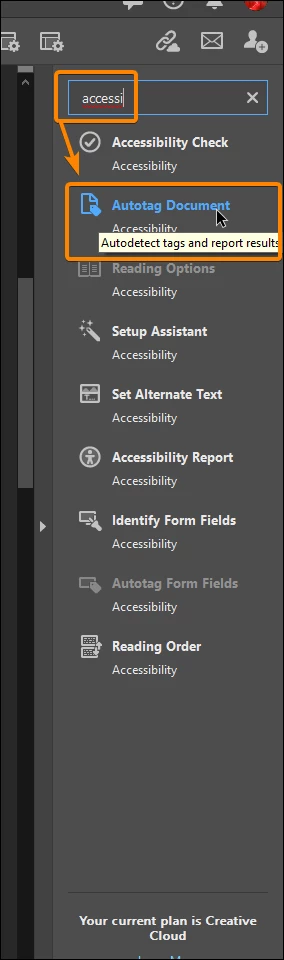
Correct answer JR Boulay

You should try to "Autotag" the PDF document using Acrobat Pro, before exporting Comments:


2 replies

JR Boulay
Community Expert
JR BoulayCommunity ExpertCorrect answer
Community Expert
August 18, 2021

You should try to "Autotag" the PDF document using Acrobat Pro, before exporting Comments:


Acrobate du PDF, InDesigner et Photoshopographe
nanoLMAuthor
Known Participant
August 18, 2021

Thanks JR Boulay ! This works! 

is there any possibility that the comments can be adjusted a little bit to the left? is that adjustable?

screenshot attached. ( The screenshot is after exporting the comments to the word document ).


JR Boulay
Community Expert
Community Expert
August 19, 2021

This is a Word issue, I can't reply.

Acrobate du PDF, InDesigner et Photoshopographe
Amal.
Community Manager
Community Manager
August 12, 2021

Hi NanoLM


Hope you are doing well and sorry for the trouble. As described, you are unable to find the option for 'change conversion settings'


Please check out the correct answer marked in a similar discussion - https://community.adobe.com/t5/acrobat/how-to-change-conversion-settings/m-p/1716231 and see if that helps.


For more information about creating a tagged PDF from authoring application please check the help page -
https://helpx.adobe.com/acrobat/using/creating-accessible-pdfs.html#creating_a_tagged_pdf_from_an_authoring_application


Regards

Amal

nanoLMAuthor
Known Participant
August 12, 2021

No This is from word ( i.e when I first open the word and then export the pdf to the word , I am looking at the other way around ,i.e open pdf then go to comments and then export to word - which I normally do. , I am looking for export from Adobe. Refer to the screenshot. what I do for this error? 

Amal.
Community Manager
Community Manager
August 13, 2021

Hi there


We are sorry to hear that. please check out the similar discussion here - https://acrobatusers.com/forum/general-acrobat-topics/how-do-i-find-and-update-change-converson-settings-export-comments/ and see if that works.


Regards

Amal