dv8kiwi
Inspiring
Dec 8, 2021 11:35 AM UTC
Answered

Where is the plugins menu?

Where do I find the plugins I had installed in previous versions of Acrobat?

ASR1428Correct answer
Participant
May 28, 2024 7:17 PM UTC

Hi,
I came to this forum looking for the PlugIns and then found it after searching for it.
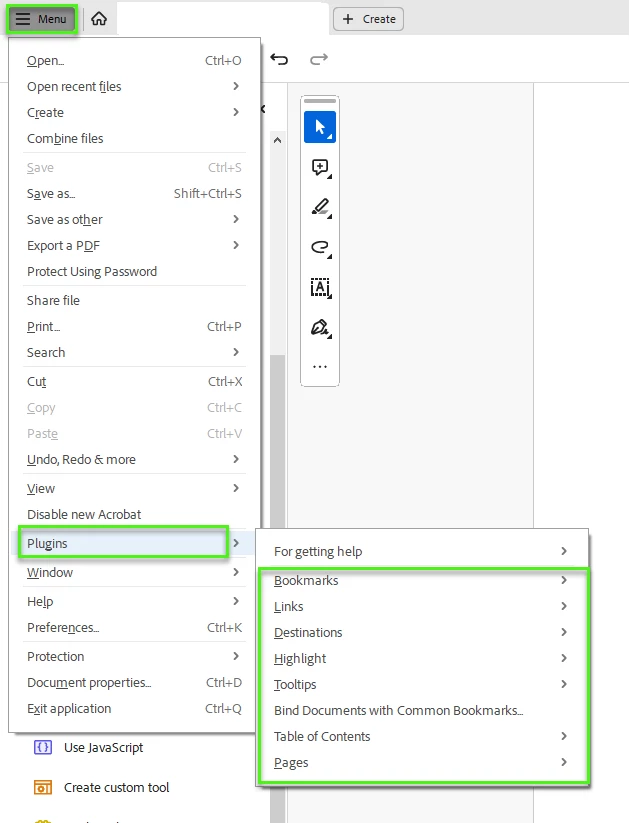
It seems to have moved under Menu> PlugIns. I hope that answers your question.


14 replies

Participant
Oct 3, 2025 7:14 PM UTC

For those using Quite Imposing, try switching from the new version of Acrobat to the old version (or vice versa).

Translate
Participant
Mar 5, 2025 10:48 AM UTC

I had the same problem with my Quite Imposing V2—no plugins were showing in Adobe Acrobat Pro. I found out that I needed to update Quite Imposing to the latest version (V5). After upgrading, everything works as expected!

Translate
ASR1428Correct answer
Participant
May 28, 2024 7:17 PM UTC

Hi,
I came to this forum looking for the PlugIns and then found it after searching for it.
It seems to have moved under Menu> PlugIns. I hope that answers your question.


Translate
Participant
Jul 6, 2023 6:49 AM UTC

Click on Edit, select Menu at top left and the drop-down menu shows Quite Imposing.

Translate
Participant
Jul 11, 2022 2:37 PM UTC

Looks like nobody found a solution to this.  I can't find anything on it on the net.  This is the closest I've found to the peoglem one of my users is having.

Translate
Bernd Alheit
Community Expert
Community Expert
Jul 11, 2022 3:07 PM UTC

What is the problem?

Translate
Legend
Dec 8, 2021 12:22 PM UTC

If you have updated to 64-bit Acrobat, you will need all new plug-ins.

Translate
dv8kiwi
dv8kiwiAuthor
Inspiring
Dec 8, 2021 12:44 PM UTC

Quite Imposing Plus 5.2 works with 64 bit Acrobat 2021. It's just not there. There is no plugin menu

Translate
JR Boulay
Community Expert
Community Expert
Dec 8, 2021 11:43 AM UTC

This free utility can give you all the paths of the affected folders:

https://www.abracadabrapdf.net/utilitaires/utilities-in-english/show_me_the_path-en/

Translate
Acrobate du PDF, InDesigner et Photoshopographe
dv8kiwi
dv8kiwiAuthor
Inspiring
Dec 8, 2021 11:54 AM UTC

Thanks but I don't understand how this helps. It doesn't seem to answer my question. There used to be a menu to access and launch plugins. There isn't one any more. Where is it now?

Translate
Bernd Alheit
Community Expert
Community Expert
Dec 8, 2021 12:04 PM UTC

What plugins have you installed?

Translate