Known Participant
Feb 26, 2024 9:16 AM UTC
Answered

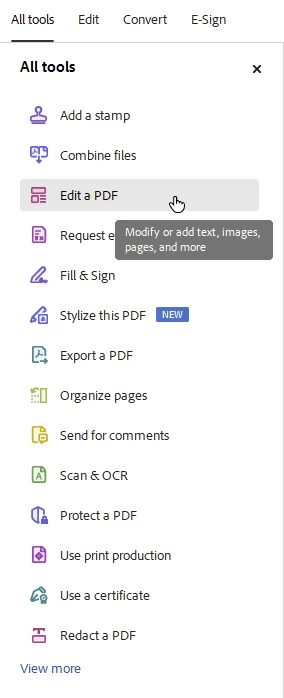
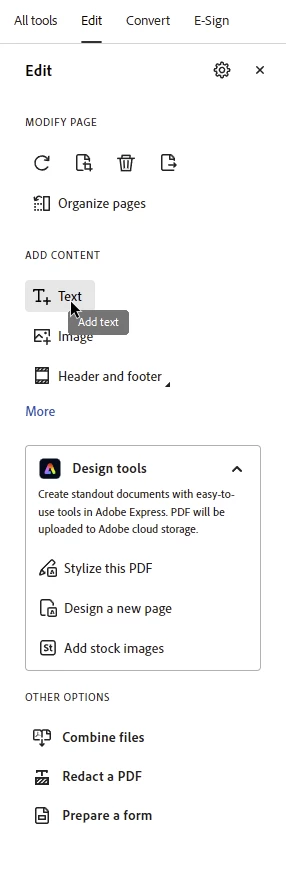
Where is the typing tool???

I started my machine last week and a new version of acrobat had been installed.   Great.  That means new features that will make my design life more productive.


In this case that does not seem  to be the case.   I hope I am mistaken here as I have already heard from others that this is a problem.


Please direct me to the typing tool...not a textbox.  The typing tool can be used to add textg anywhere on the document and is an incredibly powerful tool for those of us that are not advanced users (I spend my much of my time in cad).   


Any help here will be greatly appreciated.

Abambo
AbamboCorrect answer
Community Expert
Feb 26, 2024 11:37 AM UTC

1.


2.


ABAMBO | Hard- and Software Engineer | Photographer

10 replies

Community Expert
Apr 22, 2024 9:26 AM UTC

Hi @jlcampijr ,

if you ever want get the old version of tools back, go to main menu


View > Disable new Acrobat


But if you do this you'll miss the new function AI Assistant.


Regards,
Uwe Laubender
( Adobe Community Expert )

Translate
jlcampijrAuthor
Known Participant
Apr 22, 2024 7:35 PM UTC

I presume this is a sarcastic remark regarding the AI.   It's anything but intelligent.   I have had it summarize some of my reports.   After the first few LOLs it was clear this is not ready for prime time.   In fact, let's say a client used this to summarize my enginerring reports, it would clearly misinform.   The most rediculous piece of this is that I caught myself arguming my point.   How embarrsing.

Translate
Amal.
Legend
Apr 23, 2024 5:13 PM UTC

Hi there


We are sorry to hear that.


You can interact with the content that the generative AI features produce to indicate whether you're satisfied with the output. Based on whether you find it useful, you can choose to like or dislike the generated response.


You can also play a part in improving the capabilities of the generative AI features by providing specific feedback about your experiences with the features.


The underlying algorithm learns from your feedback, which helps refine the capabilities of generative AI features and the accuracy of responses to specific queries.


For more information, please check the help page https://helpx.adobe.com/acrobat/using/react-to-content-responses.html


~Amal

Translate
Amal.
Legend
Feb 26, 2024 6:38 PM UTC

Hi there


++ Adding to the discussion


To know more about the New Acrobat, please go through the help page https://helpx.adobe.com/acrobat/learn-new-acrobat.html


~Amal

Translate
Abambo
Community Expert
AbamboCommunity ExpertCorrect answer
Community Expert
Feb 26, 2024 11:37 AM UTC

1.


2.


Translate
ABAMBO | Hard- and Software Engineer | Photographer
jlcampijrAuthor
Known Participant
Feb 26, 2024 4:05 PM UTC

Thank you!   I was told this tgool was deleted.

Translate
try67
Community Expert
Community Expert
Feb 26, 2024 9:22 AM UTC

Search the Tools panel for "add text".

Translate