
Participating Frequently
September 1, 2022
Answered

Why are images low quality when imported Acrobat?

  • September 1, 2022
  • 1 reply
  • 8705 views

Is there a way to fix it? 


So I have 10 png images that are 72 dpi each. They are exported from Adobe XD. 

I want to create a PDF version so I combine all the images into PDF.


But as soon as I import the images into acrobat's "combine files", the images look bad, and depixelated. 

So when I save to PDF, the pages look bad, and no longer same quality as the original PNGs. 


Is there a way to fix this? Like retain the quality of the original PNGs?

Thanks in advance. 
This topic has been closed for replies.
Correct answer S_S

Hi @AndeeDoree10,


I hope you are doing well. Sorry for the trouble.


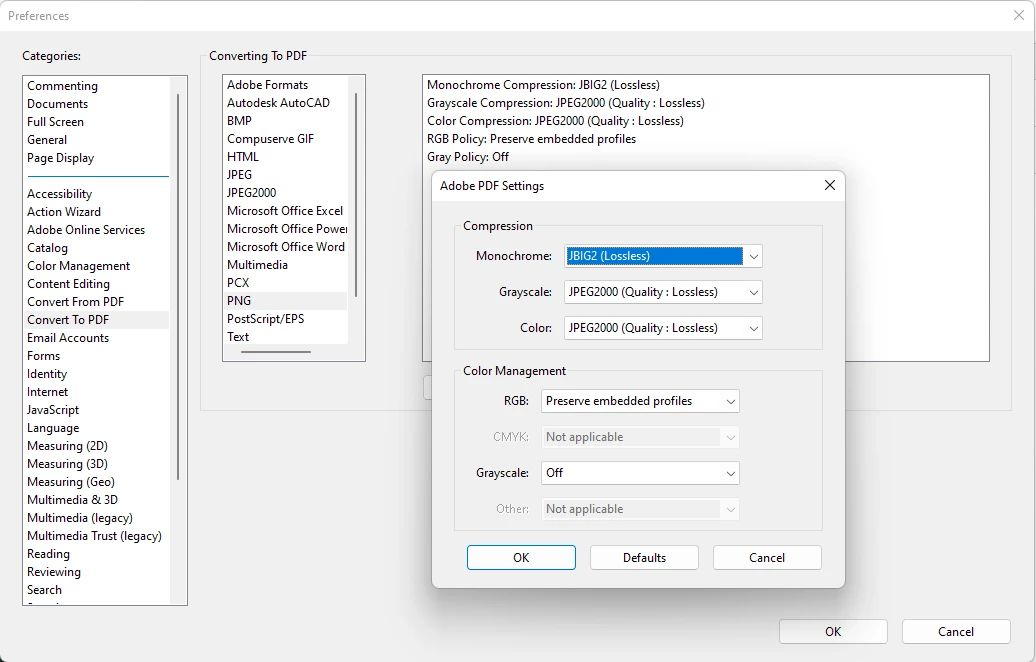
Have you tried changing the preferences of how an image file is treated when imported in Acrobat or converted using Acrobat?


You might want to tweak the settings from here: 

Preferences-> Convert to PDF-> PNG and change how you want the files to be.


I hope this helps.


Thanks,

Souvik.

1 reply

S_S
Community Manager
S_SCommunity ManagerCorrect answer
Community Manager
September 2, 2022

Hi @AndeeDoree10,


I hope you are doing well. Sorry for the trouble.


Have you tried changing the preferences of how an image file is treated when imported in Acrobat or converted using Acrobat?


You might want to tweak the settings from here: 

Preferences-> Convert to PDF-> PNG and change how you want the files to be.


I hope this helps.


Thanks,

Souvik.

Participating Frequently
September 4, 2022

It worked. Thank you so much! 🙂 

S_S
Community Manager
Community Manager
September 5, 2022

Hi @AndeeDoree10 ,


Thank you for taking the time and letting me know that it worked.


Best,

Souvik.