Participant
January 12, 2018
Answered

Why can I no longer add hollow (no fill) shapes in Acrobat Pro DC when I am using the Commenting tool to add shapes and text boxes?

  • January 12, 2018
  • 5 replies
  • 41651 views

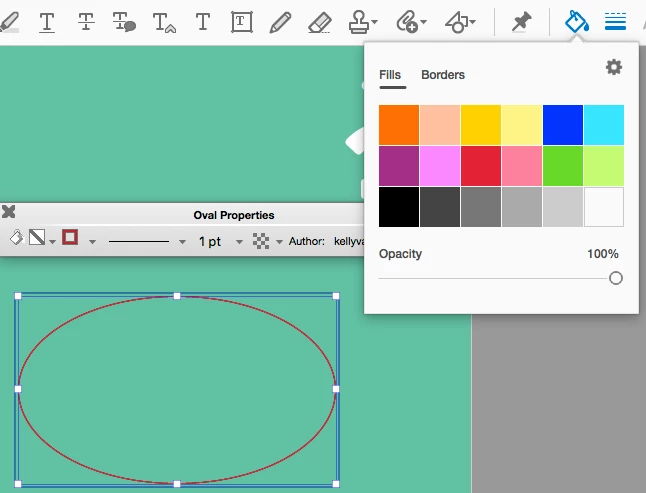
I am using Adobe Acrobat Pro DC (Version 2018.009.20050) on a Mac Mini running macOS High Sierra (Version 10.13.2) and I used to be able to use the Comment tool to add shapes to drawings and reports...I used to insert the shape, and then I was able to go to properties, and when I would click on the Fill Color, there was an option/check box to make it transparent. That option is no longer there and I don't know why it just disappeared. Now when I try to insert a circle to show an area, it just covers up what I'm trying to circle and there's no way for me to remove the fill color (I can only change it to be a different color). ??? Please help! This is so irritating!!

Correct answer Document Geek

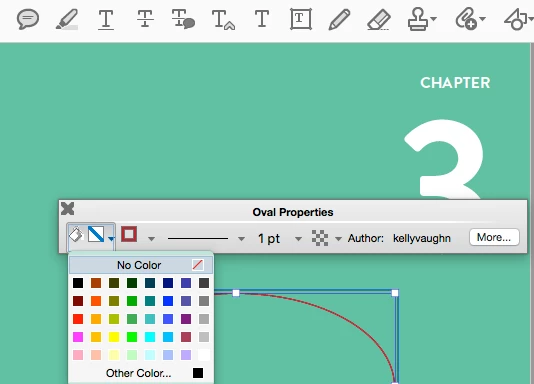
In the "new and improved" user interface for Acrobat DC, they didn't include the "no Fill" for drawing shapes. But it is still available in the old Properties Toolbar. Cmd / Ctrl + E. I wrote an entire article about why the Properties Toolbar is better than the new color picker.

5 replies

Participating Frequently
February 18, 2026

You have to admire the amount of effort Adobe puts into making usability worse.

Shlomit Heymann
Inspiring
February 12, 2026

Thank you for that 🙏🏻

dxeodllAuthor
Participant
January 26, 2018

OMG! Thank you so much, Document Geek!! You have no idea how long I have been trying to figure this out! LOL!

Document Geek
Community Expert
Community Expert
January 26, 2018

@dxeodll

Did you know that Adobe has a User Voice site where you can vote for improvements and give direct feedback? Your issue can be voted for here: Comment UI was better in former version.

I have been told that Adobe makes their decisions on priorities of features based directly on the feedback from the user base. Please vote for the above feature and make your voice known.

Document Geek
Community Expert
Community Expert
June 26, 2018

I wrote an entire article about this missing feature: How to Make a PDF Drawing markup with "No Fill"

Please vote for this feature on the Acrobat User Voice site here: Draw Shapes - add a no fill option

Document Geek
Community Expert
Document GeekCommunity ExpertCorrect answer
Community Expert
January 15, 2018

In the "new and improved" user interface for Acrobat DC, they didn't include the "no Fill" for drawing shapes. But it is still available in the old Properties Toolbar. Cmd / Ctrl + E. I wrote an entire article about why the Properties Toolbar is better than the new color picker.

Participant
June 2, 2025

This helped, THANKS Document Geek!

try67
Community Expert
Community Expert
January 14, 2018

It's a bug in Acrobat. Make sure you update it to the latest available version and it might be solved.