Answered
Why do values double in one form field?
When I type values into a form field, the value duplicates when I move to the next field. (the small 5 is the correct value and the larger one appears when I move on. WHY?
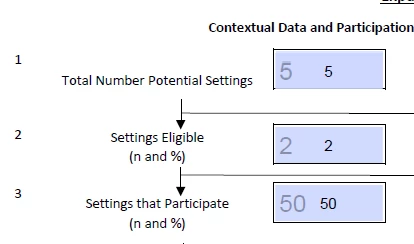
When I type values into a form field, the value duplicates when I move to the next field. (the small 5 is the correct value and the larger one appears when I move on. WHY?
Go to Form Edit mode (Tools - Prepare Form). Are you not able to select the field and delete it?
It's also possible that the underlying number is just static text. In that case it should still remain there when you change the value of the field.
Already have an account? Login
Enter your E-mail address. We'll send you an e-mail with instructions to reset your password.
 AdChoices