
daitranthanhoa
Inspiring
June 30, 2023
Question

Why does Acrobat Pro DC 2023 64bit hang when running a script?

  • June 30, 2023
  • 4 replies
  • 1950 views

I want get infor of Text by Script.

Ex, My Script :


var link_info = "";
var pPageTime="";
for (var p = 0; p < 1000; p++)
{

    var numWords = this.getPageNumWords(p);

	var st=new Date();
	pPageTime += p +"-" +numWords +": "+ st;
	var bLink=false;
	var iFirstPage=0;

		for (var i=0; i<numWords; i++)
		{       
			var ckWord = this.getPageNthWord(p, i, false); 
			if (ckWord.search("P\\.")>=0)
						{
				var iPageGoto =this.getPageNthWord(p, i+1, true);
				
				if(iPageGoto>0)
				{
				   link_info +=iPageGoto;
				}

			}
				
		}
	var et=new Date();
	pPageTime += "_"+ et +"\n";

}

event.value = pPageTime;


Acrobat Pro DC 2023 64bit not occur error, but some time it hang very long.
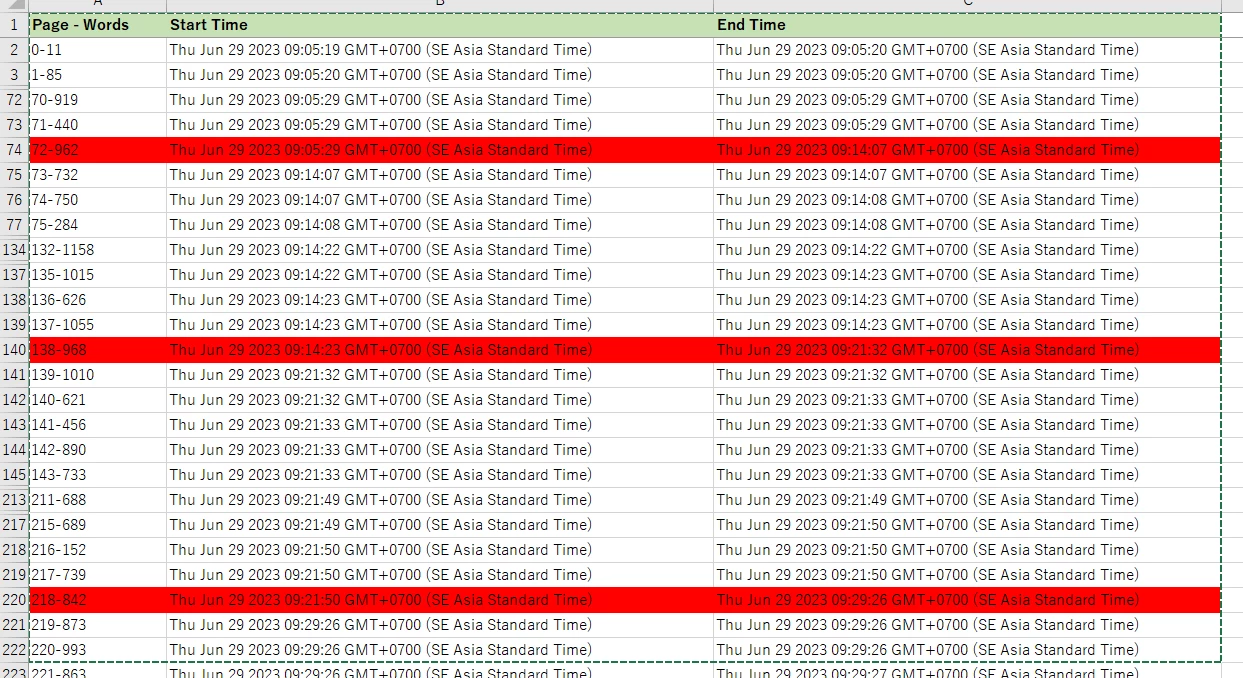


I had try with Acrobat Pro DC 2023 32 bit, it not occur this problem.

Why does Acrobat Pro DC 2023 64bit hang when running a script?

This topic has been closed for replies.

4 replies

daitranthanhoa
Inspiring
July 4, 2023

I had create a sample data test at.

https://drive.google.com/file/d/1sTILHTJAtqSZwc4PmCifKmf0GznoZuxp/view?usp=sharing


This is result of Acrobat Pro 2023 64 bit: Time is 1h 11' 

It hang at Page 137


var link_info = "";
var ckWord ;	
var iPageGoto;
for (var p = 0; p < 200; p++)
{

    var numWords = this.getPageNumWords(p);

	var st=new Date();
	console.println(p + st);


		for (var i=0; i<numWords; i++)
		{       
			 ckWord = this.getPageNthWord(p, i, false); 
			if (ckWord.search("P\\.")>=0)
						{
				iPageGoto =this.getPageNthWord(p, i+1, true);
				
				if(iPageGoto>0)
				{
				   link_info +=iPageGoto;
				}
				iPageGoto=null;
			}
			ckWord=null;
			
				
		}
	

}

event.value = link_info;0Tue Jul 04 2023 16:22:32 GMT+0700 (SE Asia Standard Time)
1Tue Jul 04 2023 16:22:32 GMT+0700 (SE Asia Standard Time)
2Tue Jul 04 2023 16:22:32 GMT+0700 (SE Asia Standard Time)
3Tue Jul 04 2023 16:22:32 GMT+0700 (SE Asia Standard Time)
...
133Tue Jul 04 2023 16:22:42 GMT+0700 (SE Asia Standard Time)
134Tue Jul 04 2023 16:22:42 GMT+0700 (SE Asia Standard Time)
135Tue Jul 04 2023 16:22:43 GMT+0700 (SE Asia Standard Time)
136Tue Jul 04 2023 16:22:43 GMT+0700 (SE Asia Standard Time)
137Tue Jul 04 2023 16:22:43 GMT+0700 (SE Asia Standard Time)
138Tue Jul 04 2023 17:33:32 GMT+0700 (SE Asia Standard Time)
139Tue Jul 04 2023 17:33:32 GMT+0700 (SE Asia Standard Time)
...
198Tue Jul 04 2023 17:33:37 GMT+0700 (SE Asia Standard Time)
199Tue Jul 04 2023 17:33:37 GMT+0700 (SE Asia Standard Time)


This is result of Acrobat Pro 2023 32 bit: Time only is 2'


var link_info = "";
var ckWord ;	
var iPageGoto;
for (var p = 0; p < 200; p++)
{

    var numWords = this.getPageNumWords(p);
	var st=new Date();
	console.println(p + st);

	for (var i=0; i<numWords; i++)
	{       
		 ckWord = this.getPageNthWord(p, i, false); 
		if (ckWord.search("P\\.")>=0)
					{
			iPageGoto =this.getPageNthWord(p, i+1, true);
			
			if(iPageGoto>0)
			{
			   link_info +=iPageGoto;
			}
			iPageGoto=null;
		}
		ckWord=null;		
			
	}	

}

event.value = link_info;
0Tue Jul 04 2023 16:21:46 GMT+0700 (SE Asia Standard Time)
1Tue Jul 04 2023 16:21:46 GMT+0700 (SE Asia Standard Time)
2Tue Jul 04 2023 16:21:46 GMT+0700 (SE Asia Standard Time)
3Tue Jul 04 2023 16:21:46 GMT+0700 (SE Asia Standard Time)
...
132Tue Jul 04 2023 16:22:04 GMT+0700 (SE Asia Standard Time)
133Tue Jul 04 2023 16:22:04 GMT+0700 (SE Asia Standard Time)
134Tue Jul 04 2023 16:22:05 GMT+0700 (SE Asia Standard Time)
135Tue Jul 04 2023 16:22:05 GMT+0700 (SE Asia Standard Time)
136Tue Jul 04 2023 16:22:05 GMT+0700 (SE Asia Standard Time)
137Tue Jul 04 2023 16:22:05 GMT+0700 (SE Asia Standard Time)
138Tue Jul 04 2023 16:22:05 GMT+0700 (SE Asia Standard Time)
139Tue Jul 04 2023 16:22:05 GMT+0700 (SE Asia Standard Time)
...
196Tue Jul 04 2023 16:22:15 GMT+0700 (SE Asia Standard Time)
197Tue Jul 04 2023 16:22:15 GMT+0700 (SE Asia Standard Time)
198Tue Jul 04 2023 16:22:16 GMT+0700 (SE Asia Standard Time)
199Tue Jul 04 2023 16:22:16 GMT+0700 (SE Asia Standard Time)


Does anyone have any experience with this?

Why does Acrobat Pro 64bit take so long?

daitranthanhoa
Inspiring
July 5, 2023

I had try uncheck Security (Enhanced)>"Enable Protected Mode at Start-up" and "Enable Enhanced Sercurity", But it is not ok.

daitranthanhoa
Inspiring
July 6, 2023

Is this a bug of Acrobat Pro 64bit?

Or Is it a problem of the processing environment?

try67
Community Expert
Community Expert
June 30, 2023

Unfortunately, scripts in Acrobat are not ran very efficiently, especially when it comes to complex tasks like reading a page's contents. Processing a 1000-page document is pushing it, really, and is likely to cause the application to get stuck, regardless of your computer's specs.

I recommend doing it in batches of say up to 200 pages per run, and to restart the application between each run. Or to do it elsewhere, using a more robust tool...

daitranthanhoa
Inspiring
June 30, 2023

Yes, From report time: about 70 pages will happen.

But Acrobat Pro DC 2023 32 bit it is ok.

Legend
June 30, 2023

Sorry, I see that there is no nested loop for getting words, just words per page. That's what happens when I try to read a block of code on a phone... !

daitranthanhoa
Inspiring
June 30, 2023

What setting exists that makes the difference between Ver 32bit and 64bit?
I think it is related to memory issue.

Legend
June 30, 2023

Ok, I assume these are two runs on the SAME file, 32-bit and 64-bit?

Memory management is an important issue, and rather unpredictable. JavaScript gets back memory using "garbage collection". Details here Garbage collection (javascript.info) - you don't need to know them, but you can see it is very complex. I can imagine that having more memory could have a bad effect on garbage collection, though I never heard of it happening.

One thing you can do is focus your tests. Your results show certain page ranges take a long time. 

1. Is this always the same? Is it always exactly the same page ranges for the EXACT SAME PDF? Or does it vary?

If it varies, then it looks like something outside your control. If it is always the same, continue...

2. Make modified code to process only that page range. (Without any other page ranges).  Is it still slow?

If it's still slow, you can focus more.

3. Add code to track the pages separately, so you can see if a single page is causing the problem.

4. Repeat testing. See if this page causes a problem every time.

5. If it causes the problem every time, make a new PDF with that extracted single page.

6. Does it still show the problem?

If you have arrived at a single page that shows the problem, every time, this is useful. If the page can be shared publicly, that's especially useful, as other people can see if they have the same problem.

Legend
June 30, 2023

I am not sure what you are describing. Acrobat will always hang while a script is runnning; the menus are locked, you can't type. Extracting all the words, one at a time, from 1000 pages, is going to take a while. The time it takes is not fixed, depends on the complexity of the PDF; some PDF could take 1000 times longer. Because you have 3 nested loops, each checking all the words, that translates to a billion times slower. I can see this code could easily take hours. 

daitranthanhoa
Inspiring
June 30, 2023

I had output time of earch Page, It only hang after process some pages.

Acrobat Pro DC 2023 64bit not occur error, but some time it hang very long (red row).


I had try with Acrobat Pro DC 2023 32 bit, it not occur this problem.