



Participant
August 17, 2020
Answered

Why has the Acrobat DC Pro Icon has changed from red to black?

  • August 17, 2020
  • 13 replies
  • 30118 views

Yesterday, the Adobe Acrobat DC Pro icon in my Mac desktop dock and in all pdfs in Finder has changed from red to black. Was this supposed to happen? 

This topic has been closed for replies.
Correct answer Bevi Chagnon - PubCom.com

It's a design change throughout Adobe's programs, not just Acrobat.

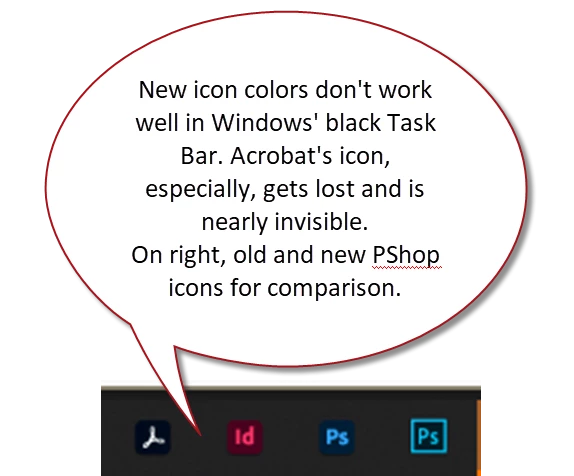
Poorly tested by the GUI design team; on Windows, the icon's black square melds into the default black background color of the Windows Task Bar. The Acrobat icon, especially, is nearly invisible on a high-resolution monitor.  Just what users need: an invisible user interface!


This screen cap shows (from left to right), the new icons for Acrobat, InDesign, and Photoshop, and the previous icon for Photoshop on the far right.
Good example of what NOT to do to a user interface!


13 replies

ANNISS+BARTON
Participant
August 21, 2020

#ACROBATbacktoBurgundy   - so much easier to identify AdobeAcrobat when it was Burgundy. 😞

lmiar
Participant
August 19, 2020

Thanks for your information

Bernd Alheit
Community Expert
Community Expert
August 17, 2020

This is the actual version.

Bevi Chagnon - PubCom.com
Legend
August 17, 2020

It's a design change throughout Adobe's programs, not just Acrobat.

Poorly tested by the GUI design team; on Windows, the icon's black square melds into the default black background color of the Windows Task Bar. The Acrobat icon, especially, is nearly invisible on a high-resolution monitor.  Just what users need: an invisible user interface!


This screen cap shows (from left to right), the new icons for Acrobat, InDesign, and Photoshop, and the previous icon for Photoshop on the far right.

Good example of what NOT to do to a user interface!


|    Bevi Chagnon   |  Designer, Trainer, & Technologist for Accessible Documents ||    PubCom |    Classes & Books for Accessible InDesign, PDFs & MS Office |
Participant
August 17, 2020
Thanks for the explanation! I wasn't sure if I had done something to change
it or if I was in a different version of Acrobat.