



rachelcenter
Legend
Jul 16, 2026 8:58 PM UTC
Question

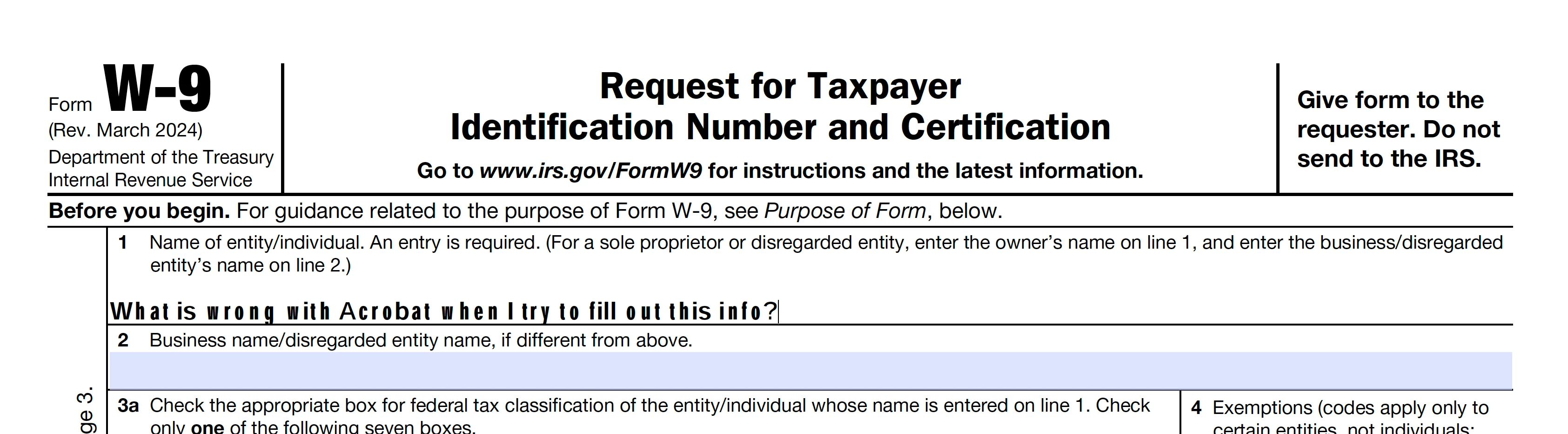
Why is acrobat showing text that looks so screwed up in the Fill&Sign process of a pdf?

When I open an empty W9 in acrobat and choose “fill & sign” look at how its typing out the fonts. It looks messed up like its using different fonts in one sentence. They look mismatched. Certain letters look stretched. It looks like a glitch. its never done this before. so I went to preferences and changed fonts to arial but it didnt fix the issue. how do i fix this? 
 

    6 replies

    Participant
    Oct 28, 2026 10:38 PM UTC

    I had the exact same issue... I downloaded W-9 from IRS and text looked messed up just like that. I even uninstalled and reinstalled Acrobat to see if it would fix it. It did not; however, once I saved the file, the text looked normal in the Finder window preview! And it looked normal when I printed the page 👍

    Translate
    justlearn
    Community Expert
    Community Expert
    Oct 28, 2026 11:41 PM UTC

    ​@tessad9261601 I agree with you. I had downloaded the PDF. I am guessing, they (the person who created the form) likely changed the properties of the field to use this weird text (itc-franklin-gothic-std-demi?) 


    Oddly, it looks fine in Preview on a MAC


    When I reopen it in Acrobat (I didn’t even the save the PDF), the text displays normally again and appears to have been converted to Helvetica. This makes me wonder whether Preview is rebuilding the form field appearance and replacing the original ITCFranklinGothicStd-Demi appearance stream. If that's what's happening, the problem may be with the original form field or embedded font rather than Acrobat itself.
     

     Weird I say! Weird! 

    Translate
    m
    Participant
    Oct 29, 2026 5:34 AM UTC

    Interesting! Very strange. 
    The worst part is that there is no fillable field for the date of signature. The form is locked so I couldn’t add my own text box to write the date. I had to print it the old fashioned way just to add the date (and then scan it because I just need the form electronically. 
    Or maybe I’m missing something and it’s just me 😆

    Translate
    Dave Creamer of IDEAS
    Community Expert
    Community Expert
    Jul 16, 2026 9:14 PM UTC

    Did you try to download a new form directly from the IRS?

    This is what I get:


    Translate
    David Creamer: Community Expert (ACI and ACE 1995-2023)
    rachelcenter
    Legend
    Jul 16, 2026 9:15 PM UTC

    I did download a form fresh from the internet, and the screenshot you see is a result of me taking the brand new download and trying to enter text into it via acrobat fill & sign. every few letters looked stretched!

    Translate