NavPDFer007
Participant
June 19, 2019
Question

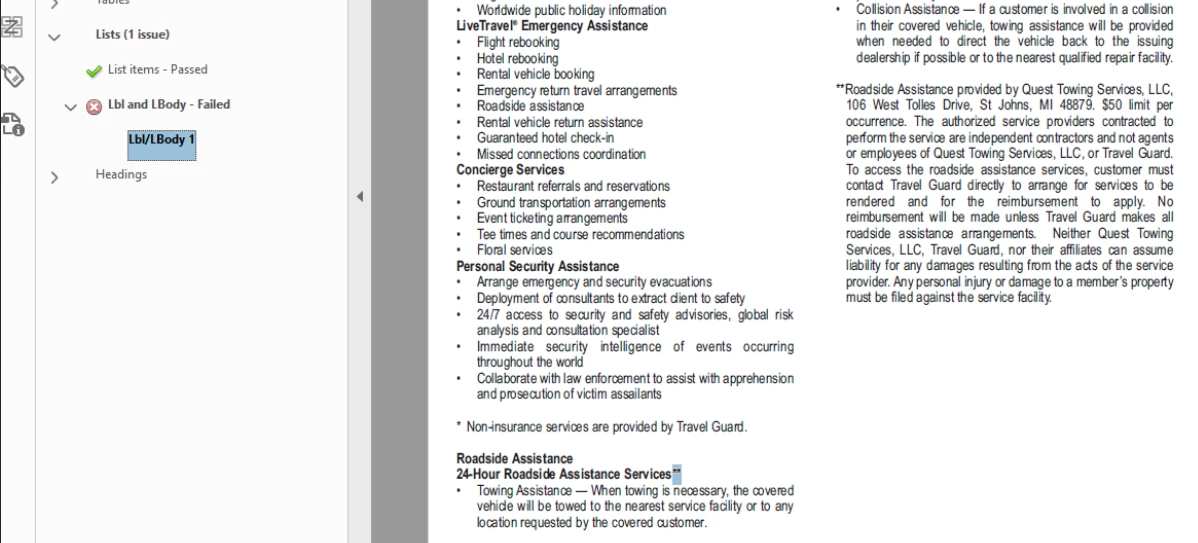
Why or how can I get Acrobat Pro DC accessibility check to resolve <Lbl> error

  • June 19, 2019
  • 2 replies
  • 2091 views

Hello and hoping I can get a good solid answer on this one.

Ive been tagging reference notes as recommended on some of your other posts, however, the screen reader (NVDA) reads 'link' even though a link doesnt exist.

Ive also tagged based on whats required for PDF/UA except Acrobat Pro DC give a <Lbl>  error.

These two examples, doesn't give an acrobat accessibility error, but reads 'link' with the screen reader even though there is no link
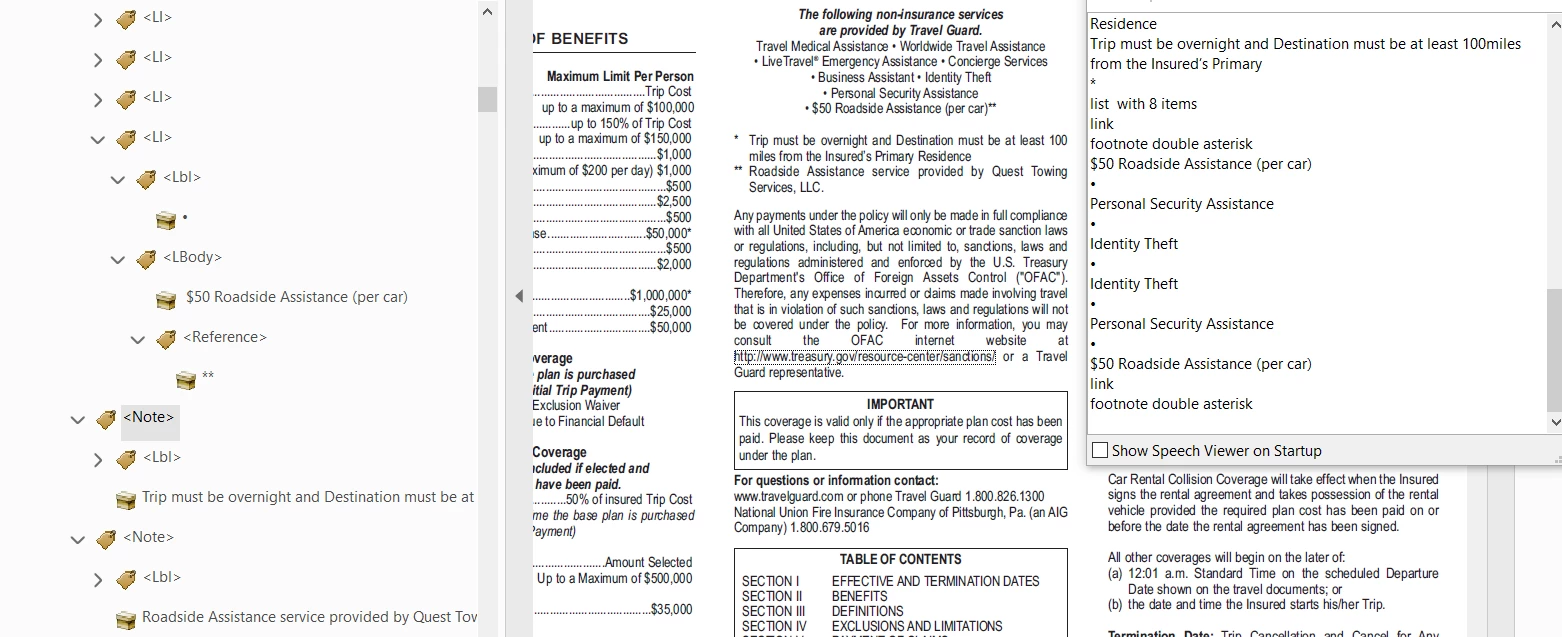
how can I tag this correctly where the AT doesnt read 'Link'  AND where acrobat doesnt throw a <Lbl> or <Lbody> error in the accessibility check

Example where error occurs but this is what was recommended to comply with PDF/UA
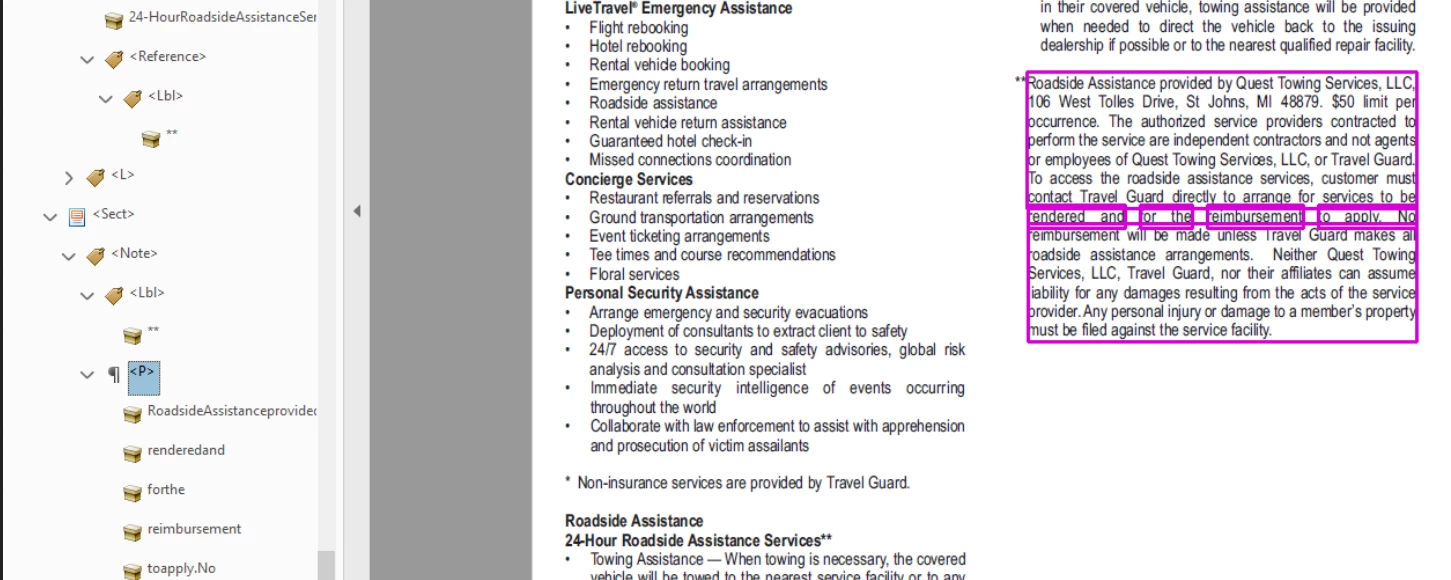
Any details that can be given that will help me how to tag scenarios like these that wont give an acrobat error and wont read link to the AT that comply with PDF/UA and WCAG would be helpful.

Thanks in advance

2 replies

Philip_Kiff
Participant
June 19, 2019

This issue was referenced on an external list, and when I followed the link through, I thought that I might have something to add here by way of a couple theories I have.

First, <Lbl> is getting flagged as an error by Acrobat Pro DC by mistake. It is allowable to have an <Lbl> nested inside a <Reference>. The built-in Acrobat tester used to be silent when it encountered this structure, but some time in the past 6 months(?), Adobe's algorithm for testing List elements changed, and it now flags these <Lbl>'s as errors. One way to resolve this first issue is to simply get rid of the <Lbl> tag and use only the <Reference> tag around the footnote number. This is allowable I think and it is unclear to me what additional value the <Lbl> tag currently provides for Assistive Technology users. This is also the structure recommended in the HHS's PDF tagging guide, if that is of any value. Regardless, it should pass the Acrobat DC accessibility tester cleanly. Alternatively, you could just ignore this error and wait until Acrobat fixes their built-in tester to allow for such structures.

Second, the announcement of "Link" I think is because of the <Reference> tag, which is read by NVDA as "Link" instead of reading it as "Reference". It is unclear to me if this is an error in NVDA or if it is by design. Or which versions of NVDA do this. But if I'm right, then this is not something I think you can fix in your PDF without replacing the <Reference> with another tag. And in this case, you definitely should be using <Reference> I think - especially if you decide to do away with the <Lbl> as I suggest above. If you listen to this PDF passage in JAWS, I think you may find that these References are not read as Links?

Phil.

NavPDFer007
Participant
June 19, 2019

Thank you! Ive heard this response quite often but have had many clients ask me to point them in the direction where Adobe states this as they dont want to have PDF's that contain accessibility errors even after they have been educated on the reason. I will verify this on JAWS, didnt think about that, normally the recommendation is for NVDA as its a free tool for most companies to validate with. Really appreciate the response!

Bevi Chagnon - PubCom.com
Legend
June 19, 2019

NavPDFer007  wrote

I will verify this on JAWS, didnt think about that, normally the recommendation is for NVDA as its a free tool for most companies to validate with.

Actually, JAWS is the leading screen reader program and is often specified as a testing agent in contracts. NVDA is #2.

So our remediation studio tests with JAWS primarily, and then with NVDA and Apple's VoiceOver.

But JAWS always dominates in the accessibility community.

|&nbsp;&nbsp;&nbsp;&nbsp;Bevi Chagnon &nbsp;&nbsp;|&nbsp;&nbsp;Designer, Trainer, &amp; Technologist for Accessible Documents ||&nbsp;&nbsp;&nbsp;&nbsp;PubCom |&nbsp;&nbsp;&nbsp;&nbsp;Classes &amp; Books for Accessible InDesign, PDFs &amp; MS Office |
Bevi Chagnon - PubCom.com
Legend
June 19, 2019

Can you give us details about the software you're using?

  • The source program, platform, and version/build
  • The utility used to export to PDF (such as PDFMaker (Acrobat Ribbon) from Word)
  • The version/build of Acrobat Pro.
|&nbsp;&nbsp;&nbsp;&nbsp;Bevi Chagnon &nbsp;&nbsp;|&nbsp;&nbsp;Designer, Trainer, &amp; Technologist for Accessible Documents ||&nbsp;&nbsp;&nbsp;&nbsp;PubCom |&nbsp;&nbsp;&nbsp;&nbsp;Classes &amp; Books for Accessible InDesign, PDFs &amp; MS Office |