

Michael Linder
Inspiring
June 20, 2018
Answered

Why won't Acrobat create content thumbnails in Windows Explorer?

  • June 20, 2018
  • 4 replies
  • 3591 views

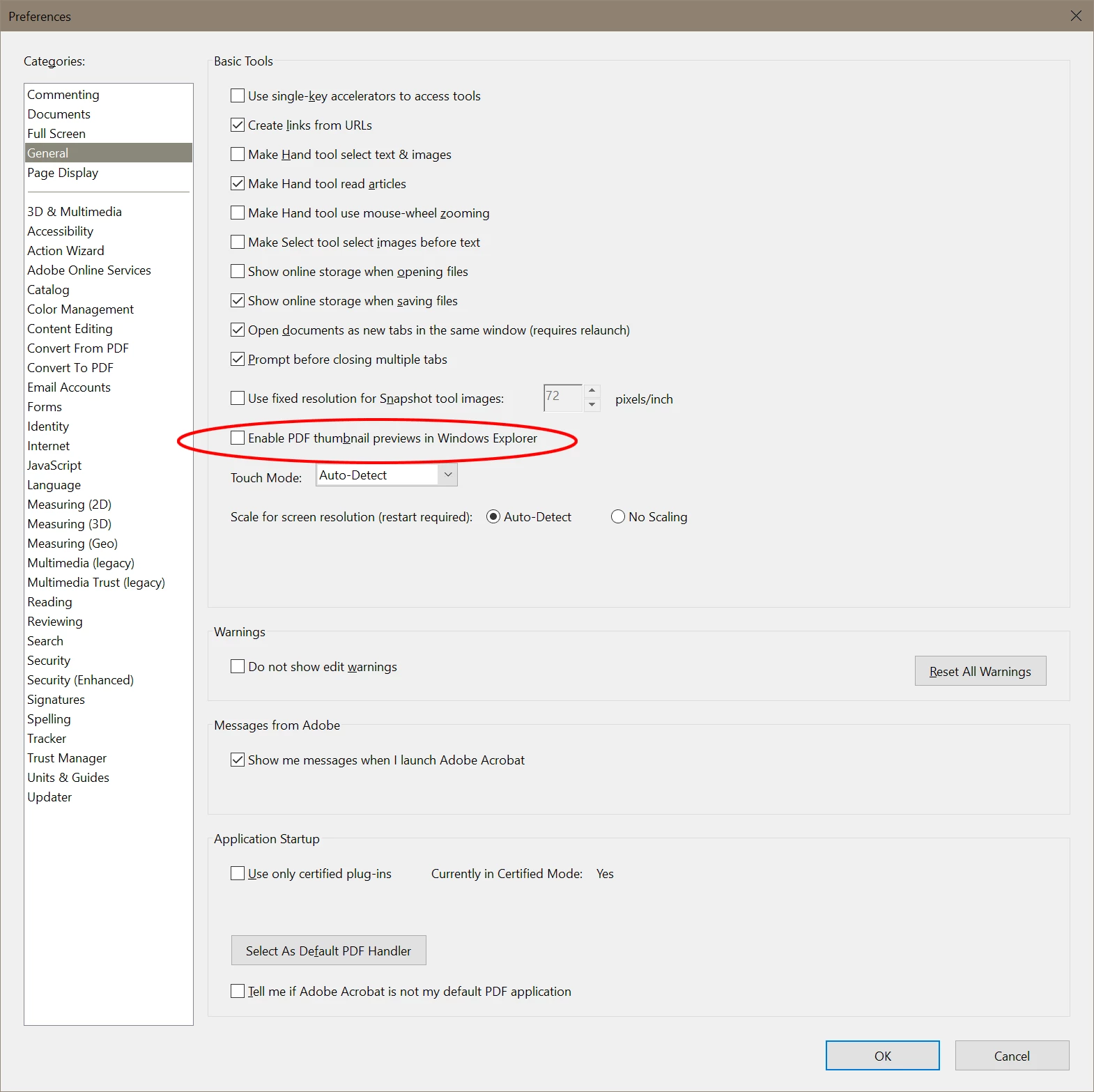
The ability to create content image thumbnails in Acrobat Pro DC appears to be present in Preferences>General, but when the appropriate box is given a check mark, it goes blank as soon as the selection is saved. I'm using Version 2018.011.20040 in Windows 10, but this issue has been present for at least two years. it seems there's no way to accomplish this task. Only the Acrobat logo appears in Windows Explorer.

Am I missing something? If Acrobat will not generate thumbs, what will? Others have raised the issue here and elsewhere, but I've not found anyone who's found the solution.
 

This topic has been closed for replies.
Correct answer Walt Bilofsky

See if either of these helps.

4 replies

Inspiring
January 19, 2019

The display of thumbnails is also dependent upon the Windows OS to preform the task. This has been an issue with Windows and other vendors files that include Nikon as well as Acrobat files. Not only do the various vendors need to comply with Window's requirements, but Microsoft must also do its part to display the images.

Andacar62
Known Participant
January 22, 2019

Not only does this remain an infuriating problem after all these years, but even if I can get Acrobat to generate 64 bit thumbnails it will crash after a while and yield this error:

The application-specific permission settings do not grant Local Activation permission for the COM Server application with CLSID

{2593F8B9-4EAF-457C-B68A-50F6B8EA6B54}

and APPID

{15C20B67-12E7-4BB6-92BB-7AFF07997402}

to the user MORTICIA\Darrell SID (S-1-5-21-1613753860-4255819057-30713582-1001) from address LocalHost (Using LRPC) running in the application container Unavailable SID (Unavailable). This security permission can be modified using the Component Services administrative tool.

it references Event ID 10016, a well known Windows permissions error. When  are you guys going to fix this? Inexcusable.

Michael Linder
Inspiring
January 27, 2019

Ah! Our old nemesis Runtime Broker again — the diabolical Windows supervillain. I gave myself ownership, then full permissions for both Registry entries mentioned in your error message — Recent Documents and Runtime Broker — but was blocked from doing so in one of two DCOM entries for Runtime Broker. So, I'm still seeing PDF icons in Windows Explorer where thumbnails should be while Unknown Account SID S-1-15-3-1024 continues to wreak havoc in permissions settings.

Windows will probably continue to blissfully ignore the issue while Adobe reverts to it's tried, decades-old game — blaming it on someone else instead of assuming responsibility for the integrity of Acrobat DC and working with Microsoft to resolve it. A pox on both your houses!

Michael Linder
Inspiring
January 18, 2019

About the delay, I received no email stating this question had been answered.

  • I am using Adobe Acrobat Pro DC 2019.010.20069
  • I'm using Windows 10 Version 1809, Build 17763.253
  • Acrobat DC has all default settings applied to it (attachment)
  • The problem existed on my previous machine which I replaced last year. It persists on my new PC, even after a clean install of windows.
  • Windows is set to always display thumbnails, never icons. No other program on my PC using thumbnails responds in this manner.
  • I have uninstalled and reinstalled Acrobat DC.
  • I have tried the Acrobat DC repair option,

Nothing works. Do you now have access to Windows Registry settings that determine the whether a thumbnail is being used rather than an Icon?

Michael Linder
Inspiring
December 3, 2018

How many more years until Adobe lives up to its promises?

May we have a solution, please?

Meenakshi Negi
Community Manager
Community Manager
December 3, 2018

Hi MLinder,

Sorry for the inconvenience caused.

As you have mentioned above, the thumbnails do not work even when the option "Enable PDF thumbnail preview in Windows Explorer" is checked in the preferences.

We have tried to replicate the same at our end and it is working fine.

Could you please let us know the details as asked below:

- What is the application version installed on your machine?

- OS version on your machine?

- Default application selected to open the PDFs?

- Troubleshooting steps that you have already tried?

We will be waiting for your response.

Regards,

Meenakshi

Walt BilofskyCorrect answer
Inspiring
July 12, 2018

See if either of these helps.

Michael Linder
Inspiring
September 15, 2018

The alleged fixes on the page you recommend actually work. Yet that post, like mine, carries a "Correct Answer" status which seems to infer that the problem no longer exists for an issue that's persisted for years.

How many more years, how many more forum posts? Adobe's inability to get something as basic as thumnails right is downright sad, bordering on the pathic.