Why won't certain Acrobat files view correctly?
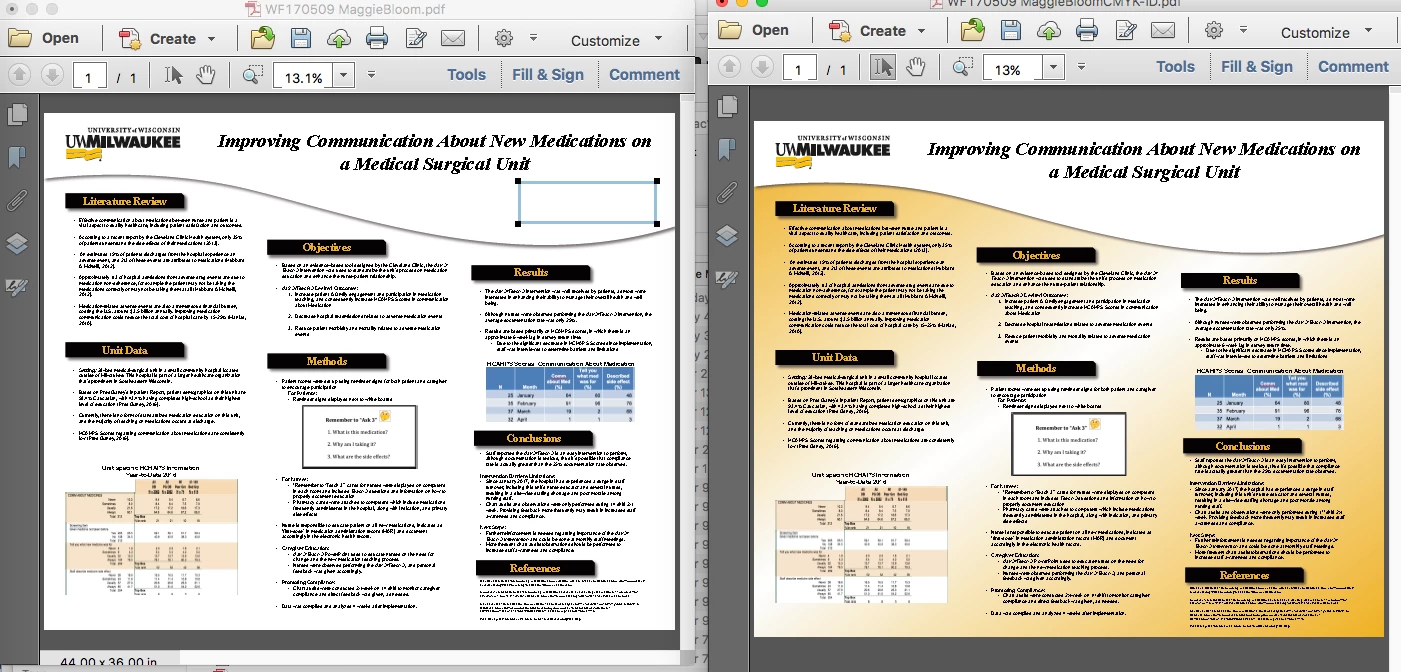
When opening certain pdf files, the screen preview is not correct. The background layer does not show up. Sometimes though, the background will still print but sometimes it does not. I am on Mac in system Sierra and have tried these files on multiple computers including a pc, with extensions off etc. and always that same result. What I see is not what I get. If I place the pdf file in InDesign it will preview correctly and also export correctly so something InDesign does corrects the problem "most" of the time. However, this is an extra step I should not have to be doing just to get a proper preview of the file. I also have pitstop pro and have tried various preflight profiles resulting in "partial" fixes. I can do a "save as other - optimized pdf" and this will sometimes fix the problem but not with every file. The issue is occurring more and more often. Most of the pdf files I receive that are giving me a problem are generated from Powerpoint files. Below is a typical file demonstrating my issue. The file on the left is what I see when I open the pdf file and the file on the right is the correct view of the file after I had placed it in InDesign and exported it back out.
 AdChoices