
adminu31318584
Participant
July 18, 2024
Answered

Windows Application Error Referenced Memory could not be written

  • July 18, 2024
  • 37 replies
  • 292306 views

Hello,


I am having an issue with Adobe Acrobat Standard license when opening all PDF's. When I open the PDF's, I get the error in the attached image. I have tried uninstalling and reinstalling Adobe twice, updating Windows, rolling back the version of Adobe to DC June 2024 (24.002.20857) from DC Jul 2024 (24.002.20933), SFC, DISM, checked compatibility settings on .exe of the app, turned off protection mode in Adobe. Nothing seems to pop up in event viewer or Process monitor. Mind you, clicking OK on this pop-up does not close the application and does allow the PDF to be edited normally. Any help would be much appreciated.


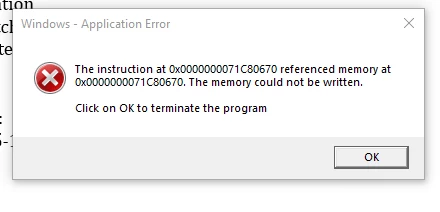
The error if you can't see the picture is:


Windows - Application Error

The instruction at 0x0000000071C80670 referenced memory at 0x0000000071C80670. The memory could not be written. Click on OK to terminate the program.
Correct answer adminu31318584

This issue got fixed over a remote session with an Adobe support Tech. The fix was uninstalling Adobe Acrobat, deleting all folders/directories named "Adobe" on Local drive (Program Files, PF x86, Common Files, etc...), then finally using the "Adobe Cleanup Tool" (this step isn't too important if you deleted everything). After that, you should be able to reinstall it and the pop-up will no longer appear. 

37 replies

Participant
October 27, 2025

Pretty crazy that after a year this problem persists, even with newer installs.  

Participating Frequently
September 23, 2025
You lose a lot of functionality, though. You can’t create links to email pdf’s, for example - including via Word.

Jeffrey Hunter KC | Barrister at Law
L13, 420 George St, Brisbane, Qld 4000
t: 07 3210 6884
m: 0419 723 293
f: 07 3211 0038
e: jhunter@qldbar.asn.au
Participant
September 25, 2025

Have had this issue for months now. Scrolled through support threads dating back 12 months ago with a myriad of work arounds offered but no solutions. "We're working on it" the only update we've had.
Most of these threads are marked as SOLVED. There is no solution. Can we get the labelling changed? It might be pushing down the priority of this. In a large org these work arounds aren't viable, it's a major issue that's exited for a year now.

dvfd84266091
Participant
October 1, 2025

Started hspping to us yesterday. Uninstalling and reinstalling is not a FIX.  Adobe DC is slow and unresponsive many complaints form ALL the DC users. Never had this problem till we moved to DC. 2020 worked fine.

As much as we pay you for a Subscription this is BS. 


Participant
September 23, 2025

I was able to solve this by changing compatibility mode to windows 8


Participant
September 8, 2025

I was setting up a new Windows 11 computer and received the same error.


Acrobat was installed through Creative Suite.

Participant
September 23, 2025

Same thing, received this error on my old laptop. I have recently bought a new one and still receiving the same error messages. SO frustrating!

Participant
September 8, 2025

I'm getting the same error when opening Acrobat. After dismissing the dialog box, the program functions normally.


Participant
October 3, 2025

Adobe Acrobat build 25.001.20756 contains a fix for this.

Changelog

Participant
October 5, 2025

Can confirm, we've updated to this version and the error no longer appears.

Participating Frequently
August 24, 2025

Adobe do not seem to be motivated to address this issue, which has plagued me for over a year across 4 devices.

Jeffrey Hunter KC | Barrister at Law
[PII removed by moderator]

Participant
August 24, 2025

is this still the only solution? I read a few comments stating that was only a temporary fix.... 


Participant
August 6, 2025

Au 08,2025 - I tried all that was reccommend and still had the same issue. Then I also tried it again and also updated my graphics cards driver. This seemed to work for now. I will follow-up if the issue appears again. But for now, I am good. Thank God!

Participant
August 22, 2025

Same issue here. I am unable to open PDF from anywhere in W11 without experiencing this issue. This has been going on for over a year. We pay for Adobe and we get this type of service???


Participant
July 24, 2025

Still a problem July 2025. There has to be a different solution than uninstall/delete folders, REG entries/reinstall. This is crazy.

Amal.
Community Manager
Community Manager
July 25, 2025

Hi there,

Sorry for the trouble you're experiencing. Our engineering team is already working on this issue. While we don’t have a fixed timeline yet, we’ll keep you updated as soon as we have more information to share.

Thanks for your patience!

 
Participant
August 1, 2025

Please give an update.

Participant
July 22, 2025

That Windows pop-up…

“The instruction at 0x00007FFE07CCD2D4 referenced memory at 0x0000000000000018. The memory could not be read.”

…is actually a generic access-violation inside Acrobat’s sandbox. It most often shows up when you open a PDF directly from Outlook (or another container) rather than from disk. Acrobat’s “Protected Mode” (AppContainer) or a long/odd file path can trigger the crash.

Here’s how to work around or fix it:


1. Quick Workaround

Save the PDF locally first (Desktop or Downloads), then open it.

2. Disable AppContainer (Protected Mode)

  1. In Acrobat, go to Edit > Preferences (or click your profile icon > Preferences).

  2. Select Security (Enhanced).

  3. Uncheck Run in AppContainer.

  4. Click OK and restart Acrobat. 

3. Compatibility Mode

  1. Find your Acrobat shortcut or Acrobat.exe (Start Menu > right-click > Open file location).

  2. Right-click it, choose Properties, then go to the Compatibility tab.

  3. Check Run this program in compatibility mode for: and select Windows 8.

  4. Click OK and restart Acrobat. 

4. Repair / Update Acrobat

  • In Acrobat: Help > Repair Installation.

  • Then Help > Check for Updates to get the latest build (64-bit recommended). 

5. Disable GPU Acceleration

In Edit > Preferences > Page Display, uncheck Use hardware acceleration and restart.

6. Rule Out Conflicts

Temporarily disable any third-party PDF-printing tools, sandboxing/VDI agents or antivirus hooks, then retry.


If you still see the error:

  • Try another viewer (Edge/Chrome/Sumatra) to confirm the PDF itself isn’t corrupt.

  • Run Windows Memory Diagnostic to rule out a hardware fault.

  • Review the Event Viewer logs under Windows Logs > Application for Acrobat crash details.

Participant
October 3, 2025

Adobe Acrobat build25.001.20756 contains a fix for this.

Changelog