


Windows Application Error - The Memory could not be READ
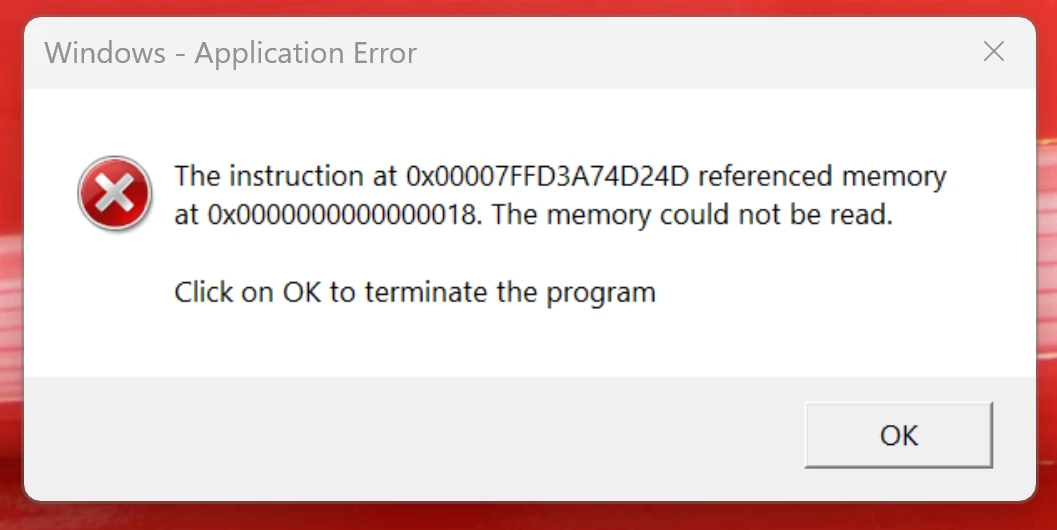
Opening an attached pdf from the new outlook app with Adobe Acrobat Pro installed locally, throws a windows application error saying the memory could not be read. When opening a pdf file from file explorer there is no problem or error. Not sure if this is an Adobe Acrobate Pro issue or New Outlook app issue? I can just click ok and prompt goes away. PDF opens fine as it should, it just always will pop up with this error message everytime I open a pdf attachment on a mail, which I then have to actively click ok.
I had this problem on my old computer for a long time, tried everything. Couldn't find a resolution. Just got a brand new laptop, with new installs of Windows 11, New Outlook and Adobe Acrobat Pro. Everyting is up to date. I am now haunted by the same issue. This is not good for my OCD 🙂
Also, I have run virus scans to make sure it isn't a virus causing this issue. Used Copilot for assistance, still no luck. If anyone out there has solved this. Would love to hear from you.
 AdChoices