Participant
Aug 21, 2019 11:37 AM UTC
Answered

Windows desktop shortcut to Scan to PDF - Solution

Tired of clicking way too many times through Acrobat just to make a scan? After looking for a way like many others, in the end I figured out the coding myself and replied to an initial post. Here by a new post to have a more recent thread.

SOLUTION:

Create a .vbs file and use the following code below.

It works for me on Windows 7 and with Adobe version 9. If your program path is different that than the x86 folder in this example, just simply correct the path to your own installed version. Not sure about OS or Linux platforms.

NOTE: This is for English version only. When you are using a different language version, change the (ffss) according the File Menu and use of the ALT key + shortkeys marked by an underscore.

Additionally, you can create a dekstop shortcut from the vbs file and from its properties give it a random personal icon to make it more appealing and recognizable.

Good luck

("There is always a way")


CODE:

Dim objShell

Set objShell = WScript.CreateObject( "WScript.Shell" )

objShell.Run("""C:\Program Files (x86)\Adobe\Acrobat 9.0\Acrobat\Acrobat.exe""")

WScript.Sleep 500

objShell.SendKeys "%(ffss)"

WScript.Sleep 100

objShell.SendKeys "~"

JR Boulay
JR BoulayCorrect answer
Community Expert
Dec 21, 2021 9:53 AM UTC

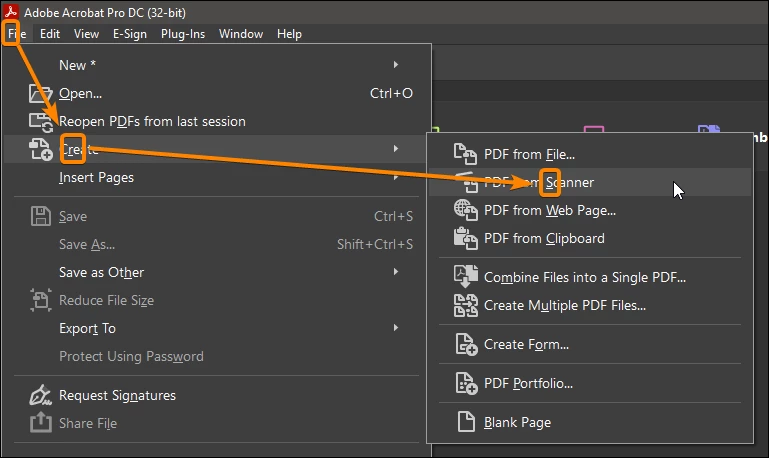
These are the basic manipulations of the interface that everyone should know, you can scan just by using 3 shortcuts:


ALT F (open the File menu)

ALT R (cReate)

ALT S (from Scanner)


Acrobate du PDF, InDesigner et Photoshopographe

9 replies

JR Boulay
Community Expert
Community Expert
Nov 3, 2024 4:59 PM UTC

However, these shortcuts still don't work in the French version, even though I've been reporting this problem to Adobe for nearly 3 years now!

@AnandSri 

Translate
Acrobate du PDF, InDesigner et Photoshopographe
AnandSri
Legend
Jan 13, 2025 3:01 PM UTC

Hi JR,


I hope you're doing well, and I apologize for the delayed response.  

Is the issue still occurring with the latest French version of Acrobat? If so, could you please share more details? I'll look into this for you.  


Thanks,
Anand Sri.

Translate
JR Boulay
Community Expert
Community Expert
Jan 14, 2025 10:04 PM UTC

Hi AnandSri

It seems to work fine in the latest version, thanks for pointing it out.

Translate
Acrobate du PDF, InDesigner et Photoshopographe
JR Boulay
Community Expert
JR BoulayCommunity ExpertCorrect answer
Community Expert
Dec 21, 2021 9:53 AM UTC

These are the basic manipulations of the interface that everyone should know, you can scan just by using 3 shortcuts:


ALT F (open the File menu)

ALT R (cReate)

ALT S (from Scanner)


Translate
Acrobate du PDF, InDesigner et Photoshopographe
AnandSri
Legend
Sep 12, 2019 2:24 PM UTC

Hi Jjkastanje,

Welcome to the new Adobe Community.

Thank you for sharing your observation, as correctly mentioned by Bernd_Alheit Acrobat 9 is an out of support version as the activation server is not available as well the new updates, features and security patches. So suggestions or steps may or may not work in a specific scenario.

For detailed information about the support of Acrobat 9, you may refer to the Adobe article  https://helpx.adobe.com/acrobat/kb/end-support-acrobat-8-reader.html


Feel free to contact us back for any assistance related to the latest version of Acrobat Pro DC.


Thanks,

Anand Sri.

Translate
Participant
Dec 17, 2021 9:11 AM UTC

Can I ask what will be the solution for the latest version because at work I am using acrobat dc pro and in order to scan a page I have to click 5 times before printer start scanning, on the old version there was an option to do a shotcut in the toolbar and was only 1 click now when acrobat is better is actually not. 

Translate
AnandSri
Legend
Dec 21, 2021 8:41 AM UTC

Hi @Vadim22073597ay68 


Please see the suggestions shared in these articles and let us know if that works for you: 

https://answers.acrobatusers.com/How-I-add-Icon-toolbar-Create-PDF-scanner-I-multiple-steps-complete-thi-q182687.aspx

https://helpx.adobe.com/acrobat/using/scan-documents-pdf.html

https://helpx.adobe.com/acrobat/how-to/customize-toolbar.html 


Also, if you feel that the solutions shared in the articles are not working for you, you may file a feature request  to the product team using the Adobe Wish form: https://www.adobe.com/products/wishform.html


Regards,

Anand Sri.

Translate
Bernd Alheit
Community Expert
Community Expert
Sep 12, 2019 2:14 PM UTC

Info: Version 9 is old and unsupported.

Translate