


Windows explorer context menu will convert single files but not multiple files to PDF
Greetings everyone, I hope I am clear enough in my post,
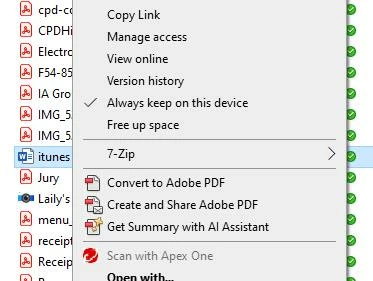
I have a user who has acrobat pro installed on their computer and complain that as of yesterday, they can no longer convert multiple files to pdf via the context menu. It does however convert single files, here is an example:
single file -> convert to pdf appears
multiple files -> no
other users on our adobe plan have this option functionning correctly as of today.
for troubleshooting steps, here's what I tried
regsvr32 "C:\\Program Files\\Adobe\\Acrobat DC\\Acrobat Elements\\ContextMenu64.dll"
they do not have the folder in Program Files (X86) .
After this I uninstalled acrobat pro completely, reinstalled it through creative cloud and then updated acrobat pro as an update was available, no dice.
Tried re-registering the file, both times i registered it, it gives me confirmation that the registration is successful.
does anyone have any insight to give? such as a registry key to edit or should i use the adobe cleanup tool to nuke creative cloud and start from scratch?

 AdChoices