
Participant
December 7, 2022
Question

Windows file explorer crashes when loading PDF files in preview

  • December 7, 2022
  • 3 replies
  • 4295 views

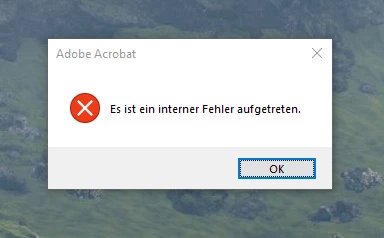
When I enable the preview window in the Windows file explorer and click on a PDF file, the whole explorer crashes. Then I get an error message from Adobe Acrobat: "An internal error occured."


I reinstalled Acrobat several times, but nothing changed.

My computer runs on Windows 10 Home.


Is there a way to fix this issue?
 

This topic has been closed for replies.

3 replies

Participating Frequently
January 5, 2023

@adobe please can we have an update on this? You've been silent on this issue since september. The solutions mentioned aren't working for everyone. It's been months. PDFs are a staple part of my day to day, and they're constantly crashing my machine, not saving, not loading, not previewing, crashing programs etc etc. Whats going on, when will this be fixed?

AkanchhaS8194121
Legend
January 5, 2023

Hi All,

 @ThomHayes sorry to hear about your experience. PDFs play an important part in our day-to-day life and work. We understand how frustrating it can be. 


This issue, "An Internal error occurred" on various actions, was initially reported in Sept; you're correct. 

Our engineering team is aware of it and currently working on the fix.

The fixed version is excepted to be rolled out with future releases. As soon as we get a confirmation, we will keep you posted. 


We appreciate your patience. 


Thanks,

Akanchha 

Participating Frequently
January 5, 2023

Hi Akanchha


Cheers for the update - going stir-crazy...

kglad
Community Expert
Community Expert
December 7, 2022

are you using acrobat pro or acrobat reader?

what's your os version?

Participant
December 7, 2022

I am using Acrobat Pro (64-bit) on Windows 10 Home version 21H2 64-bit.

kglad
Community Expert
Community Expert
December 7, 2022
LinSims
Community Expert
Community Expert
December 7, 2022

This is most probably a Windows problem as opposed to an Acrobat problem, but someone in the Acrobat forum may know better.


* The Using the Community forum is for help in using the Adobe Support Community forums, not for help with specific programs, installation issues, or account issues such as subscription questions or billing problems, or generalized questions about Creative Cloud services.
* Questions about business plans should be posted in Enterprise and Teams 
* Product questions should be posted in the associated product community.
* Installation questions should be posted in the Download & Install community.
* Account issues, including subscription questions or billing problems, should be posted in the Account, Payment, & Plan community.
* Questions about the Creative Cloud desktop app or general questions about apps in the Creative Cloud should be posted to the Creative Cloud Services community.