Inspiring
September 7, 2018
Answered

Word wants to open PDF file it created via "Save as"

  • September 7, 2018
  • 1 reply
  • 1988 views

I created a PDF file via Word's "Save as PDF" function (Mac OSX). However, when someone on a Windows machine downloaded it, and opened it, the default was to open it in Microsoft Word. This meant that only some of the form functionality was supported (as opposed to opening it in Acrobat).

When I created the PDF file with "Print" instead of "Save as", this problem went away.

This topic has been closed for replies.
Correct answer DavidRCowe

Hi David,

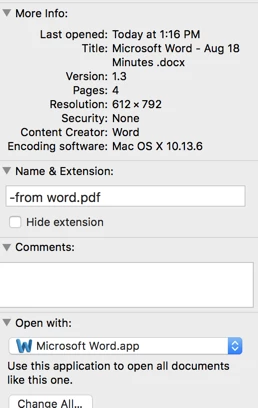
Oh, sorry about that. Here it is again at the bottom of this message (at a minimum so you could see what I was talking about).

You didn't tell me if this is the only document suffering from this issue or if there were others.

I do expect Word's export to provide the PDF suffix. I'm just wondering if there's any chance that this was changed. It can be done (I just did it but it would have to be an intentional act). But when I tried to open this document it went to word and because it didn't recognize the structure of the document it asked me to tell it what kind of document it was. (In other words, it wasn't going to happen.

I'm not saying this DID happen, only that it could possible explain what you are seeing.

Thanks for your interest in this problem. So far it is only one file (albeit recreated from the same Word source file multiple times).

I checked the email that I originally sent and the file most definitely had the ".pdf" extension. The person receiving it on windows also reported the .pdf extension, but it still opened with Word. I thought Windows was pretty basic with it's file opening routine (i.e. basing everything on the extension) but maybe newer versions of Windows take other things into consideration.

1 reply

Dov Isaacs
Legend
September 7, 2018

What likely happened is that when you used MacOS Word's “save as PDF” function, it saved the file with the suffix .docx as opposed to adding the suffix .pdf. In other words, if your original MacOS Word document was foo.docx, it was saved as a PDF file with the name foo.docx instead of either foo.pdf or even foo.docx.pdf.

          - Dov

- Dov Isaacs, former Adobe Principal Scientist (April 30, 1990 - May 30, 2021)
Inspiring
September 8, 2018

No, definitely not. The file had a .pdf extension. I even checked to make sure that the extension was visible, as OSX has the ability to selectively hide extensions.

gary_sc
Community Expert
Community Expert
September 8, 2018

Hi DavidRCowe,

Quick question (with a few extra questions tossed in).

Does this happen only with this one document or with others as well?

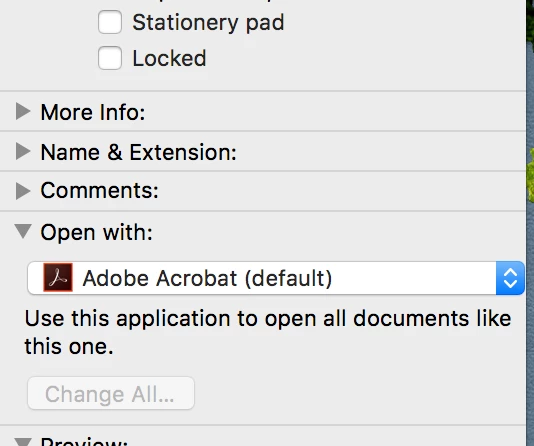
If it is with this one document, select the document in the Finder and do a Get Info on the document (Command-i). On the bottom of the long narrow window that pops up, what does it say to open this document with?

For example, here is shows that this document is supposed to be opened with Acrobat. What does it say for your document that's giving you problems?

Screen Shot 2018-09-08 at 9.19.50 AM.png