Participant
July 22, 2019
Question

Wrong colors in Adobe Acrobat DC

  • July 22, 2019
  • 3 replies
  • 4019 views

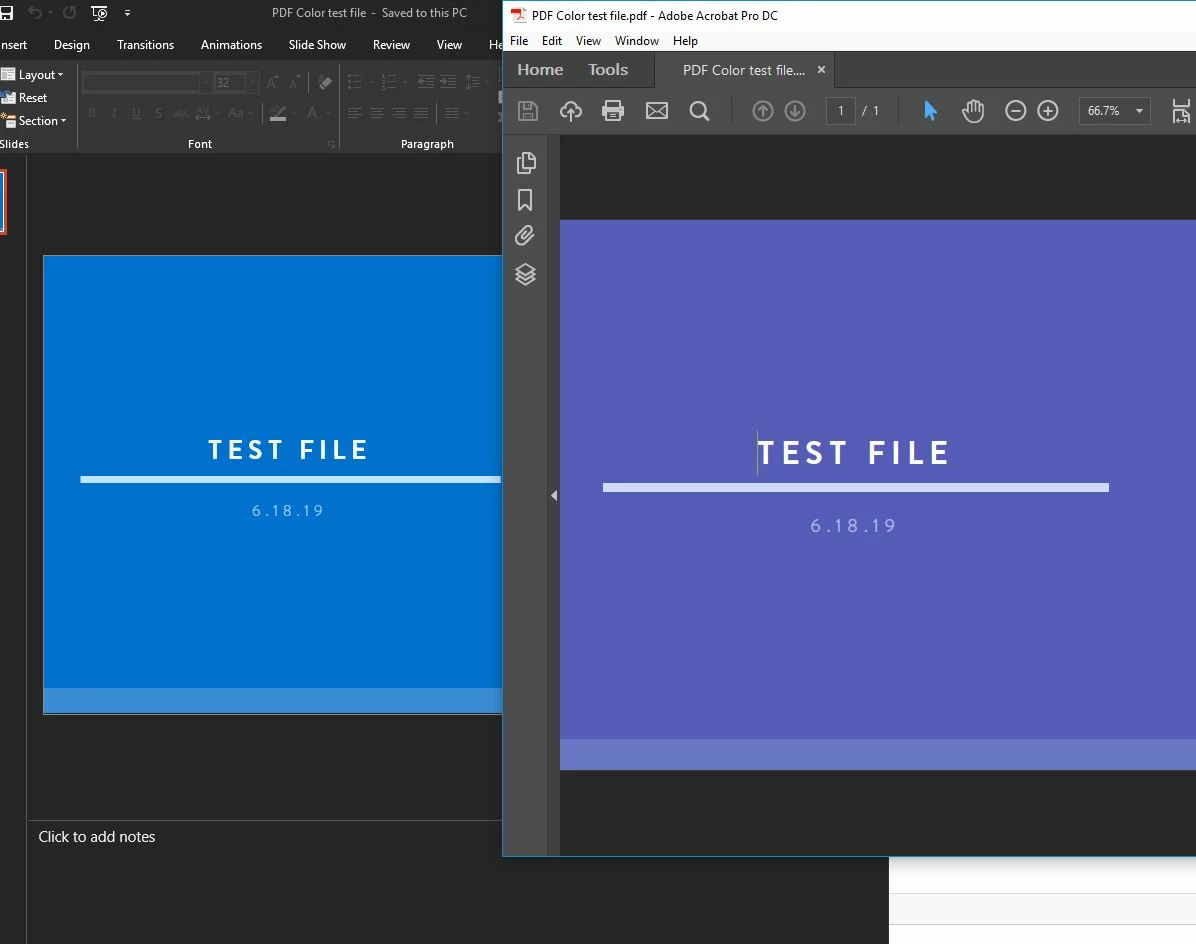
Hi all.  I am having issues with DC in that the colors in documents are off.  The doc to the left is a PPT and the right is a PDF of the same document.  I have tried playing around with the setting in color management trying to correct it but no such luck.  Any thoughts on how to fix this?
This topic has been closed for replies.

3 replies

Legend
July 22, 2019

These are your settings for viewing the PDF, and it may be the use of ProPhotoRGB as your monitor profile which is causing the issue. Please try sRGB.

But I was really looking for the settings you choose (or allow to default) on making the PDF.

Amal.
Community Manager
Community Manager
July 22, 2019

Hi Msmit,

Thanks for reaching out to us, as you are getting issues with the color in the PDF file.

The document uses the working space profile associated with its color mode for creating and editing colors. However, some existing documents may not use the working space profile that you have specified, and some existing documents may not be color-managed.

In such a case, the application uses a color management policy to decide how to handle the color data in the document. for more information, you may please follow the help article in the link- Adobe Acrobat Color settings

Also, your application version is 2018.009.20044, Please update the application to the latest version to get access to the latest features and functionalities.

You may try the following troubleshooting steps:

Do let us know if that works for you

Regards,

Amal

Legend
July 22, 2019

I wonder if it's been converted to CMYK somehow. How do you make the PDF and exactly what settings do you use in PDF creation (especially the colour settings)?

msmit55Author
Participant
July 22, 2019

Here is the color management settings i have right now.  I typically just save a doc as a PDF but this happened also when i used the Adobe PDF printer.  It is happening not just on PDFs I have converted but on ones others have sent me as well.