
Wrong links in PDF's in SharePoint
Dear Community members,
I am reaching out to address an issue I have encountered with my Adobe Document Cloud integration on SharePoint. I have successfully installed Adobe DC on our SharePoint platform, and overall, it functions well. However, there is one persistent problem that I need assistance with.
The problem arises when I open a file using Adobe DC from within SharePoint. While I am able to edit the file and save it correctly to the intended location, I encounter an issue when attempting to navigate back to the previous site. Specifically, after saving the file, clicking on the link to return to the previous site leads to an incorrect destination.
For clarity, here is a step-by-step breakdown:
- I initiate the opening of the "test.pdf" file located in SharePoint using Adobe DC.
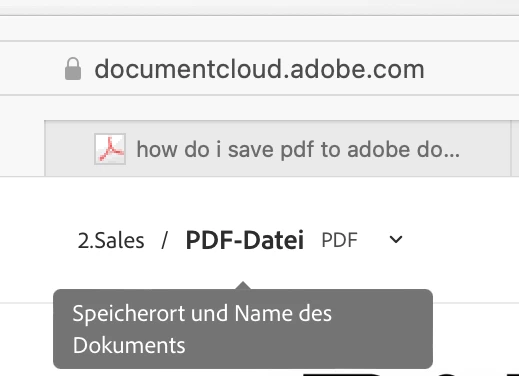
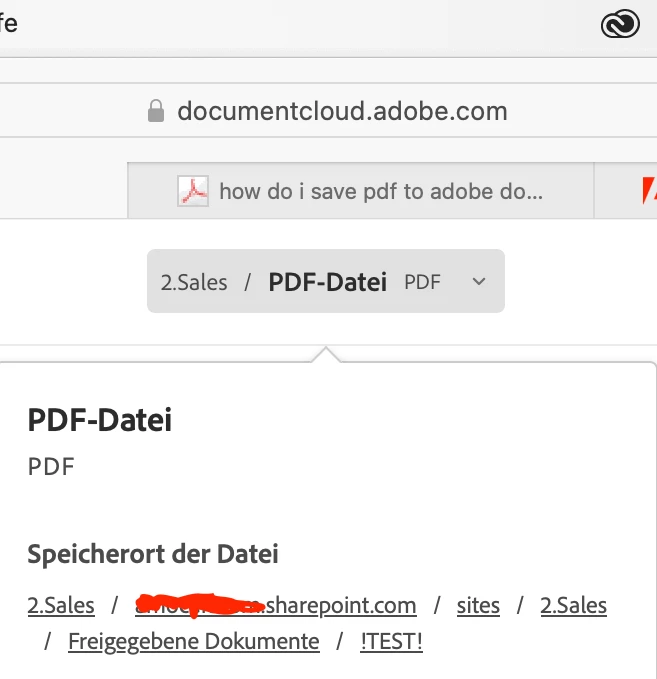
- After editing the file, I save it by selecting the file name displayed at the top-middle of the interface, followed by clicking on the path preceding the file name (as illustrated in the provided image).
The concern lies in the link redirection after this step. While the link should ideally direct me to "test.sharepoint.com," it instead redirects me to "est.sharepoint.com." It appears that a letter has been omitted from the link, resulting in the redirection to an incorrect location.
I am reaching out to the community in hopes of finding a viable solution to this issue. If anyone has encountered a similar problem or possesses insight into resolving this matter, I would greatly appreciate your assistance and guidance.
 AdChoices