Participant
September 17, 2026
Answered

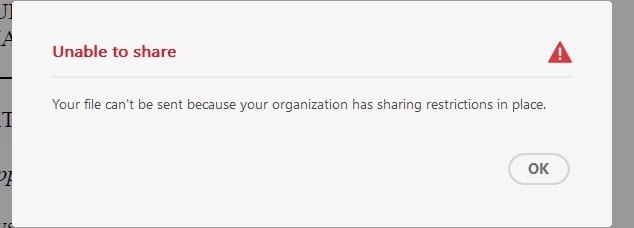
"Your file can't be sent because your organization has sharing restrictions in place."

  • September 17, 2026
  • 2 replies
  • 20 views

Hello,


I have a user who experiences this error when she tries to share any PDF via Acrobat’s email function.

There is nothing abnormal about her permissions in the admin console, and she gets this error on almost every single PDF she tries to send, so it’s not a permissions issue related to the individual file. We ran an Adobe repair and rebooted her PC. Under Security (Enhanced) “Enable Protected Mode at startup” is unchecked.

These are all suggestions online we tried that did not work. Her version of Adobe is the same as the rest of the userbase yet she (and one other person) is experiencing this. 26.002.21901

Any other suggestions on how to resolve? Much appreciated.
    Correct answer creative explorer

    @katie_4800 in addition with ​@Anand Sri Bhattacharya mentioned, could also check whether the affected users are behind a VPN, firewall, proxy, or network security appliance that's interfering with Acrobat's email-sharing services. Since only two users are experiencing the issue while everyone else is on the same Acrobat version, it may be worth comparing their network configuration, security software, and VPN settings against a working user's setup.

    2 replies

    creative explorer
    Community Expert
    creative explorerCommunity ExpertCorrect answer
    Community Expert
    September 22, 2026

    @katie_4800 in addition with ​@Anand Sri Bhattacharya mentioned, could also check whether the affected users are behind a VPN, firewall, proxy, or network security appliance that's interfering with Acrobat's email-sharing services. Since only two users are experiencing the issue while everyone else is on the same Acrobat version, it may be worth comparing their network configuration, security software, and VPN settings against a working user's setup.

    m
    Anand Sri Bhattacharya
    Community Manager
    Community Manager
    September 17, 2026

    Hello @katie_4800,


    I hope you are doing well, and thanks for reaching out. Sorry for the trouble.


    This message is consistent with Adobe’s enterprise sharing restrictions, which are controlled separately from an individual user’s product permissions under Admin Console > Settings > Asset Settings. Depending on the selected policy, public links or sharing with recipients outside approved domains can be blocked. Please check these articles for more details: https://adobe.ly/46A3m4z

    https://adobe.ly/4iAjCd6


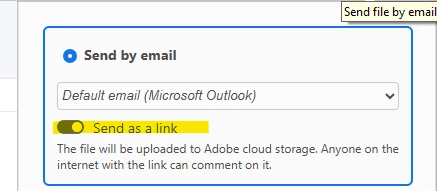
    In Acrobat’s Share > Share link via email workflow, confirm whether Send as link is enabled. This creates an Adobe Cloud link, so the organisation’s Asset Settings apply. This will also help distinguish link sharing from sending a regular attachment. Reference help article: https://adobe.ly/4heJgla


    Have your Adobe System Administrator verify the affected users’ effective organisation, Sharing Restrictions Policy, and, if the recipients are external, the organisation’s Authorised Domains. If the policy is Sharing Limited to Org Members and Trusted Users, recipients must belong to the organisation or a claimed, trusted, or authorised domain. Reference article: https://adobe.ly/4iAjCd6


    Because only two users appear affected, have them sign out and sign back in, selecting the intended company or school account and Business profile if prompted. Adobe profiles can have separate organization memberships, storage, and policies

    Since disabling Protected Mode did not help, please re-enable it; Adobe recommends keeping it enabled except during temporary testing.


    I hope this helps, and please out if you need any help.


    Regards,

    Anand Sri.