



daniellei4510
Community Expert
Community Expert
March 2, 2026
Question

A little photo restoration project.

  • March 2, 2026
  • 7 replies
  • 102 views

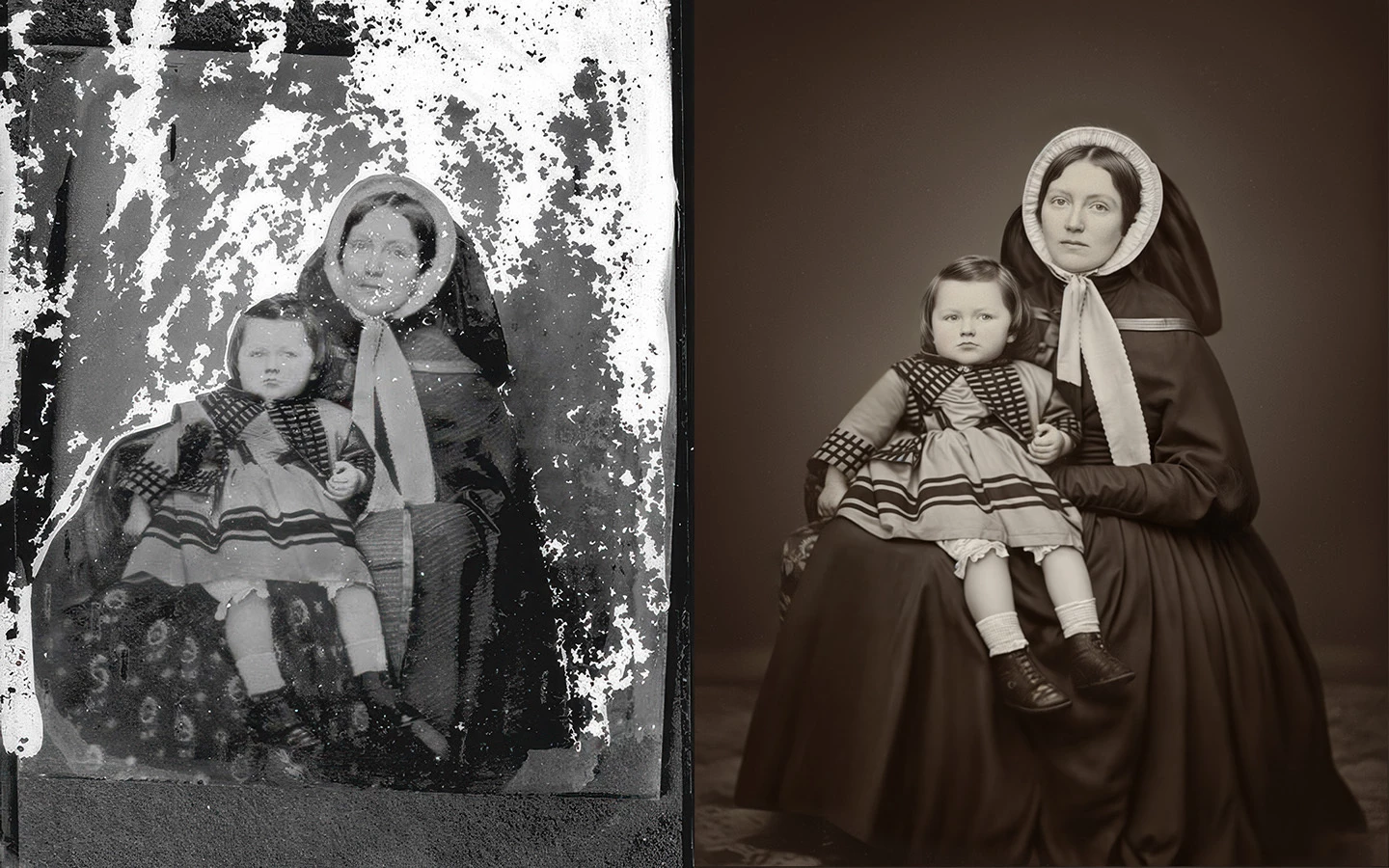
I have great landlords. In exchange for providing me with thousands of dollars worth of cat food and litter over the past eight years for the two cats I “volunteered” to take from them in a moment of weakness, they asked if I might be able to restore this photograph. They own and have restored a number of properties built during the 18 hundreds in my neighborhood (affectionately referred to as The Village) and they wanted to hang this image in one of them. Adobe Photoshop and a variety of AI tools to the rescue.


    7 replies

    Participant
    August 15, 2026

    This is an impressive restoration, especially because the original character of the photograph has been preserved instead of making it look artificially modern. Working on faces, hands, clothing, and other complex areas separately seems like a smart way to keep control over AI changes. I also agree that prompts should clearly tell the tool to leave everything else unchanged, since [spam link removed by moderator] AI can easily alter identities and historical details. Which part of the restoration required the most manual cleanup? 


    daniellei4510
    Community Expert
    Community Expert
    August 15, 2026

    It was actually a year-long or more process. I started working on it before AI came along and ended up with something adequate enough for the landlords to give it to our local library for their archives. When AI was first introduced, I was able to make some additional improvements while leaving the faces along. Then AI improved again and I went in for the finishing touches. I did take some liberties. I wasn’t sure where the cloth with the floral pattern was coming from, whether it was part of the woman’s dress or a blanket, so I made it her entire dress. And I did overlook part of the scarf around her neck. Contrast, vignetting, the sepia tones and some final touches were old-fashion manual fixes in Photoshop.

    Adobe Community Expert | If you aren't submitting your assets in sRGB, you probably didn't read the rules.
    Jill_C
    Community Expert
    Community Expert
    March 12, 2026

    Wow, what a great photo recovery result !

    Jill C., Forum Volunteer
    Nancy OShea
    Community Expert
    Community Expert
    March 8, 2026

    That outer dress, foundation and underlayers must have felt like carrying a 50 lb sack of flour.

    Thankfully, women aren’t required to dress like that anymore!


    Happy International Women’s Day!  


    Nancy O'Shea— Product User & Community Expert
    Peru Bob
    Community Expert
    Community Expert
    March 2, 2026

    Wow1

    How long did that take you?

    daniellei4510
    Community Expert
    Community Expert
    March 2, 2026

    Long story. I actually started it a few years ago using Photoshop and whatever rudimentary photo restoration apps were available at the time. The results were adequate enough that the landlords gave a copy to the local library for their archives. Then I kept improving and AI kept improving and I’d continue working on it every year or so.

    Then Gemini 3 happened. When I work with Gemini 3, I first upscale the image dimensions and ppi to 300 to give the AI enough pixels to work with. Then I take individual square sections of areas that need work (faces, hands, feet, articles of clothing, various objects), and work on each section separately after pasting and resizing the result back onto the original. (By the way, I learned one of the most important prompts one can use when editing with Gemini, for example, “Improve the quality and anatomy of the hands, with particular attention to the fingernails. Leave everything else as is.”) Gemini likes to take liberties on occasion, so that last sentence is important. I even developed a keystroke shortcut for it.

    Anyway, to answer your question, years. But all in all, maybe 8 hours total. 

    Adobe Community Expert | If you aren't submitting your assets in sRGB, you probably didn't read the rules.
    PaintedKitty
    Community Expert
    Community Expert
    March 5, 2026

    Just gorgeous! Really turned out beautiful. 

    I kind of did something similar years ago with a photo of my dad. The photo wasn’t in too bad of a shape but the paper had this texture that I had to carefully removed. I’m sure I wouldn’t have as much to do had I had access to the tools like we have available now.