
Answered
Quando apro qualsiasi file in pdf scompaiono i comandi dal menu e dalla barra comandi
Quando apro qualsiasi file in pdf scompaiono i comandi dal menu e dalla barra comandi
Quando apro qualsiasi file in pdf scompaiono i comandi dal menu e dalla barra comandi
Thank you for the additional info. Did you have any luck trying the Esc key?
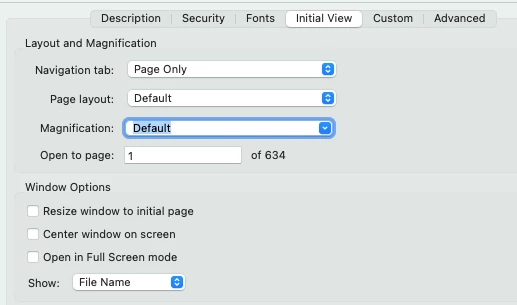
You can set that on a document basis by selecting the File>Properties… pull-down menu command, going to the Initial View tab and de-selecting the Open in Full Screen mode check box, as shown below:
On the application side, it’s a little more difficult to find — especially if, like me, you prefer to run on the “Old Acrobat” interface. In the Old Acrobat interface, first go to the View pull-down menu and select the Enable new Acrobat menu command. You’ll then be told to restart your system and you’ll be in the “New Acrobat” interface.
When you get there, or if you already are there, Go to the menu command up to the left with the three horizontal lines, also known as the Sandwich Menu, and click on it. Choose the Preferences… menu command and select Page Display in the list of setting options to the left. You can then use the Page Display: and Zoom: list boxes to set the view to where you would like things to be by default.
Randy
Already have an account? Login
Enter your E-mail address. We'll send you an e-mail with instructions to reset your password.
 AdChoices