
Participant
November 14, 2018
Answered

Can't see lasso tool outline until selection is complete

  • November 14, 2018
  • 3 replies
  • 4224 views

I just installed Photoshop 2019 and the problem I'm having is that I can't see lasso tool outline until selection is complete. I still have Photoshop 2018 installed and the lasso tool works as expected. Mac OS 10.13.6. I use this tool so much and I need to be able to see the selection as I'm making it.
    This topic has been closed for replies.
    Correct answer

    Hi

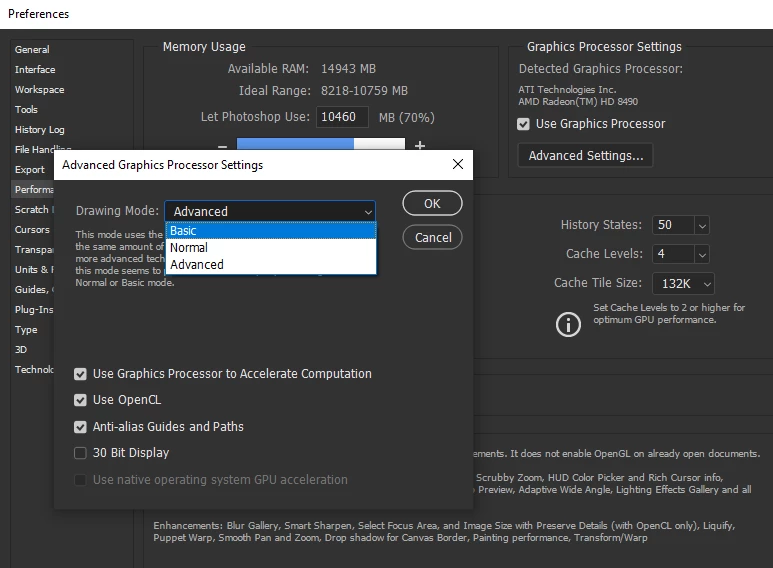
    Try setting the drawing mode to basic in preferences > performance > advanced settings and restarting Photoshop

    3 replies

    Participating Frequently
    December 3, 2018

    That didnt work

    Participating Frequently
    December 3, 2018

    Same here.  Adobe what are you up to. Ive had issues on all the new programs. Seems you're trying to be too smart and put updates where not necessary. Photoshop and Illustrator have worked fone for 20 years and now you are causing issues....

    And don't get me started on the scale tool in Photoshop


    What a joke

    jane-e
    Community Expert
    Community Expert
    November 14, 2018

    Have you done the update to 20.0.1 that was just released? I am on 10.13.6 and can see the lasso tool as I work.

    November 14, 2018

    Hi Jane

    There's no mention of that been fixed in the update and as far as I'm aware it only affects certain people, not everybody was seeing the issue.

    Correct answer
    November 14, 2018

    Hi

    Try setting the drawing mode to basic in preferences > performance > advanced settings and restarting Photoshop

    jcallisonAuthor
    Participant
    November 14, 2018

    Changing the Performance setting to "basic" worked! Thank you Ged! Do you know if this will hinder anything else?

    November 14, 2018

    No you should be fine