/t5/photoshop-ecosystem-discussions/how-to-delete-images-from-photoshop-cc-2017/m-p/9552332#M135491Nov 22, 2017
Nov 22, 2017
Copy link to clipboard
Copied
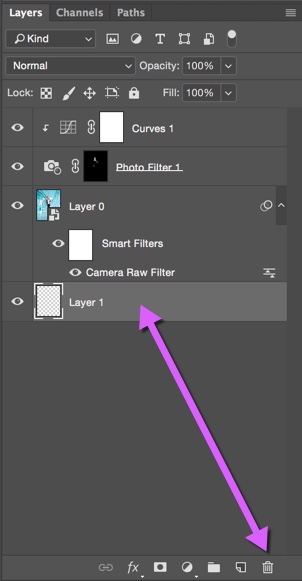
Drag the layers you want to delete to the trash in layers palette or right click on the layers in the layers palette and select delete layer. You can not delete all layers there must be at least one layer remaining.
Thanks JJMack and others, What I really want to do is to simply delete the image. I want to delete it off my computer and it won't allow that because it's still open in Photoshop. I'm not trying to save any particular layers, I just want to be able to delete the image and it will not drag to the trash can (trash is grayed out) and I can't find a simple "delete" action in any of the dropdown menus. Sorry for being unclear in my original post; I'm new to Photoshop.
/t5/photoshop-ecosystem-discussions/how-to-delete-images-from-photoshop-cc-2017/m-p/9552333#M135492Nov 22, 2017
Nov 22, 2017
Copy link to clipboard
Copied
I assume you meant how to delete a layer from Photoshop and not an image, but please explain if I am wrong.
As JJMack mentioned, you can simply drag your Layer 0 to the Trash Can icon. You must maintain at least one layer, and the original Background layer would need to be renamed before deleted.
/t5/photoshop-ecosystem-discussions/how-to-delete-images-from-photoshop-cc-2017/m-p/9552334#M135493Nov 22, 2017
Nov 22, 2017
Copy link to clipboard
Copied
If you want, you can just press the Delete key (right of enter) as long as no blending modes are selected in the dropdown at the top. I prefer this because the bin icon is tiny at 4k and too often the Windows taskbar pops up when I'm trying to delete a layer by dragging.





 6
Replies
6
Replies






 AdChoices