
66111374
Participant
January 6, 2018
Question

How to add custom menu in Photoshop?

  • January 6, 2018
  • 1 reply
  • 2480 views

Hello,

Is it possible to add a custom menu in Photoshop?

I'm using the following code as a startup script in InDesign, but it doesn't work for Photoshop:

(function(){

     alert("Hello world 1");

     var sma = app.scriptMenuActions.add("Create Photobook");


     // Add an Event Listener

     sma.addEventListener("onInvoke", function(){main()},false);


     // Create a new menu item in the Help submenu

     var mnu = app.menus.item("$ID/Main").submenus.item("$ID/&Help");

     mnu.menuSeparators.add();

     mnu.menuItems.add(sma);

})()

function main(){

     alert("Hello world 2");

}

In InDesign, this shows the following, and "Hello world 2" is displayed when selected:
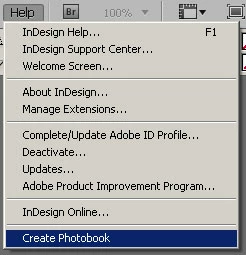
In Photoshop, "Hello world 1" displays as soon as Photoshop is launched (as expected), but the "Create Photobook" menu is missing. No error is thrown.

Thanks!

This topic has been closed for replies.

1 reply

Kukurykus
Legend
January 6, 2018

Save any script that (had to be executed at time of selecting custom menu) to your Presets / Scripts folder of your Ps folder. Restart Photoshop and you find your script in File / Scripts list (you can bind some shortcut to) - that's the only way I know to add kind of 'custom menu' item.

Jarda Bereza
Inspiring
January 6, 2018

There are only few predefined locations where you can add custom item.

JJMack
Community Expert
Community Expert
January 7, 2018

nd there are just so many items that can be added. Menu item list has some limits. Also when the list reach to the bottom of your display Photoshop will only scrolls the list one item at a time not a page of items a time. Scrolling one item at time is a pain. However you setup shortcut for Items way down on the list and you can also group items you add into groups.  Group names are not displayed the just a separator added between groups. Help  can be add for these to menu Help>About Plug-ins They need not be Photoshop Plug-ins. However in CS3 Adobe also added Plug-in support into scripting.  So a script can be a Plug-in like Adobe Fit Image Plug-in.

JJMack