
Mike-Me-3000
Participant
February 26, 2018
Answered

Photoshop CC 2018: How do I draw a line?

  • February 26, 2018
  • 1 reply
  • 12021 views

In Photoshop CC 2018 the Line Tool has been removed. I've been looking for documentation for the past two hours on how to draw a line. Would someone please put me out of my misery and help me with how to draw a line?

Also, I used the Shape tool and set the shape to an arrow. Now I can't unselect a shape. All I really want to do is to be able to draw lines and arrows. Thanks for your help.

    This topic has been closed for replies.
    Correct answer davescm

    Hi

    The line tool is still there. Just click and hold on whichever shape tool is showing in the toolbar

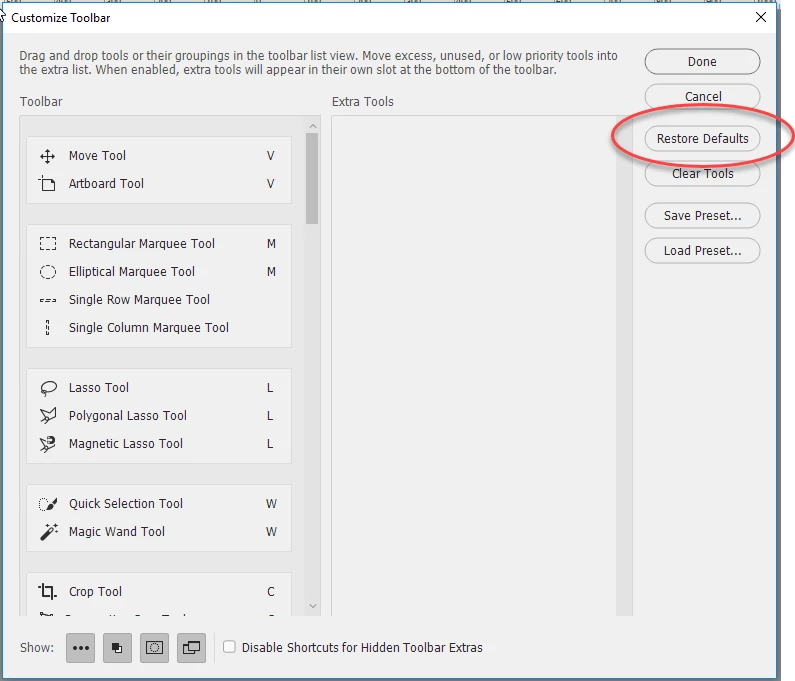
    If you still don't see it go to Edit > Toolbar and click restore defaults

    Dave

    1 reply

    davescm
    Community Expert
    davescmCommunity ExpertCorrect answer
    Community Expert
    February 26, 2018

    Hi

    The line tool is still there. Just click and hold on whichever shape tool is showing in the toolbar

    If you still don't see it go to Edit > Toolbar and click restore defaults

    Dave

    Mike-Me-3000
    Participant
    February 26, 2018

    Thank you, Dave. I loaded Window > Workspace > Essentials, and it was indeed there.

    davescm
    Community Expert
    Community Expert
    February 26, 2018

    You're welcome

    Dave