Participating Frequently
May 24, 2017
Answered

Can I create a PDF/A 1b compliant document while signing with a SHA256 digital certificate?

  • May 24, 2017
  • 3 replies
  • 8487 views

The italian Public Administration requires signed PDF/A 1b compliant documents. I've upgraded my digital certificate to a SHA256 one. Can I still create a PDF/A 1b document (1.4 version) or the SHA256 certificate signature requires PDF/A 2b (1.7 version)?

This topic has been closed for replies.
Correct answer ToM_1st

Hi ToM_1st,

if I don't set the "This document require signatures" all goes right, never mind about this flag ...

What I'm interested in is whether Acrobat can create a PDF/A 1b document with a SHA256 signature.

Starting from a PDF/A 1b document with a blank signature field I can sign the document, but it seems that the added text is created with a not embedded font causing the document not be convertable to PDF/A. Can I avoid the addition of text whose font will not be embedded or can I instruct Acrobat to embed the font of the newly added text?

Thank you for your help.

Paolo Righi.


Ok now I am getting your point! I did the same and when using a textual appearance the font is not embedded into the document by adobe acrobat. Which is in my opinion a bug.

Ok since Adobe Acrobat doesn't include the font - just use an image as appearance. To do that use the following steps:

1. In the signing dialog use the option "Create new Appearance"
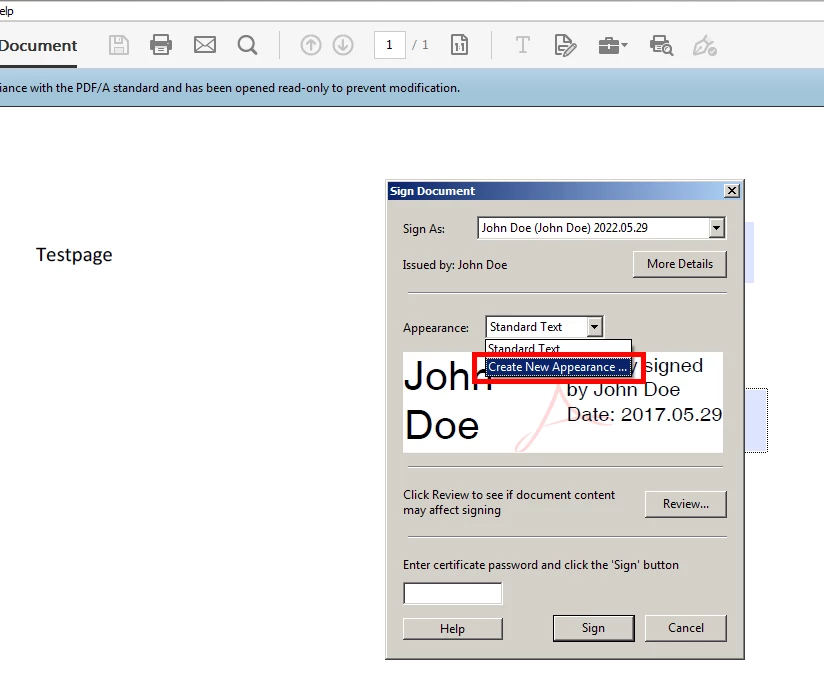
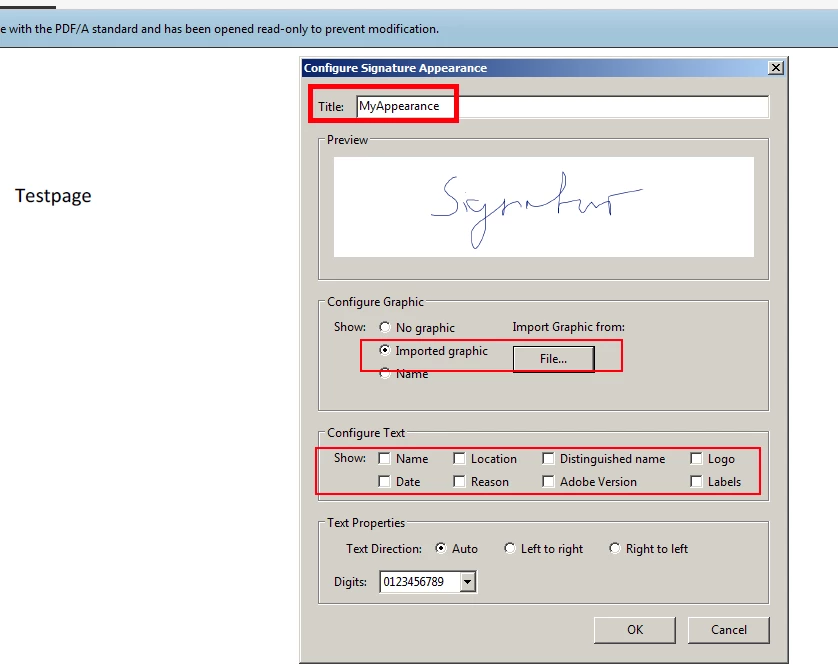
2. Define a title, import any graphic and unclick all texstual elements like name, location etc.
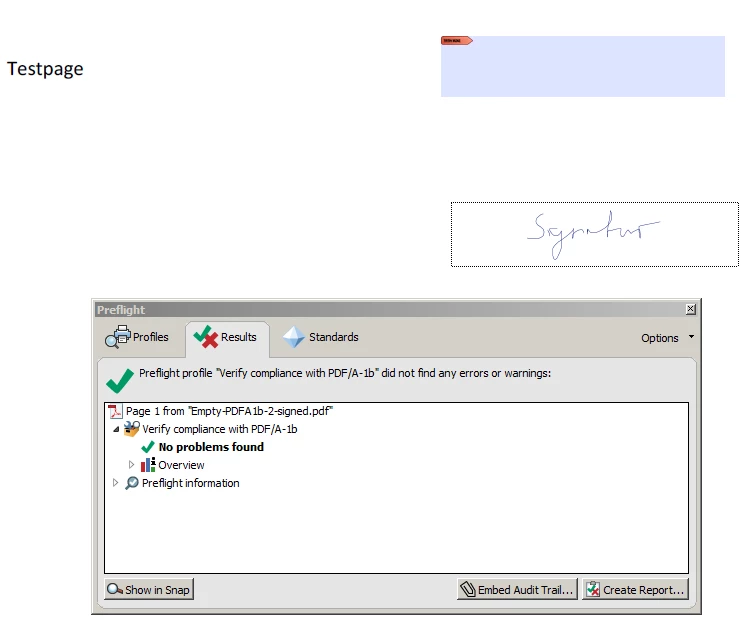
3. Et voilà - your perfect valid signature :-)
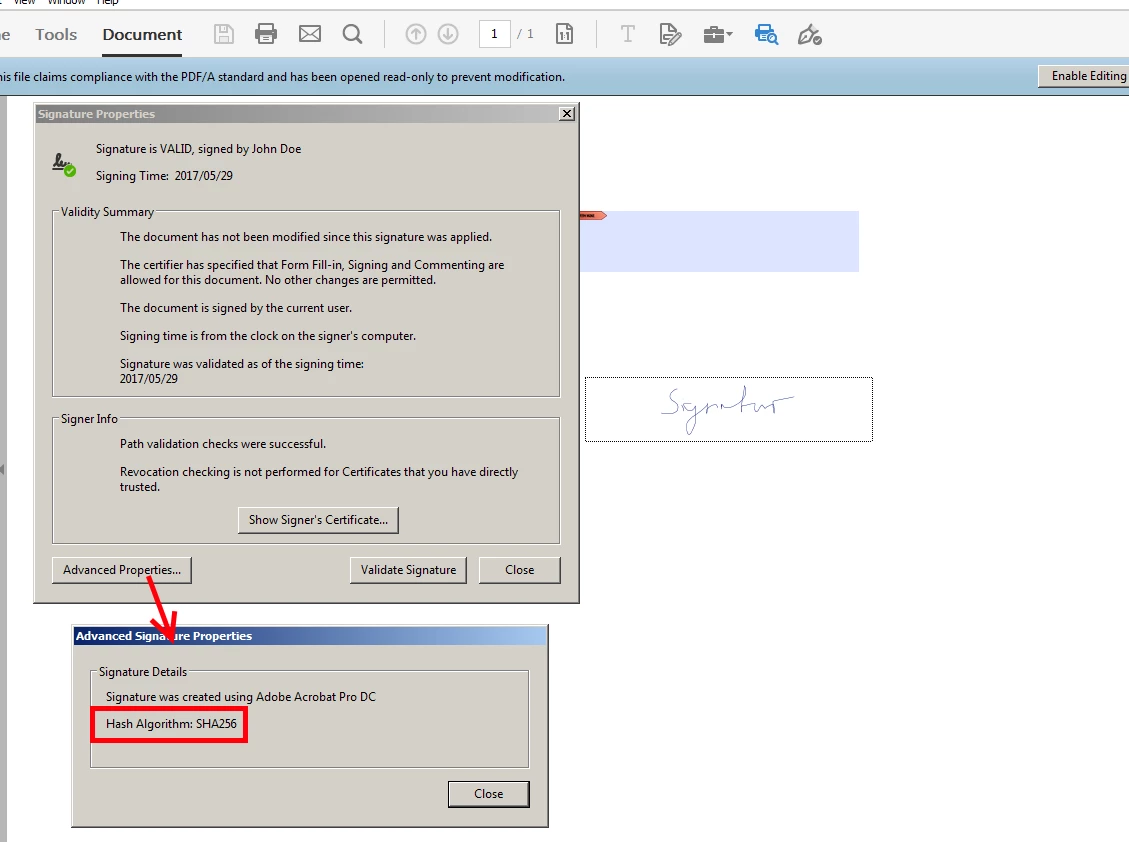
4. If you look at the properties its a SHA256 signature

3 replies

Participating Frequently
May 24, 2017

Hi Guys,

thank you for your suggestions.

I tried to create a signed PDF/A document with a trial version of Acrobat DC starting from a simple txt file.

I can create a PDF, convert it to a PDF/A 1b, but once I've signed it (with a SHA256 certificate) I can't convert it again to PDF/A 1b.

I receive the following errors:

"PDF document is not compliant with PDF/A-1b (2005)"

"Compressed stream object used"

"PDF/A entry missing".

Am I doing something wrong?

Paolo Righi.

ToM_1st
Inspiring
May 24, 2017

Converting a signed file back to PDF/A is not possible since this most certainly would invalidate the signature.

I got it to work the following way:

1. Create a document which contains a signature field

2. Convert it to PDF/A-1b

3. Open it with Adobe Reader (DC) or Acrobat

4. Do not click on the "Enable Editing" Button

5. Right click on a signature field and a greyed out "Sign document" dialog will pop up

6. Create yourself a test certificate / use an existing if you already have one

7. Save the document and open it with Acrobat again and run the PDF/A-1b preflight check

8. Voilá a perfect valid PDF/A-1 document

It seems that Adobe Acrobat / Reader removes the PDF/A entry when clicking on "enable editing" - and since its not PDF/A anymore it can compress its streams ....

Participating Frequently
May 24, 2017

Hi ToM_1st,

I don’t know how to create a signature field with Acrobat DC.

If I try to create a form then it is flattened during the PDF/A conversion.

While if I try to sign the document then an upload is requested (I would like to avoid that).

Thank you for your assistance.

[Private info removed. -Mod.]

ToM_1st
Inspiring
May 24, 2017

I discussed the same question with Leonard a while ago:

SubFilter value algorithm support in PDF/A

This may give you some insight into the different aspects of this topic.

On a personal side note - after considering all points we decided that it is valid to use newer/stronger methods of encryption/hashing even if its PDF/A-1...

Legend
May 24, 2017

A PDF/A-1 document must use features only found in PDF 1.4. Or rather, a viewer must ignore everything else. A signature is not actually part of viewing though. This may be undefined.