
Participant
December 14, 2016
Answered

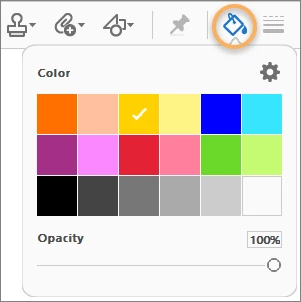
Can't find 'highlight color picker tool' (shortcut icon) in acrobat pro DC

  • December 14, 2016
  • 2 replies
  • 17835 views

Hello, I'm acrobat pro DC user.

I frequently use the highlight function... almost every time I read PDF files.

I was once able to select color not only yellow of highlight.

But I can't find the icon (below) anymore. ;(

Is there anyone who have a possible idea ?
This topic has been closed for replies.
Correct answer gener7

You may have to select a tool first. See this article for some ideas,

How do I change the highlighter color in Adobe Acrobat Reader DC permanently? - Stack Overflow

2 replies

Participant
December 20, 2022

Thank you SO MUCH ...... trying to locate the colour palette has been driving me crazy ..............


Hidden under 'Comments' ............ now why didn't I look there ...... ??


Thanks again

gener7
Community Expert
Community Expert
December 14, 2016

You have to add it to the "Toolbar" if it is not there.

Right click on a blank space in the Toolbar.  Choose "Customize Quick Tools".

Add the Color Picker by selecting it, (It's under Comment), then click the + button on the right to add it to the top.

Click "Save" to keep your changes. It will then show up in the Toolbar.

Participant
December 14, 2016

Thank you for your kind answer.

I followed the procedure as you told and found out the fact that Korean version of pro DC didn't have the specific icon of color picker as you can notice. I attached the pics below.

I guess the Adobe developer should consider this problem. 

gener7
Community Expert
Community Expert
December 15, 2016

Thank you for the apply.

Now I see the best shortcut is using 'Ctrl + E' to pop up 'highlights properties' window.


Great! I'm glad you found an answer to the problem!

Gene