suzannes27499859
Participant
March 5, 2018
Answered

Can't print fill in PDF tax forms

  • March 5, 2018
  • 1 reply
  • 14773 views

What's going on with Adobe? I do my own taxes and have never had trouble printing them. This year, despite hours of working on this issue, the forms print (fill in boxes) only in light grey. I worked over 3.5 hours online with a Geek Squad guy and couldn't figure out anything to do except buy an upgrade. I have ALWAYS been able to print my tax forms. Done early this year and Adobe product screwing everything up! Please help.

This topic has been closed for replies.
Correct answer Meenakshi Negi

Hi Suzanne,

Sorry for the delay in response.

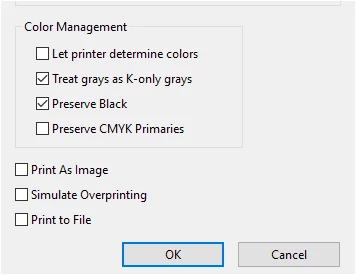
1. The settings selected in Advanced  > Color management in the print dialogue window:

You may also try to check the box for "Print as Image".

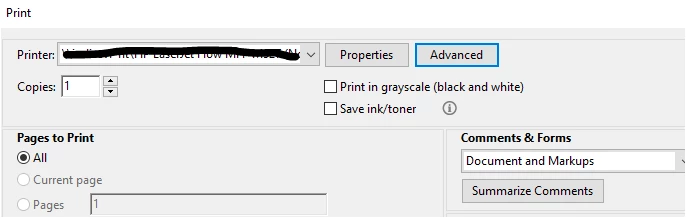
2. Please make sure that you uncheck the box for 'Print in grayscale" just below the properties tab.

Please let us know when you print the documents from another system in your house, are you using the same printer.

Did you try to print files from other application like MS Word, etc? Check if the files print fine without any issue.

Let us know how it goes.

Regards,

Meenakshi

1 reply

Meenakshi Negi
Legend
March 6, 2018

Hi Suzannes,

As you are experiencing issue in printing the document, please try the troubleshooting steps mentioned here: Troubleshoot PDF printing in Acrobat and Reader

Check the settings selected in Advanced > Color Management in the Print dialog window.

Also, Check if the document text color set to black in the document color options under Preferences.

In Application, go to Edit menu > Preferences > Accessibility and check the box for Replace document colors.

Then check the color selected for document text.

If the issue still persists, please let us know the exact version of the Adobe application you are using.

Are you on Mac or Windows? What is the OS version?

Is it an issue with the particular file? Check if you can print other files without any issue.

Let us know if you still need help.

Regards,

Meenakshi

suzannes27499859
Participant
March 7, 2018

Thank you so much for responding to my inquiry. I've tried most everything in the Troubleshooting Link. I also allowed the Geek Squad to remote into my computer. After 3.5 hours, the technician couldn't fix the issue. We ended up thinking I needed to purchase the EDIT PDF application from Adobe. Please see my questions and responses, which are numbered to help for ease of communication.

1. As for this, Check the settings selected in Advanced > Color Management in the Print dialog window.

Four options are available to be checked. Which should be checked? This is confusing to me.

2. As for this, Also, Check if the document text color set to black in the document color options under Preferences.

I do not know how to find this.

3. As for this,

In Application, go to Edit menu > Preferences > Accessibility and check the box for Replace document colors.

Then check the color selected for document text.

The document text is black.

4. To find the Windows Edition, I performed the following:

Check for operating system information in Windows 7


  1. Click the Start button The Start button, enter Computer in the search box, right-click Computer, and then click Properties.
  2. Look under Windows edition for the version and edition of Windows that your PC is running.

I cannot find Windows Edition, but I am pretty sure I am running Windows 7. The version of Adobe is the most recent of Adobe Acrobat Reader DC. (I removed my old version and re-downloaded the new one. Geek Squad did this as well.)

5. Yesterday, I turned off my computer and was able to print the PDFs in black from another computer in the house. I had tried this previously and it didn't work. I can now send my tax documents in, which is great, but I tried all of the steps you mentioned this morning and a PDF still does not print correctly from my computer.


Thanks for your help. If you can help further I appreciate it.

-Suzanne

Meenakshi Negi
Meenakshi NegiCorrect answer
Legend
March 14, 2018

Hi Suzanne,

Sorry for the delay in response.

1. The settings selected in Advanced  > Color management in the print dialogue window:

You may also try to check the box for "Print as Image".

2. Please make sure that you uncheck the box for 'Print in grayscale" just below the properties tab.

Please let us know when you print the documents from another system in your house, are you using the same printer.

Did you try to print files from other application like MS Word, etc? Check if the files print fine without any issue.

Let us know how it goes.

Regards,

Meenakshi