
Participant
December 10, 2018
Answered

Default Page view

  • December 10, 2018
  • 1 reply
  • 4835 views

Hi, We just had adobe acrobat pro dc installed and in the past (pro 9) I was easily able to set the default page view to fit to page. Even though I set it in the preferences to fit to page when I open a pdf its never set to fit page. it always opens at 113% zoom.
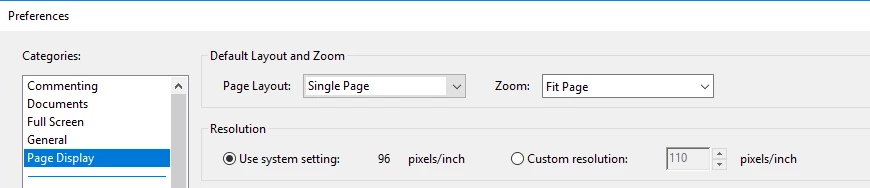
Any idea how to make this setting stick? its pretty annoying to have to manual set the zoom when opening 1000's of PDFs.

Thanks!

This topic has been closed for replies.
Correct answer Allta Media

Aha! No, none of them have the initial view / resize window to initial page checked.

Now here is a question, how to batch set these so I dont have to do it each time I open a pdf? Its pretty annoying because with acrobat pro 9 I never had this problem with the same pdf's.

Thanks for your help though, you are shedding some light on this weird issue for sure!


You shouldn't have to set them on a document by document basis. I just wanted to make sure the documents weren't set to an initial zoom level on an individual basis. Also, check under Edit >Preferences>Accessibility to make sure a zoom setting isn't set there.

1 reply

Allta Media
Community Expert
Community Expert
December 11, 2018

Make sure you don't have preference to restore the last view settings checked under the Document category.

DANricoh1Author
Participant
December 11, 2018

Hi Allta, Thanks for your reply. Unfortunately this does not help.

Allta Media
Community Expert
Community Expert
December 11, 2018

Do any of these PDFs have the zoom set at the document level? File > Properties > Initial View