
Participant
April 9, 2015
Answered

File preview thumbnails aren't working for Acrobat DC files in Windows Explorer

  • April 9, 2015
  • 60 replies
  • 247188 views

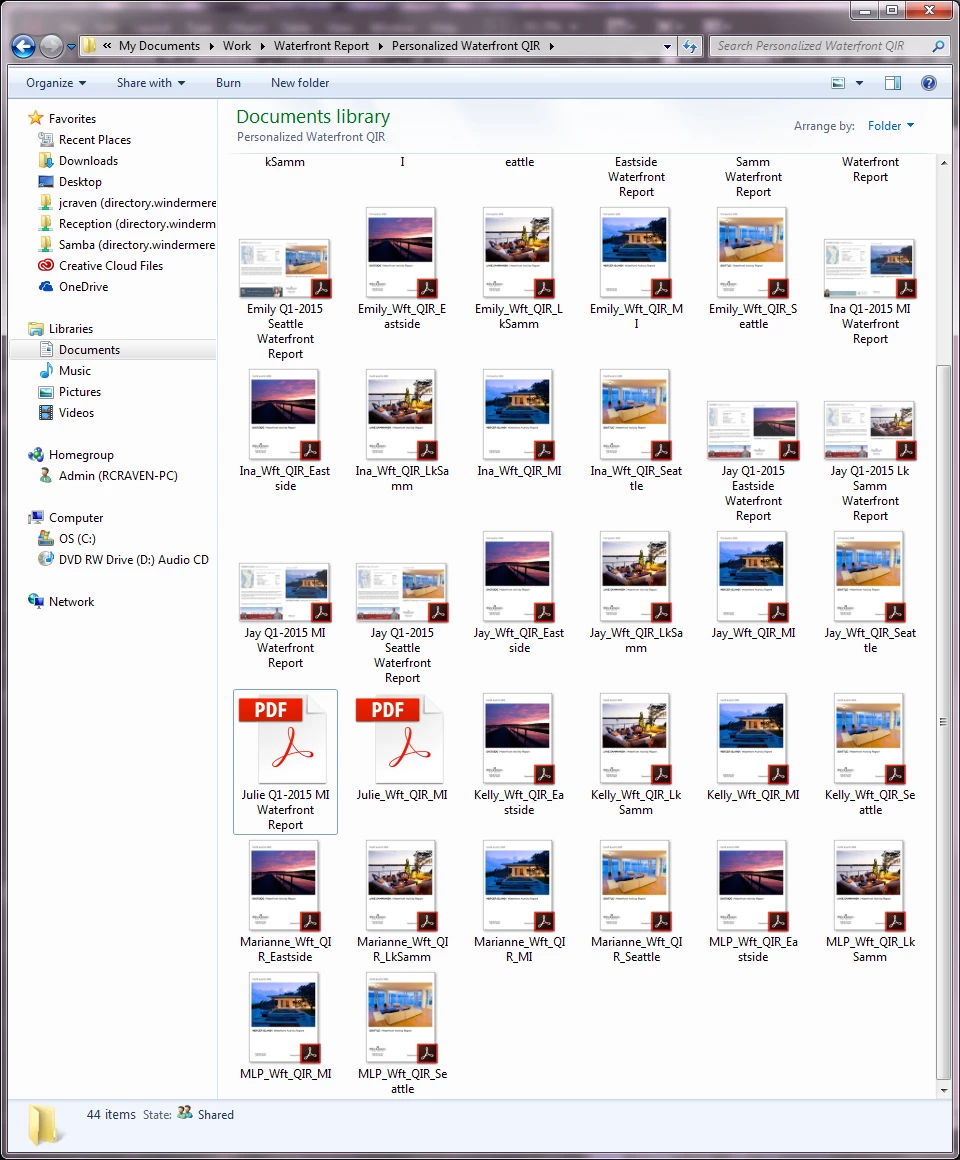
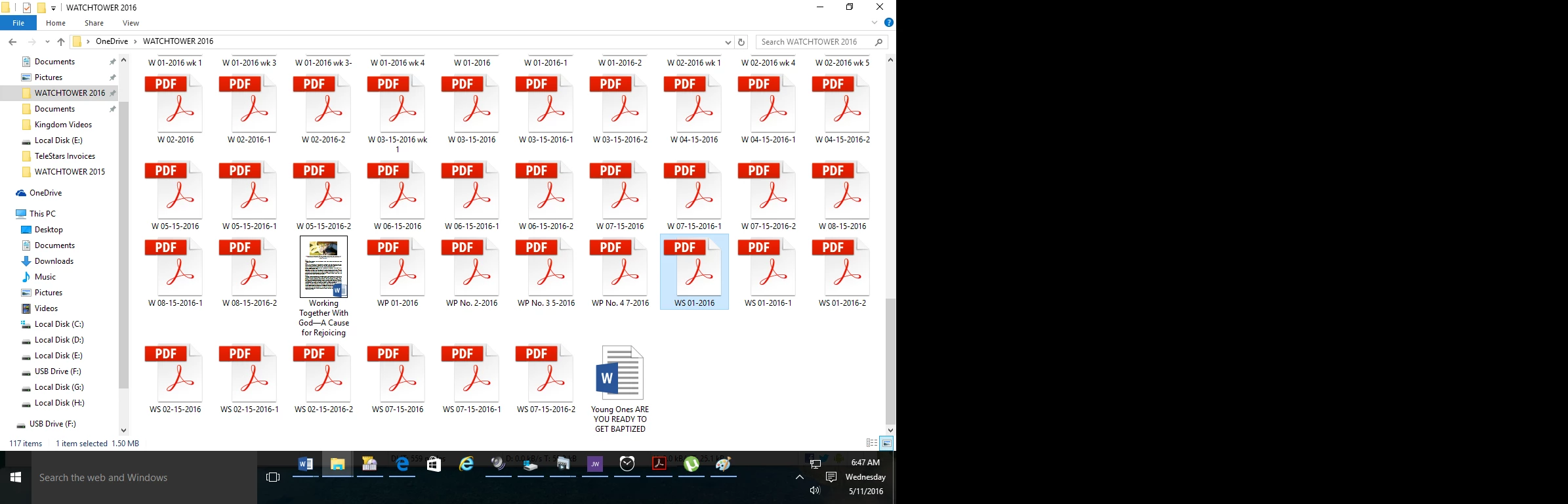
I just upgraded from Acrobat XI to Acrobat DC on Windows 7, and now any new PDFs I create display with a generic PDF icon rather than a thumbnail preview of the file.  Files created in Acrobat XI are displaying correctly (see screenshot).  Is anyone else experiencing this and is there a resolution?
This topic has been closed for replies.
Correct answer AshuMittal9644438

Yeah, this is still what I get!


Hi djbilly

This was fixed in our update released yesterday. Make sure you are on the latest update by visiting Help > Check for updates.

Next, to enable thumbnail previews go to Preferences > General and then select Enable PDF thumbnail previews in Windows Explorer.

Thanks,

-ashu

60 replies

Hani.sawiress
Inspiring
April 23, 2015

This is very weird .. Adobe is now following Microsoft policy which is (launching a new version not related to the old one - make the use lost)

but Adobe deals with artist maybe the artists are looking for what's new in their work and approach .. but certainly they don't want to change their tools from version to another every day. specially when the new tool is downgrading their expectations.

another point Adobe have to deal with: the artists have a "Eidetic memory" they deal with designs (icons, Thumbnails) more than a just silly file name.

Acrobat is ignoring that important point they disable .PSD .AI .PDF .EPS thumbnails over windows explorer ... and guess what!! they disable it over the file opening dialogue in the associated software. -for what reason?- for technical issues !!!!

who cares about technical issues .. Adobe deal with technical issues and we deal with our Money we pay in that software.and we can wait until solving that "technical issues"!!

the problem is Acrobat DC have stopped my third party software that shows all .PSD .AI and .PDF thumbnails over explorer, like MysticThumbs and Adobe PDF fixes!!! simply we say in such situation (They never mercy and Don't let other mercy)

we don't have to accept what ... Their technical issues certainly will reflect to or financial issues.

Participant
April 20, 2015

"We had to remove the thumbnail preview functionality from Acrobat and Reader DC for technical reasons. We know there are users who value it but certain design considerations forced us to make this change."

I just purchase Acrobat DC.

Due to "Customer Service" reasons,  Adobe immediately must find a solution to this issue.  With out the preview, I am lost into hundreds of .pdf files.

There is not reason for me to purchase this program and have to install "Foxit Reader" in order to make it functional. 

Participant
April 20, 2015

Installed Foxit reader. WOW!

Deleted Acrobat DC..........

bacomino
Participant
May 7, 2015

Great Job : Uninstalling is sadly the best solution !!!...

Here's adobe's thinking way :

- Users have been shouting loud that they want thumbnails for pdf files for many years, how should we fix this ?

- Let's remove thumbnails ! Our new design is financially so more important than user experience...

pixelpushingvectorvixen
Participating Frequently
April 17, 2015

I was reeeeally hoping this was something I could fix with a setting. Adobe, the removal of the previews is going to make my job a WHOLE LOT slower I have to upload many scanned documents every day and having to open every single one to see what it is before I upload (because the file names are automatic and meaningless from the scanner) is going to be a major problem. Please fix this!

RiesG
Known Participant
April 17, 2015

The remark of Anubha of april 9 made me very angry...'amazing new look'. Think you're funny??

Participant
April 16, 2015

Lack of Thumbnails has increased my work time finding correct files.  I used to be able to visually scan a file filled with dozens of thumbnails and find the correct file quickly.  Now I must read the description on each. This "upgrade" is a step back.  This flaw needs to be fixed !

Participant
April 16, 2015

Found a work around in Windows 7, install Foxit Reader and associate PDFs with it on the install, it will bring back the thumbnails. Then after the Foxit install right click a PDF and choose Acrobat DC as your default program, the Thumbnails will stay and open in Acrobat. Sucks we have to install anther program to get this feature.

Adobe you really need to fix this.

Participating Frequently
April 16, 2015

thimothy, this works for me, too!

though the thumbnails are only in square design... former acrobat versions showed them in the right rectangulars...

but now i can see what the files bare...

but i agree: THIS IS THE WORK FOR ADOBE TO FIX THIS!

damienf88
Participating Frequently
April 14, 2015

This is a massive drawback, and it is frankly unbelievable that a company such as Adobe allow themselves to do such things.

A warning before upgrade would have been more than welcome.

Who's going to pay for user time wasted on such an issue?

Abhigyan Modi - Thanks for your insight but when can we expect a fix?

Participating Frequently
September 3, 2015

It's really not that unbelievable to me anymore. "New and Improved" just means "We suck and you can't do anything about it!". It's much like the "convenience fee" when you pay a bill online. While they no longer pay anyone to process the payment, you have to pay them for the privilege of...,not paying anyone to process the payment!

Participating Frequently
April 10, 2015

i have the same problem and discussed that already here:

Re: Missing Thumbnail previews in Windows Explorer

i'm the opinion nowadays this is a "no go" to have no thumbnail previews especially when you are working as a professional like

August 6, 2015

"...i'm the opinion nowadays this is a "no go" to have no thumbnail previews especially when you are working as a professional like

Anubha Goel
Participating Frequently
April 10, 2015

Hey julieb26452343,

The new icon for PDFs created by using Acrobat DC seems to appear like this only (as a generic PDF icon)

PDF files that were created using Acrobat XI represent the same icon as it used to be earlier.

It is not a problem and you can just enjoy this amazing new look of your PDF icons.

Regards,

Anubha

Participant
April 13, 2015

Updating to Acrobat DC has killed thumbnail previews for EVERY PDF, not just the ones newly-created.

This is, in turn, destroying my workflow and frustrating me greatly.

Is there any way to uninstall the Document Cloud and go back to Acrobat Pro until this is fixed? Because DC is not providing me with enough value to justify the headaches.

Participant
April 19, 2015

This is still not working.

I have uninstalled Acrobat Pro DC, but when I go to the linked download page, select Acrobat XI Pro, and click the button which says "Download Acrobat XI Pro," it begins to download Acrobat Pro DC.

Does a link need to be updated or something...?


jzawada wrote:

This is still not working.

I have uninstalled Acrobat Pro DC, but when I go to the linked download page, select Acrobat XI Pro, and click the button which says "Download Acrobat XI Pro," it begins to download Acrobat Pro DC.

Does a link need to be updated or something...?

Previous versions of Acrobat can be found on Adobe's FTP website. Acrobat XI Pro for Windows is at ftp://ftp.adobe.com/pub/adobe/acrobat/win/11.x/11.0.10/ (latest version)

Acrobat Reader XI for Windows is at ftp://ftp.adobe.com/pub/adobe/reader/win/11.x/11.0.10/

Choose your language from the appropriate subdirectory.

Other platforms are available higher up in the directory structure.

If running Windows, it helps to reboot your computer after removing Acrobat DC to remove any remaining files.

After reinstalling Adobe XI or Adobe Reader XI, you can restore your PDF thumbnails by going to File->Open and viewing the selected directory contents. Thumbnails will be recreated as you view them in the list. You don't actually have to open any file. To view the thumbnails in Explorer or on the Desktop, you may have to refresh the display (F5 or Ctrl-F5 or right-click, Refresh).