
Participant
March 14, 2017
Answered

How to see strikethrough comments?

  • March 14, 2017
  • 1 reply
  • 4338 views

Hi,

I just received some feedback from my supervisor. He used sticky notes and strikethrough comments. Sticky notes are fine, however, I cannot see any comment from the strikethrough sections: acrobat shows them as empty.

Is there any method to activate the comments from strikethrough? Is it just a bug? Should my supervisor save the pdf file in a different way?

Please help me

By the way, I'm working on acrobat pro, mac sierra.

Bests,

Matias
This topic has been closed for replies.
Correct answer Document Geek

It may be that the supervisor's strikethroughs are actually empty. The default behavior of the strikethrough tool is to simply strikeout the text. It is different than the Replace Text Tool, which both strikes through as well as gives a little popup in which to type replacement text.

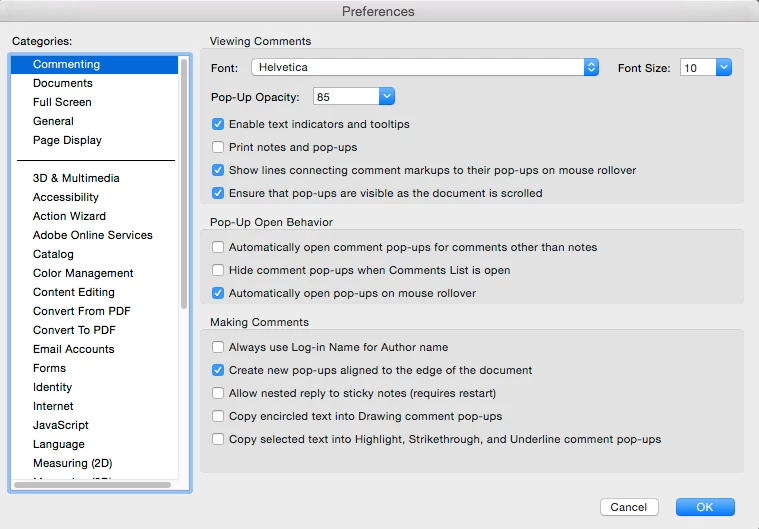
In Preferences > Commenting, you can choose the last option to Copy selected text into Highlight, Strikethrough, and underline comment pop-ups. But if that is not checked, the strikethroughs won't contain anything in the popup. Can you verify with him that he actually provided comments in the strikethrough pop-ups?

Maybe have him show you on HIS computer...

1 reply

Document Geek
Community Expert
Document GeekCommunity ExpertCorrect answer
Community Expert
March 15, 2017

It may be that the supervisor's strikethroughs are actually empty. The default behavior of the strikethrough tool is to simply strikeout the text. It is different than the Replace Text Tool, which both strikes through as well as gives a little popup in which to type replacement text.

In Preferences > Commenting, you can choose the last option to Copy selected text into Highlight, Strikethrough, and underline comment pop-ups. But if that is not checked, the strikethroughs won't contain anything in the popup. Can you verify with him that he actually provided comments in the strikethrough pop-ups?

Maybe have him show you on HIS computer...

jaggedpeak
Inspiring
March 16, 2017

Heartily agree with the recommendation to "show you on HIS computer".

I actually am (a bit perversely) happy when my SMEs do a markup that is hard to interpret (most especially when they drop sticky notes to refer to specific content --- WHICH CONTENT???)

Why? Because I can give them a quick 3-minute run-through of the key commenting tools to make both their and  *my* lives easier. (replace text/delete/insert, highlight+comment, text callout, and attachments, 'reply' to other SME's comments, sort comments, and jump directly to comments via the comment bar, possibly others if appropriate).