

Participant
August 12, 2013
Answered

Missing PDFMaker file

  • August 12, 2013
  • 3 replies
  • 27645 views

Used Acrobat 8 Standard the last 2 years without problems. Now cannot creat a PDF file in Microdoft Excel, get always "Missing PDFMaker file"

This topic has been closed for replies.
Correct answer FredkEI

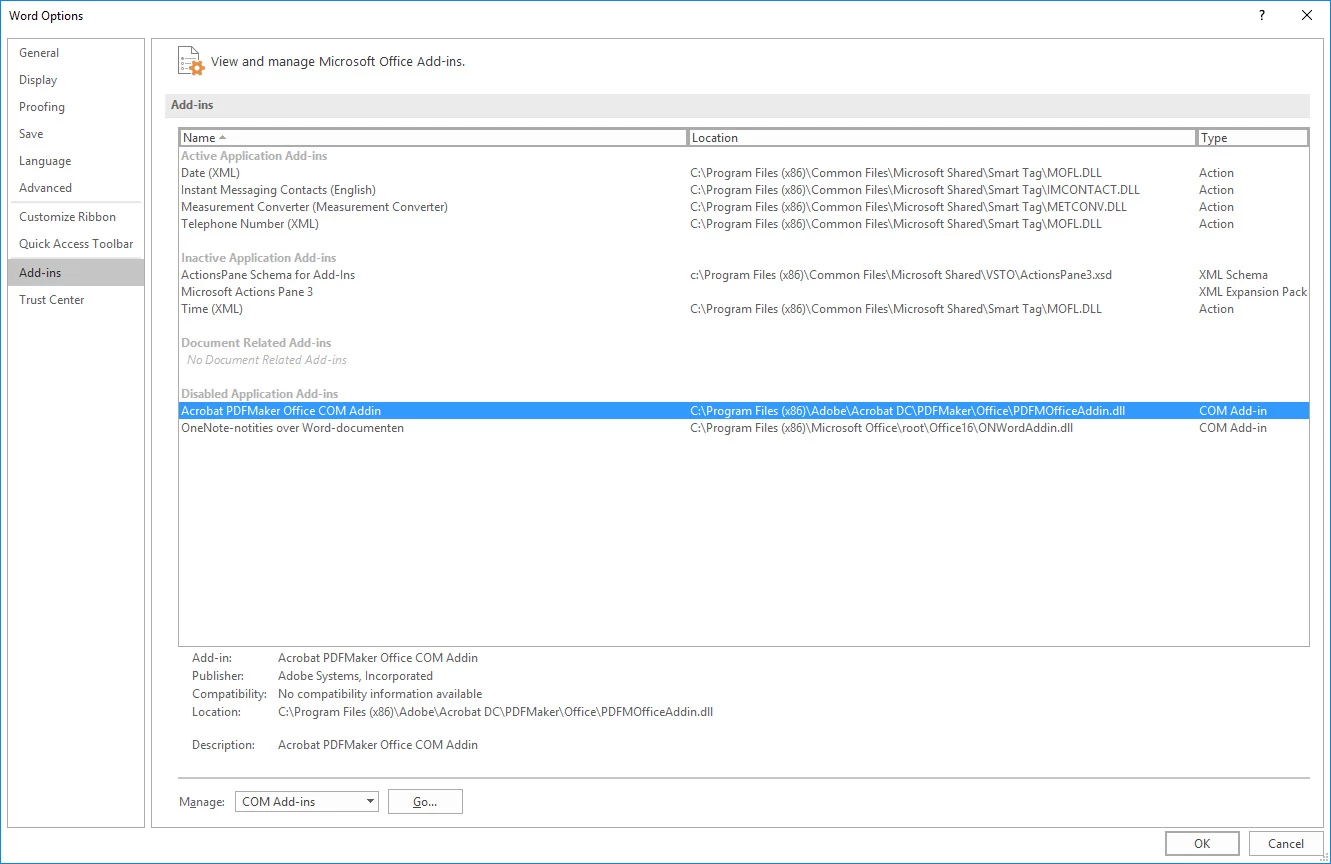
I know this is an old thread, but I had a similar issue and was unable to find an answer, so I thought I would post my solution in case anybody else is still experiencing this issue.  I was able resolve the problem by opening Word as an Administrator, remove the Adobe add-in through the options (make a note of the filepath before you remove it), close Word, reopen as administrator, and then reload the add-in. 


I had the same issue with Office 365.
Depending on your network group policies, unauthorised add-ins can be disabled in your Office environment.  Go have a chat with your network administrator (he or she already knows you very well as one-of-those-Adobe-user requiring very advanced administrator rights in order to install CC and make it function properly).

My 2cents contributions

3 replies

Participant
September 29, 2019

This is interesting because we are now with in 2019,  Adobe 19.012.20040.17853 and the bug is still there. Same problem PDFMaker is missing. And so far I have repaired, uninstalled, installed, and attempted to add by hand the addin for windows, still does not work.

We should be paid for the time waste attempting to fix features that should work. We need accountability for bugs and low quality.


Bevi Chagnon - PubCom.com
Legend
September 29, 2019

Usually it's one of 2 things prevents PDF Maker from appearing in Word or even working correctly.

  1. Word's Preferences don't have PDF Maker "on," or
  2. Your software is corrupted and you'll have to reinstall.


1. Check that PDF Maker plug-in is "on" in Word's preference. Instructions are here: Adobe's Help for Acrobat Installations

For Office 2010, follow these steps:

  • Click the File tab, and then click Option.
  • Click Add-Ins on the left side of the dialog box.


Then do one of the following:

  • If PDFMOutlook or Acrobat PDFMaker Office COM Add-in is not listed, choose COM Add-Ins from the Manage pop-up menu and click Go.
  • If PDFMOutlook or Acrobat PDFMaker Office COM Add-in is listed under Disabled Application Add-ins, select Disabled Items from the Manage pop-up menu and click Go.
  • Select PDFMOutlook or Acrobat PDFMaker Office COM Add-in and click OK.
  • Restart the Office application.


2. If that doesn't work, try to reinstall Acrobat. FYI, PDF Maker plug-in is added to Office software programs when Acrobat is installed.

  • Remove Acrobat--Entirely. Three ways, choose one:
    • Choose Uninstall from the Acrobat icon in the Start menu.
    • Choose Uninstall Acrobat in Windows Control Panel (Settings) / Apps / Acrobat.
    • From the Creative Cloud manager icon (use if you're a CC or DC subscriber), select Uninstall from Acrobat's options menu.
  • Shut down the computer and restart it. This must be a cold reboot, that is your computer must shut down completely before you reboot it again. This different from clicking the Restart button.
  • Reinstall a "fresh" copy of Acrobat.


|    Bevi Chagnon   |  Designer, Trainer, & Technologist for Accessible Documents ||    PubCom |    Classes & Books for Accessible InDesign, PDFs & MS Office |
Adobe Employee
August 15, 2013

Hi Rainer,

I am sorry that did not work with your case.

I am moving your posting to Acrobat desktop application forum as this is Acrobat.com forum.

Hope some will help you there.

Hisami

Inspiring
August 16, 2013

What version of OFFICE are you using. OFFICE 2010 and later do not work with PDF Maker for AA 8. In that case, you will have to either print to the Adobe PDF printer or upgrade Acrobat.

rv130813Author
Participant
August 16, 2013

I am using Office 2010. Strange the last 2 years the PDF Maker for AA8

worked with Office 2010. Well, it seems that I have to upgrade then. Thanks

for your help

Adobe Employee
August 12, 2013

Hi,

Please look at http://helpx.adobe.com/acrobat/kb/convert-pdf-missing-pdfmaker-files.html to add on/enable PDF Maker file.

Please let me know if this does not work.

Hisami

rv130813Author
Participant
August 14, 2013

Hi Hisami,

Thanks for the feedback. We had tried this already, unfortunately it does

not work.

Best regards

Rainer