
Participant
March 16, 2018
Question

Ordinal 2760 and LIBEAY32.dll

  • March 16, 2018
  • 2 replies
  • 1125 views

Hello,

I created a PDF form in which has a button that emails the form as an attachment. When using this button on a Windows computer, the following error occurs:
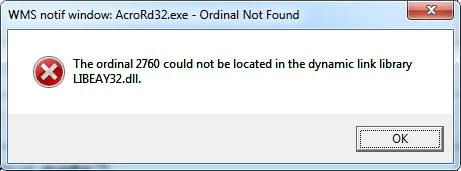
On other Windows computers it works flawlessly, the button opens the default email application and attaches the PDF. So I understand this is specific to certain computers. Any support would be greatly appreciated!

This topic has been closed for replies.

2 replies

AnandSri
Community Manager
Community Manager
April 12, 2018

Hello Anthonyc,

Sorry for the delayed response and inconvenience caused. Try repairing Microsoft runtime from the control panel, or install the operating system updates, reboot the machine and see if this brings any difference.

Also, check for any pending updates of Acrobat from help>check for updates, reboot the machine after installing the updates.

You can try resetting the Acrobat preferences once and reboot the machine, to reset the preferences, refer to Identify the product and its version for Acrobat and Reader DC

Is it possible to share the PDF file with us so that we can try it at our end? To share the file, please use Adobe Send feature, upload the file, share the link to files via private message only, How Do I Send Private Message

Let us know how it goes, and share your findings.

Regards,

Anand Sri.

John T Smith
Community Expert
Community Expert
March 16, 2018

Search http://www.microsoft.com/en-us/default.aspx to see if you can find a reference to that dll

It MAY be that a Microsoft runtime needs to be reinstalled