
PDFs display incorrectly
For several months now, I've been having an issue with Acrobat DC. It started when I updated CC to 2018 and is still present with CC 2019, and involved PDFs created mostly from InDesign and sometimes Illustrator.
My problem is that the vector colors in the PDF often do not show as anything but white when I open it in DC.
It usually happens when there are transparencies or gradients present in the file, but hte white areas should be solid color.
I've read that Acrobat might not support certain transparency blending modes, but I want to point out that it was working fine with pre-Acrobat DC versions, and the fact that all my coworkers can open the same PDF without any issues—it is only effecting mine. Oddly, the PDF will appear correctly in the Flattener Preview, so I know it's built OK. When I send the same PDFs to others, everyone else can view it corretly, in Acrobat DC Reader and Pro.
My department works on Macs running Mojave (10.14), and we are currently using CC 2019.
I've tried unistalling and reinstalling Acrobat DC.
I've tried deleting preference files and resources.
I've tried changing my monitor profile, Acrobat's display preferences, and even Apple's HDD first aid.
Nothing has worked yet, so I'm open to further suggestions.
Attached is a example of what's going on. On the left is how Acrobat opens it, and the right side is the Flattener Preview. I placed a vector solid blue background in the back, and it's not showing up. (I always convert any spot colors to process, so it shouldn't be that.)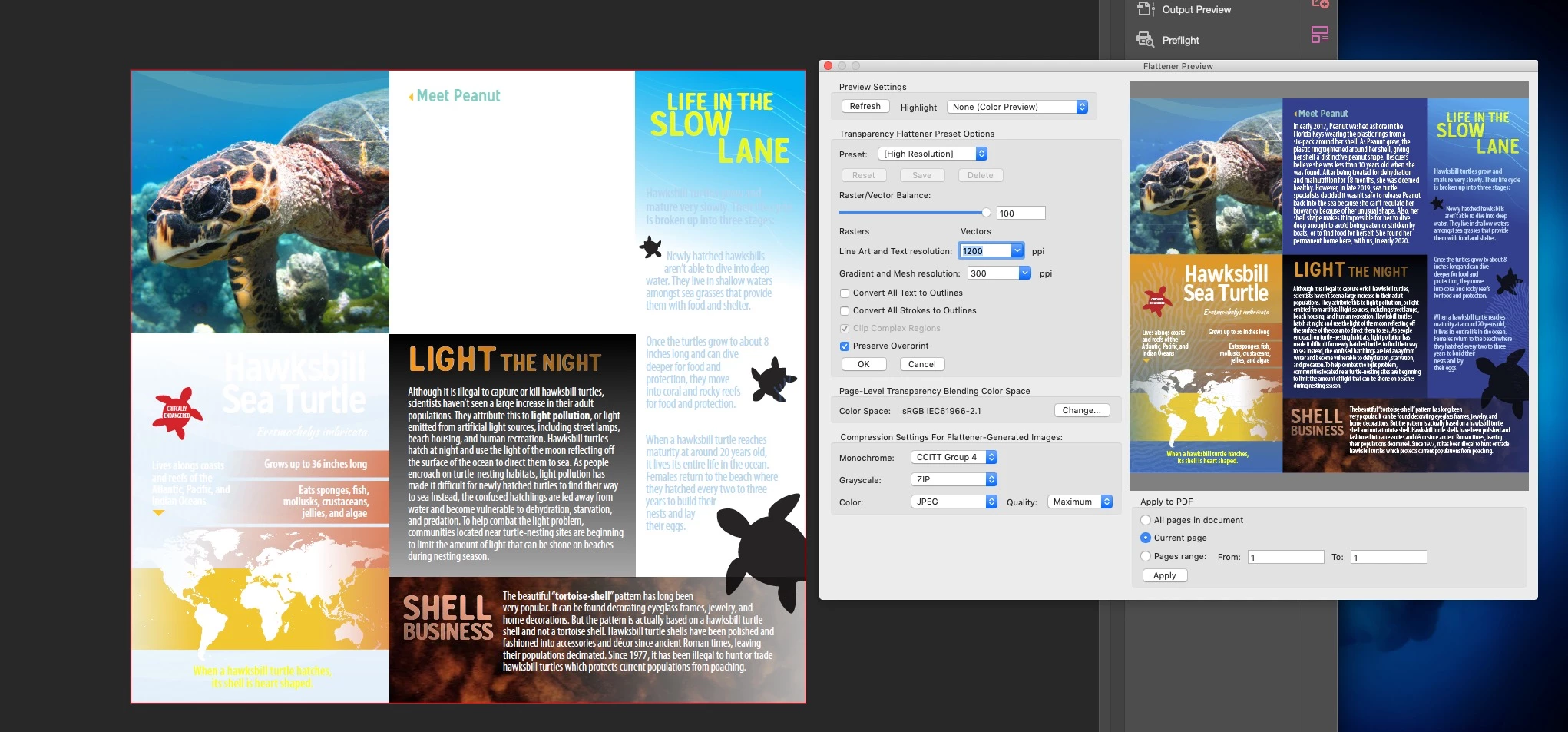


 AdChoices