
Participant
June 5, 2017
Answered

adobe_licutil.exe: the application was unable to start correctly (Oxc0000142)

  • June 5, 2017
  • 2 replies
  • 10592 views

Hi there,

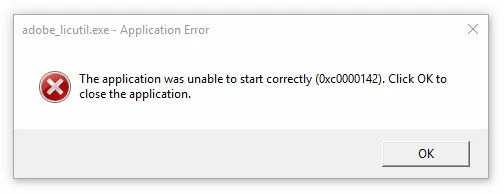
I keep getting this error - the application was unable to start correctly (Oxc0000142) - seemingly when Acrobat XI Pro opens. The error message mentions adobe_licutil.exe - Application Error.

Any ideas how to stop it? I'm using Windows 10 with a CC subscription. Not sure if it's related but the command window seems to fleetingly open then vanish. Desktop is brand spanking new, rammed to the hilt and 3GB vid card.

Screengrab attached for reference.
Many thanks,

Will

This topic has been closed for replies.
Correct answer kglad

has acrobat xi ever worked and that computer?

if yes, there's a preferences folder.

if not, after securing your serial number:

use your control panel to uninstall acrobat ix

clean per Download Adobe Reader and Acrobat Cleaner Tool - Adobe Labs

restart your computer

reinstall acrobat xi and activate with your serial number.

2 replies

wheeelAuthor
Participant
June 6, 2017

Should've mentioned that I'd already enabled that, but no folder ...

kglad
Community Expert
kgladCommunity ExpertCorrect answer
Community Expert
June 6, 2017

has acrobat xi ever worked and that computer?

if yes, there's a preferences folder.

if not, after securing your serial number:

use your control panel to uninstall acrobat ix

clean per Download Adobe Reader and Acrobat Cleaner Tool - Adobe Labs

restart your computer

reinstall acrobat xi and activate with your serial number.

wheeelAuthor
Participant
June 7, 2017

Thanks for your persistence kglad. The problem now appears to be fixed. I uninstalled XI and Reader DC (both of which were working despite the error message), then used the clean tools for both, restarted, then freshly installed Adobe Acrobat DC.

No error messages to report.

kglad
Community Expert
Community Expert
June 5, 2017

reset your preferences -   https://forums.adobe.com/thread/1595848?start=0&tstart=0

if you're successful and that fails to resolve the problem, do you have acrobat dc installed too?

[moved from Adobe Creative Cloud to Installing, Updating, & Subscribing to Acrobat]

wheeelAuthor
Participant
June 5, 2017

Thanks for your help kglad but I don't seem to have a preferences folder (see grab). Any further suggestions?

kglad
Community Expert
Community Expert
June 6, 2017

enable view hidden files.