


- Home
- Animate
- Discussions
- Re: Animate Not Opening: Animate.exe Bad Image
- Re: Animate Not Opening: Animate.exe Bad Image

Copy link to clipboard
Copied
I just installed Animate cc and opened it to use it for a while. I closed it and after a while I opened it again and it wouldn't start.
This Error Message pops up:
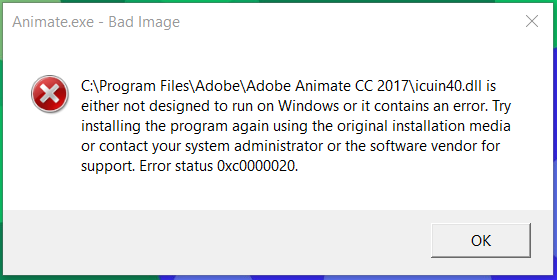
Thanks in advance.


 1 Correct answer
The problem occurred again but customer support helped out again and they uninstalled the Microsoft Visual C++ Packages. Hope other people can learn from my problems.

 8
Replies
8
8
Replies
8


Copy link to clipboard
Copied
It could be worth following the tips Microsoft give for other programs that show that error. See this example about Office:
https://microsoftofficesupport.pro/solved-error-status-0xc0000020-office-365/
Copy link to clipboard
Copied
this site doesn't seem to be about animate is it possible to still use it to fix animate cc and if so could you help me through it?
Copy link to clipboard
Copied
0xc0000020 is a Windows error, and trying what they suggest ought to help. I can't help you through it as well as that page does.
Copy link to clipboard
Copied
Okay, so I should apply what they say about office suite to animate cc or the creative cloud as a whole?
Copy link to clipboard
Copied
I followed steps 1 and 2 and they didn't work. So, I tried Step 3. I had tried uninstalling the whole creative cloud and then cleaned it and it help solve my problem but only temporarily. This time however, I tried just uninstalling Animate cc and then reinstalling it, but the Installation failed. Do you have any idea why?
Copy link to clipboard
Copied
I contacted Adobe Creative Cloud Customer Service they helped me reinstall Animate CC and in the process were able to resolve my problem. Thanks for your feedback though, Colin.
Correct answer by
Joey9094
AUTHOR
Copy link to clipboard
Copied
The problem occurred again but customer support helped out again and they uninstalled the Microsoft Visual C++ Packages. Hope other people can learn from my problems.

Copy link to clipboard
Copied
The above mention link is not working but when i did google i found this blogspot Receive "Error status 0xc0000020" for Microsoft Office 365 - [Solved] and this content is work for me first to solve issue again after update issues came. So any suggestion.


Get ready! An upgraded Adobe Community experience is coming in January.
Learn more
 AdChoices