Legend
November 9, 2017
解決済み

Source timecode (better workflow?)

  • November 9, 2017
  • 返信数 1.
  • 5938 ビュー

TL;DR version:

Can i view source timecode of wav file in Audition?

— — —

I’m a picture editor. But on short form / quick turnaround we end up finishing sound.

With AdobeCC we get a reasonable arsenal within PremPro but some things have to go to Audition for clean up.

Typically this is dialogue. Usually 2+ personal mics (interviewer/interviewees) that are balanced with room tone in gaps, routed to a dialogue bus with light compression, bit of eq to roll off highs & lows, brick wall limiter to protect true peak.

Once the edit is complete there is usually limited time to clean up that dialogue further. Today, for example, that was the two jobs of trying to reduce the intermittent noise as one of the camera sliders did its thing in an interior interview and ’heal’ a siren behind an exterior interview.

Currently I bypass the sub mix effects and export a mono wav of just the dialogue, open that wav in Audition and use noise print removal for the former and the heal brush for the latter.

This works pretty well but I don’t see any way of displaying, or navigating with, the wav source timecode (which matches my sequence timecode and thus my notes). It’s not an insurmountable problem, but if there is a solution I’d be grateful to hear it.

In addition - is there a way of ’storing’ noise prints for removal? (This week I’d have liked to sample a few of my room tones and stored them - then selectively applied them to different sections)

And is there a better way to work?

I realise I could process the whole interviews pre-edit, and have tried that approach, but I find it quicker/better to do it to finished project.

Similarly I could send the finished timeline to Audition and work within a session, but that seems fiddly to me (there are many, many dialogue edits that would need denoising individually), plus more time-consuming.

Sorry about how long my simple question took there - appreciate anyone who’s made it this far!!

    このトピックへの返信は締め切られました。
    解決に役立った回答 SteveG_AudioMasters_

    Trevor_Asq  wrote

    This works pretty well but I don’t see any way of displaying, or navigating with, the wav source timecode (which matches my sequence timecode and thus my notes). It’s not an insurmountable problem, but if there is a solution I’d be grateful to hear it.

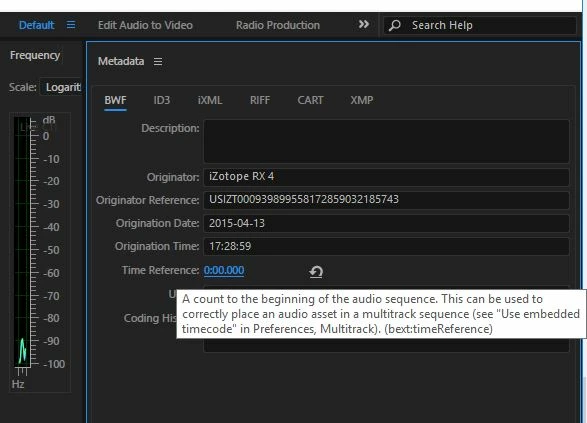
    I'm afraid that with audio, unless it's burned to a separate track as SMPTE, there's no concept of 'time code' at all. Programme duration is measured from the start of the audio, and the BWF format lets you offset this, so that clips can be placed according to their timestamps. You can alter these in Metadata if you need to:

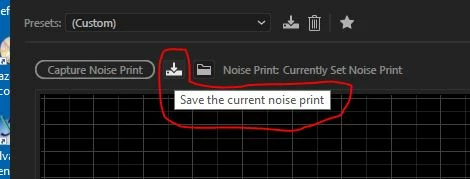
    Saving noise prints isn't a problem:

    返信数 1

    SteveG_AudioMasters_
    Community Expert
    Community Expert
    November 9, 2017

    Trevor_Asq  wrote

    This works pretty well but I don’t see any way of displaying, or navigating with, the wav source timecode (which matches my sequence timecode and thus my notes). It’s not an insurmountable problem, but if there is a solution I’d be grateful to hear it.

    I'm afraid that with audio, unless it's burned to a separate track as SMPTE, there's no concept of 'time code' at all. Programme duration is measured from the start of the audio, and the BWF format lets you offset this, so that clips can be placed according to their timestamps. You can alter these in Metadata if you need to:

    Saving noise prints isn't a problem:

    ryclark
    Participating Frequently
    November 9, 2017

    So the only way to have any reference to your timecode position is to insert the audio file into the Multitrack view using the BWF reference to place the clip at the correct place on the Timeline. You can also set an offset into your Audition session Start Time so that the clip isn't miles away up the timeline. But this doesn't help at all if you are viewing the audio file in the Waveform view.

    Perhaps we need a feature request to be able to offset the start time in the Waveform view which could be quite useful on this sort of occasion.

    SteveG_AudioMasters_
    Community Expert
    Community Expert
    November 9, 2017

    ryclark  wrote

    Perhaps we need a feature request to be able to offset the start time in the Waveform view which could be quite useful on this sort of occasion.

    All you'd need would be the option to use the BWF offset time reference as the displayed time, rather than starting at zero.