This topic has been closed for replies.
Correct answer Paul Wilson CTDP

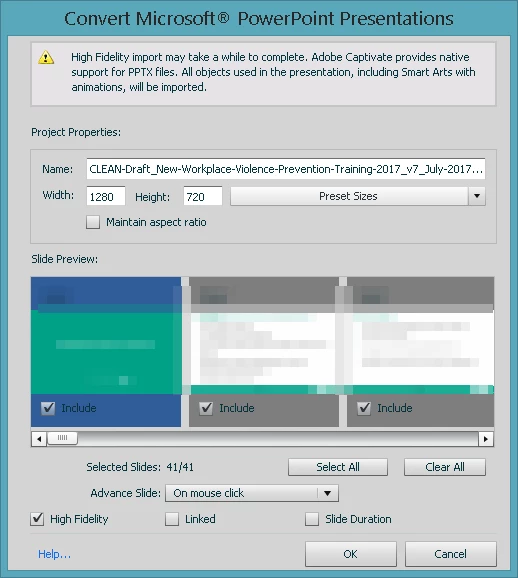
High fidelity refers mostly to the effects that have been added to the PowerPoint, but it also means smart art with shadow effects and other items. Basically anything added to the functionality of MS PowerPoint 2010 (PPTX as apposed to PPT). If you don't select this option you will get static images of the slides. Linked means that if you make a change to the source PowerPoint you will be able to resync the PowerPoint and update any of the original content from within the PowerPoint.

4 replies

AnotherMeAuthor
Inspiring
August 2, 2017

Thanks. Funny enough, I thought the High Fidelity option had to do with audio. So much for growing up as a child in the 60s! LOL

So am I correct in saying that in addition to having a clearer Captivate file, if I don't choose High Fidelity then the "animated" PowerPoint file will not import as an animated Captivate file?

By the way, what's the difference between PPTX and PPT? Is that simply the different version of PowerPoint?

Participating Frequently
July 31, 2017

note that captivate doesn't import powerpoint shapes as separate entities,  the entire slide comes in as a single, un-editable unit. further,  the image quality of the imported slides can be poor, no matter what the settings.   this can be a significant limitation.  

Lilybiri
Legend
July 31, 2017

This is written in the Help:

If you want to link to the PowerPoint presentation, select Linked. If you want to embed the PowerPoint presentation, clear Linked.

Adobe Captivate ensures that all Microsoft PowerPoint animations, all hierarchical animations (One by One, By level at Once etc.) that can be applied on Smart Art objects, all paragraph level animations on text having Text effects (glow, shadow, 3D, reflection, etc.), triggered Animations, audio bookmarks, and many more features are supported when a PPTX is imported.

If you select the High Fidelity option, you can import the features of the PPTX file.

Adobe Captivate always honors the timing of the PPTX slide. If you have modified the slide timing further in Microsoft PowerPoint (Rehearse Timings and Advance Slide -> After), select Slide Duration so that these altered settings are included in the import procedure.

Paul Wilson CTDP
Community Expert
Paul Wilson CTDPCommunity ExpertCorrect answer
Community Expert
July 31, 2017

High fidelity refers mostly to the effects that have been added to the PowerPoint, but it also means smart art with shadow effects and other items. Basically anything added to the functionality of MS PowerPoint 2010 (PPTX as apposed to PPT). If you don't select this option you will get static images of the slides. Linked means that if you make a change to the source PowerPoint you will be able to resync the PowerPoint and update any of the original content from within the PowerPoint.

Paul Wilson, CTDP