


PageMaker

Copy link to clipboard
Copied
I didn't see any FAQ regarding PageMaker. I am unable to load my CD into Windows 7. I paid over $600.00 for the program. Does this mean I have to re-purchase it?? That just isn't right.


 32
Replies
32
32
Replies
32


Copy link to clipboard
Copied
CherlyeDKing how are you unable to load the CD? Do you receive an error message? Does it just eject? Does your computer not have an optical drive?
Copy link to clipboard
Copied
No, when the menu comes up for installing the application, Windows just won’t let me select it.
Copy link to clipboard
Copied
So you are unable to click on the install button? According to the system requirements we haven't tested Pagemaker 7.0 with anything beyond Windows XP. So it is certainly possible you may run into a variety of issues installing under Windows 7.
Do you have a screen shot which you can provide of the install screen you are unable to click on?
Copy link to clipboard
Copied
How do I take a screen shot?
Copy link to clipboard
Copied
Press the print screen button and then utilize an image editor to paste the image into. Once you have pasted in the image you can then save it as a jpg. Once you have a jpg you can then click on the camera button within the forum to post your image.
Copy link to clipboard
Copied
I just sent it as a ‘snip it’. Did you get it?
Copy link to clipboard
Copied
No I did not. You will want to click the camera button in your reply post to upload your image.
Copy link to clipboard
Copied
PAGEMAKER.JPG
Copy link to clipboard
Copied
CherylDKing the camera icon is located at the top of the area you are typing into when responding through the forum.
Copy link to clipboard
Copied
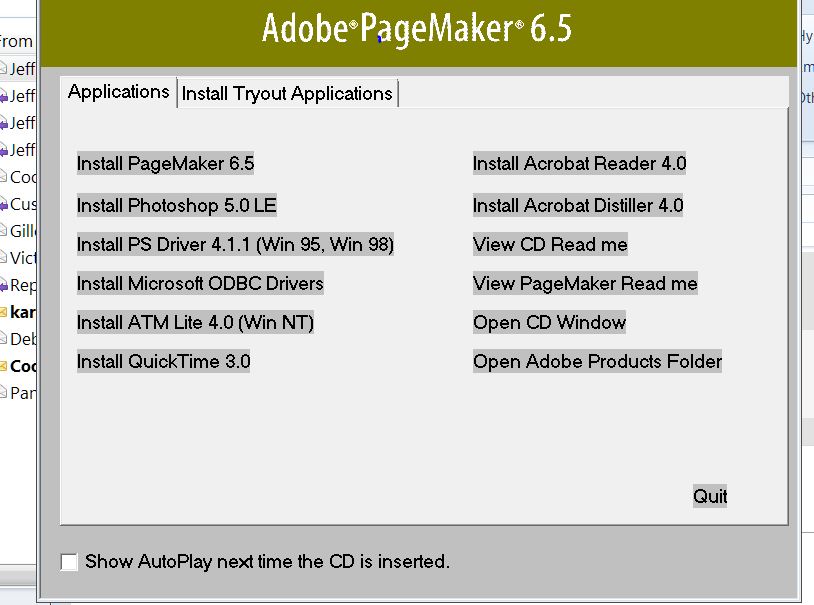 You have got to be the most patient person on earth! I'm sorry, I was replying to you via my email program. I'll try this again.
Copy link to clipboard
Copied
Did I do it right this time? I sincerely appreciate your patience. If there is a way to vote you the ‘most informed’ person as well as the most tolerant, I VOTE FOR YOU!
(I don’t know if I should be responding via this email or the forum)
Copy link to clipboard
Copied
Yes Cheryl your screenshot came through successfully. It appears you are looking at the autoplay screen. If you click on Install PageMaker 6.5 it should launch the installation program. If that doesn't work you can also try right clicking on the CD, in the Computer window, and attempting to locate Setup.exe.
Thank you for the compliment btw it is appreciated. 
Copy link to clipboard
Copied
Jeff~
I have clicked every option in the list. Didn’t work. There isn’t a SET-UP, but there is AutoRun.Exe, AutoRun.Inf, and Install.Pdf. Needless to say, I’ve tried them all. I don’t know what else to try.
p.s.
I don’t just sling compliments willy-nilly. You earned it!
Copy link to clipboard
Copied
If you click the Install Pagemaker 6.5 it should invoke the installer for you. Unfortunately I don't have access to the physical Pagemaker media. Do you have any folders on the disc besides the Autorun.exe, Autorun.inf, and Install.pdf? The setup.exe should be in a folder with a title related to Pagemaker.
Copy link to clipboard
Copied
No, I looked for a set-up file, but there isn’t one. And as I had said, there is no action when I try to click on the Install (or any of the others). When I try to check out the Autorun it gives me a bunch of garbage that is not legible. Should I just give up?
Copy link to clipboard
Copied
No another user reported being able to install Pagemaker 7.0 under Windows 7. They did run into issues with the postscript driver but that would be expected due to all the changes which have been made in the way printer drivers work in Windows Vista/7.
Could you possibly post a screenshot of what you see within the disc?
Copy link to clipboard
Copied
I sent it with the ‘snipping’ tool. If you don’t get it, I’ll go to the forum.
Copy link to clipboard
Copied
I don't think your snipping tool is compatible with the forum. If you can please click on the link to the thread and use the camera button to post your image it would be appreciated.
Copy link to clipboard
Copied
It won't let me post it. "Content of this type is not allowed"
Copy link to clipboard
Copied
Cheryl you will want to utilze the camera button and then select your jpg image. I have included an image of what you are looking for in this post.

Copy link to clipboard
Copied
Jeff~
I’ve been trying to email you for 2 days. I guess what I was sending was too big. How do you delete an email in the process of being sent?
Anyway, I understand what you want. I’ll go to the ‘forum’ and do my best.
Copy link to clipboard
Copied
Jeff,
I just can't seem to do it. It won't let me take a picture of it. "Invalid"
I'm sorry for wasting your time. You are a real good person and we really tried.
Thanks,
Cheryle
Copy link to clipboard
Copied
CheryleDKing do you have a jpg file or is it another file format? Alternately if you could list each of the folders you see when you click on the Open CD Window option.
Copy link to clipboard
Copied
OK. They are as follows:
Acrobat Distiller
Acrobat Reader
Adobe
ATM Lite For NT
AutoRun
Pm65
Postscript Driver
Pshop SLE
QTinst
Techinfo
Template Fonts
AutoRun. Exe
AutoRun.Inf
European Readme.Doc
Install.pdf
Readme.doc

-
- 1
- 2

Get ready! An upgraded Adobe Community experience is coming in January.
Learn more
 AdChoices