


- Home
- Download & Install
- Discussions
- Windows Installer blocking CC installation
- Windows Installer blocking CC installation
Windows Installer blocking CC installation

Copy link to clipboard
Copied
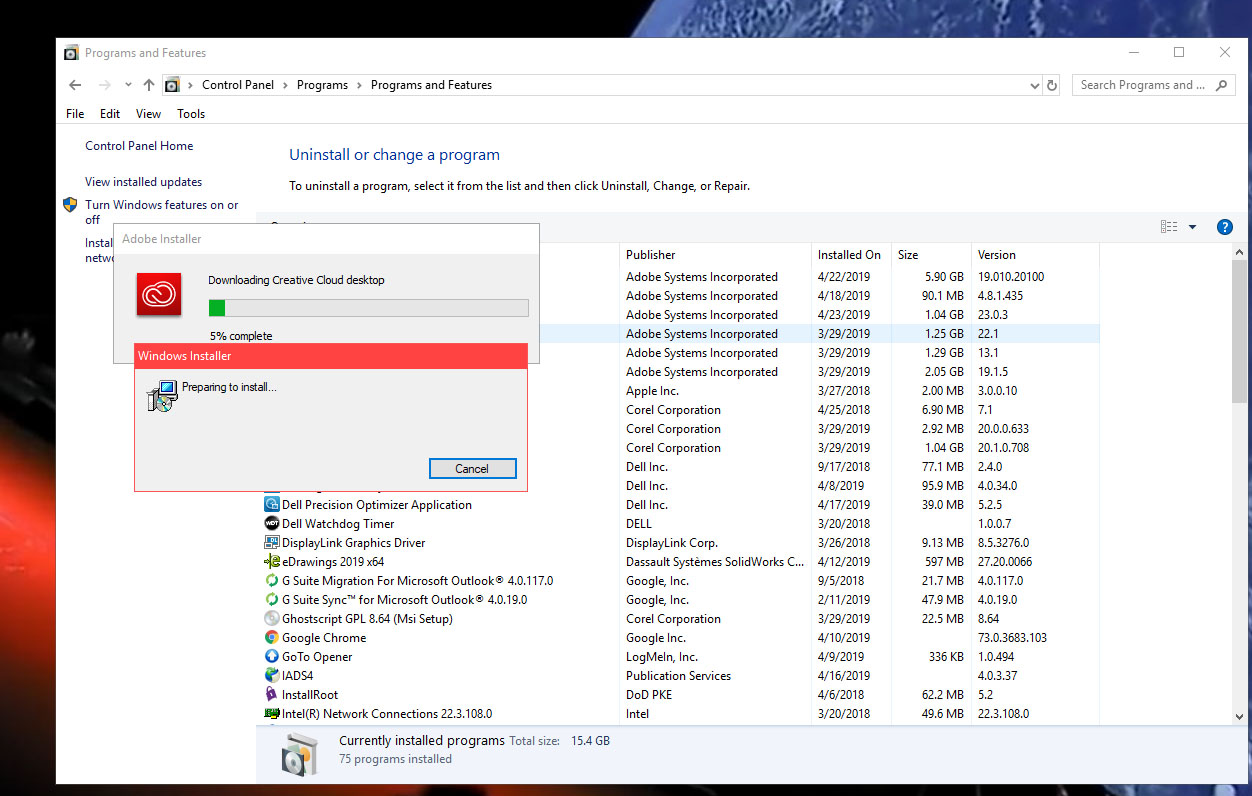
When trying to update Adobe software, or Repair Creative Cloud program, Windows Installer pops up and stalls, and causes a Need Repair error for CC.
Cannot find any information with this issue. Windows Installer also interrups AAM updates, causing them to fail.
This began after a Windows update in late March. Windows (10 Professional) says everything is ship shape! ??? Any help will be appreciated, before we have to reinstall Windows 10 and start all over.


 8
Replies
8
8
Replies
8


Copy link to clipboard
Copied
Search bar at the top of http://www.microsoft.com/en-us/default.aspx for ALL Windows help... you may find an article about a misbehaving Windows installer
Copy link to clipboard
Copied
I've been trying Microsoft troubleshooting for over a week now... 🙂 They're no help...yet!

Copy link to clipboard
Copied
first see if you can remove cc:
uninstall everything cc including preferences, https://helpx.adobe.com/creative-cloud/help/uninstall-remove-app.html
then uninstall the cc desktop app, https://helpx.adobe.com/creative-cloud/help/uninstall-creative-cloud-desktop-app.html
clean your computer of cc files per http://www.adobe.com/support/contact/cscleanertool.html
restart your computer (don't skip this)
reinstall the cc desktop app, https://creative.adobe.com/products/creative-cloud.
if you're unable to install the cc desktop app at this stage, use an administrator account (solution 4 here, https://helpx.adobe.com/creative-cloud/kb/creative-cloud-missing-damaged.html)
use the desktop app to install your cc programs/trials
Copy link to clipboard
Copied
I'm trying to not uninstall all of my Adobe programs, because they may not be able to install again, and I need them every day at work. It is annoying that I cannot update them to the latest version though.
It looks like there's a conflict since the March updates that Windows put out. I never saw Windows Installer pop up before during an Adobe install...it has its own installer.
Since the update, Solidworks also crashed and couldn't find its preferences. It took a few days to fix it, with their tech support. I still get error msgs from it, but the software runs so I can work.
Just an FYI, I am the administrator on the PC, so its not permissions causing a problem.
Thank you
Copy link to clipboard
Copied
i don't have a problem with cc and:

Copy link to clipboard
Copied
My Windows update came on 3/29/2019
it also installed a Windows update that runs as a program, and is a monitor for installations and other security issues. I uninstalled that. Windows says my updates are up to date. So, I'm not sure Microsoft is up to date!
For some reason, it also moved all of my files out of my user folder, and created a new one! Interesting, that this hasn't happened to anyone else. smh
Copy link to clipboard
Copied
install date means little. is it a different version/build?
Copy link to clipboard
Copied
No, apparently not. However, there are numerous articles stating that that particular update has changed a few times between January and now, because it caused problems, even complete hard drive losses. So its pretty suspicious.


Get ready! An upgraded Adobe Community experience is coming in January.
Learn more
 AdChoices