Abbs10
Participant
August 8, 2017
Answered

Converting adobe stock "font" (actually paths) into an actual font

  • August 8, 2017
  • 2 replies
  • 6416 views

I recently downloaded some adobe stock fonts to use in creating Snapchat filters for my sister's wedding. The only problem? They're not actually fonts just paths. I know I need to typeset them to turn them into an actual font but I have no idea how. I've tried to find tutorials on adobe and explanations on the forum but haven't found anything that actually tells me how to do it. PLEASE HELP!!

Grace & Peace,

  Abbs
This topic has been closed for replies.
Correct answer jane-e

Ugh!

The only way you can use them is to ungroup them and move and copy them—as if you were Gutenberg.

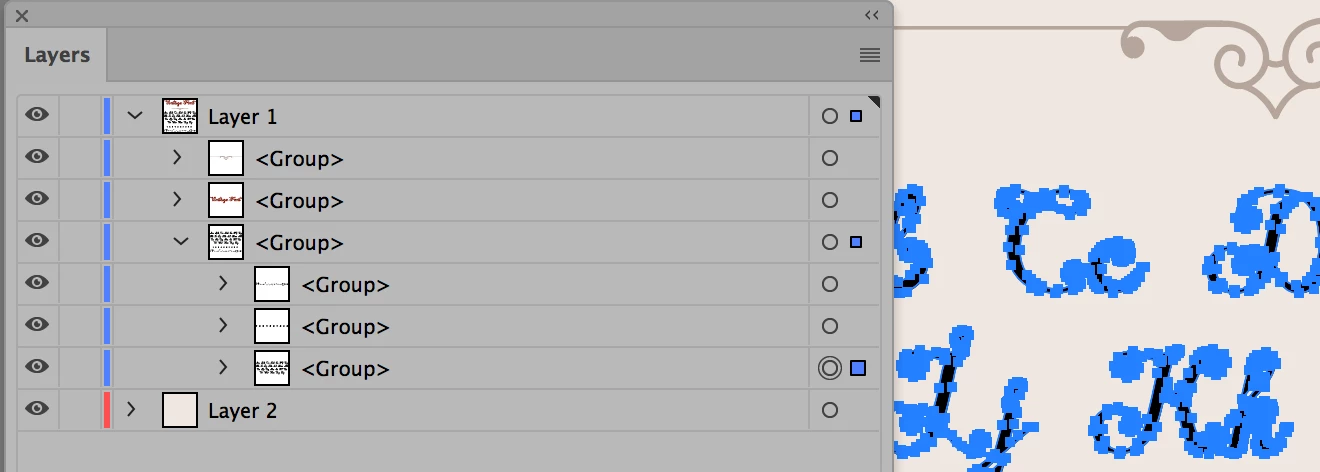
Layer 1 has 3 groups: for the title, the swirl, and the letters

The third group has 3 groups: for the letters, the numbers, and the special characters.

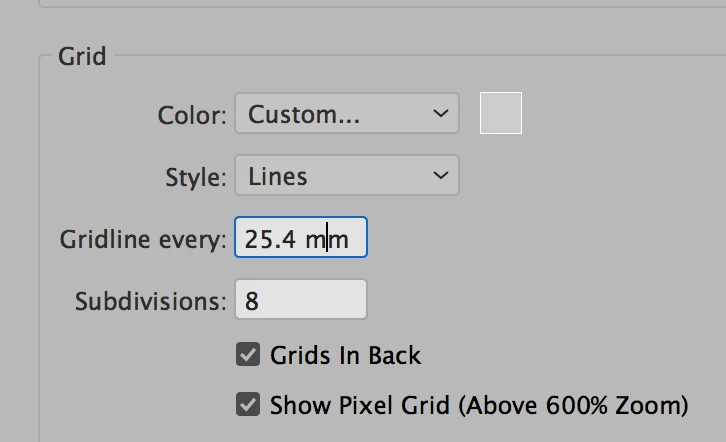
If you proceed, use a document grid to assist.

  1. View > Show Grid
  2. View > Snap to Grid
  3. Preferences > Guides and Grids > Change the subdivisions

Note: this document is in mm. You can change that or copy and paste the letters to a new document.

2 replies

Monika Gause
Community Expert
Community Expert
August 8, 2017

You could use the plugin FontSelf for that

(it's not free)

AmbrosiaArt
Participant
February 27, 2023

Fontself is awesome!

jane-e
Community Expert
Community Expert
August 8, 2017

Where exactly did you download them from? From Adobe Stock? Can you give the exact stock number so I can look at it? Did they profess to be fonts?

If they were fonts, they would have come from your Typekit subscription, included with Creative Cloud. You might look there for fonts.

There is no "Convert Outlines to a Font" command in any Adobe program.

Abbs10
Abbs10Author
Participant
August 8, 2017

I downloaded them from Adobe stock. One of the file numbers is File #:  111035029

Monika Gause
Community Expert
Community Expert
August 8, 2017

Called a Font, but it is none. An AI file or EPS can't be a font.

I will contact staff about this.