
Participant
June 3, 2019
Question

How to batch-remove anchor points?

  • June 3, 2019
  • 4 replies
  • 1715 views

Hi all,

Maybe it is a very basic question but I have a question regarding anchor points inside a given shape.

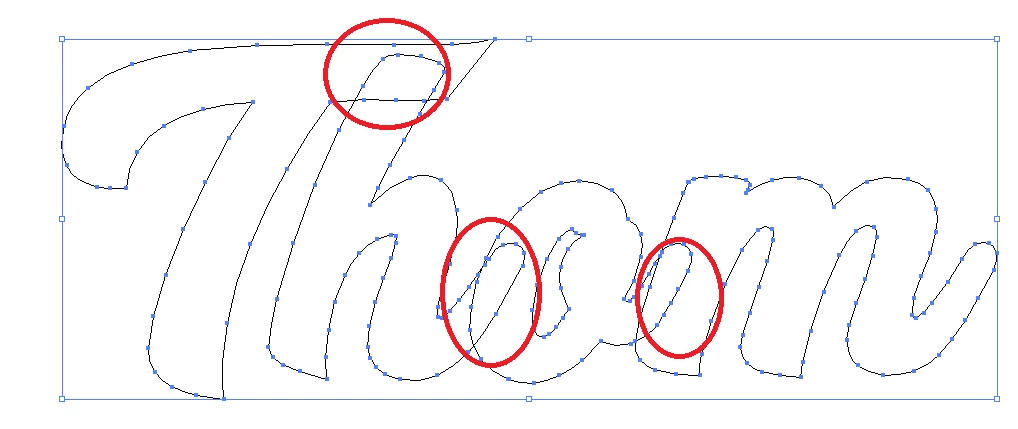
I am trying to set different names for laser cutting in a continuos font. So far so good. Then I convert them to outlines but this of course individualize each letter within the name with the result of being force to delete the anchor points of each letter that enter in the next one. I

Is there a way for getting only the countour outline of the name, without going by hand deleting those specific anchor points (for all the letters in all the names)? Or a way of "filling" the interior of the name so those anchor points get erased somehow?

Thank you all in advance!
    This topic has been closed for replies.

    4 replies

    Participant
    June 3, 2019

    Thanks to all! I will give all your suggestions a try and hopefully achieve something nice not dying in the attempt.

    Stephen Marsh
    Community Expert
    Community Expert
    June 3, 2019

    There are two issues as I see things:

    1) Combining shapes as per the red areas indicated (pathfinder, shapebuilder)

    2) Using the simplify command or manually removing anchor points to tidy up all of the other shapes

    I would duplicate the paths, then turn them into guides. Next, I would use the path/simplify command or the delete anchor point tool (pen with a minus sign) to remove unnecessary points. You will likely need to move anchor points and make other adjustments to retain the original path shape will less points.

    More here:

    How to edit and reshape paths in Illustrator

    How to combine objects in Illustrator

    Cut, divide, and trim objects in Illustrator 

    How to create shapes using the Shape Builder tool in Illustrator

    Creating complex art with the Shape Builder tool 

    avid_body16B8
    Legend
    June 3, 2019

    I would use the shape builder.

    Jacob Bugge
    Community Expert
    Community Expert
    June 3, 2019

    sg,

    How about Live Paint Group?

    Search Results

    Monika Gause
    Community Expert
    Community Expert
    June 3, 2019

    Take a look at the pathfinder panel.

    Participant
    June 3, 2019

    Thanks for the suggestion! I feel that could be useful, but I don't know how to proceed within the menu. Sorry, my knowledge of the Ilustrator is quite basic out of the main features!

    Monika Gause
    Community Expert
    Community Expert
    June 3, 2019

      schrieb

    Thanks for the suggestion! I feel that could be useful, but I don't know how to proceed within the menu. Sorry, my knowledge of the Ilustrator is quite basic out of the main features!

    That can easily be solved:

    How to combine objects in Illustrator