P__Raghu
Participant
December 16, 2016
Answered

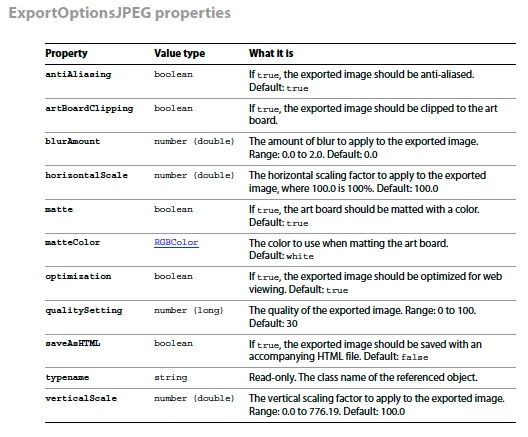
Illustrator JPEGExportOptions Object properties are missing in Object Model

  • December 16, 2016
  • 2 replies
  • 1878 views

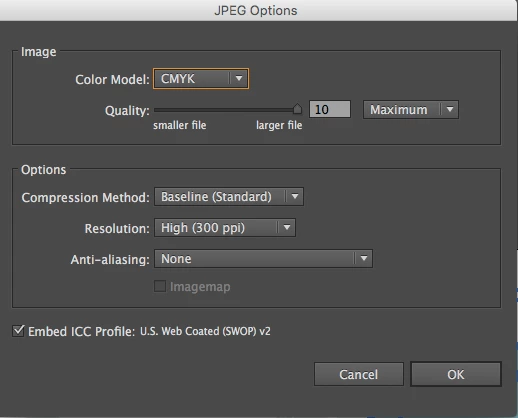
The Adobe Illustrator JPEGExportOptions Object properties are missing or mismatched in Object Model? Please advice.

This topic has been closed for replies.
Correct answer Ten A

Why don't you use action with Javascript like below?

function exportJPG(pth){ //Export 300dpi CMYK jpg

  var str = "";

  for (var i=0;i<pth.length;i++) str += u16to8(pth.charCodeAt(i));

  var act = "/version 3/name [ 4 73657431]/isOpen 1"

  + "/actionCount 1/action-1 {/name [ 4 61637431]/keyIndex 0/colorIndex 0/isOpen 1/eventCount 1"

  + "/event-1 {/useRulersIn1stQuadrant 0/internalName (adobe_exportDocument)"

  + "/isOpen 0/isOn 1/hasDialog 1/showDialog 0/parameterCount 7"

  + "/parameter-1 {/key 1885434477/showInPalette 0/type (raw)"

  + "/value < 100 0a00000001000000030000000100000000002c01020000000000000001000000"

  + "69006d006100670065006d006100700000000000000000000000000000000000"

  + "0000000000000000000000000000000000000000000000000000000000000000"

  + "00000100>/size 100}" //Probably, parameter for exporter plugin

  + "/parameter-2 {/key 1851878757/showInPalette 4294967295"

  + "/type (ustring)/value [ " + str.length/2 + " " + str + "]}"

  + "/parameter-3 {/key 1718775156/showInPalette 4294967295"

  + "/type (ustring)/value [ 16 4a5045472066696c6520666f726d6174]}" // JPEG file format

  + "/parameter-4 {/key 1702392942/showInPalette 4294967295"

  + "/type (ustring)/value [ 12 6a70672c6a70652c6a706567]}" //jpg,jpe,jpeg

  + "/parameter-5 {/key 1936548194/showInPalette 4294967295/type (boolean)/value 0}"

  + "/parameter-6 {/key 1935764588/showInPalette 4294967295/type (boolean)/value 1}"

  + "/parameter-7 {/key 1936875886/showInPalette 4294967295/type (ustring)/value [ 0]}}}";

  var tmp = File(Folder.desktop + "/set1.aia"); 

  tmp.open('w'); 

  tmp.write(act);

  tmp.close();

  app.loadAction(tmp);

  app.doScript("act1", "set1", false); 

  app.unloadAction("set1","");

  tmp.remove();

  }

function u16to8(cd) {

  var out =

  (cd < 0x80

  ? toHex2(cd)

  : (cd < 0x800

  ? toHex2(cd >> 6 & 0x1f | 0xc0)

  : toHex2(cd >> 12 | 0xe0) +

  toHex2(cd >> 6 & 0x3f | 0x80)

  ) + toHex2(cd & 0x3f | 0x80)

  );

  return out;

  }

function toHex2(num) {

  var out = '0' + num.toString(16);

  return out.slice(-2);

}

var pth = Folder.selectDialog("target Folder?").fsName + "/test.jpg";

exportJPG(pth);

2 replies

P__Raghu
P__RaghuAuthor
Participant
December 17, 2016

The object properties and actual Illustrator JPEG Export Options are not equal, that is my problem, see the attached both screenshots, and i could not fix my scripting.

Example:

Image Color Model = CMYK,

Options [Compression Method, Resolutions, and etc.,]

Ten A
Community Expert
Ten ACommunity ExpertCorrect answer
Community Expert
December 17, 2016

Why don't you use action with Javascript like below?

function exportJPG(pth){ //Export 300dpi CMYK jpg

  var str = "";

  for (var i=0;i<pth.length;i++) str += u16to8(pth.charCodeAt(i));

  var act = "/version 3/name [ 4 73657431]/isOpen 1"

  + "/actionCount 1/action-1 {/name [ 4 61637431]/keyIndex 0/colorIndex 0/isOpen 1/eventCount 1"

  + "/event-1 {/useRulersIn1stQuadrant 0/internalName (adobe_exportDocument)"

  + "/isOpen 0/isOn 1/hasDialog 1/showDialog 0/parameterCount 7"

  + "/parameter-1 {/key 1885434477/showInPalette 0/type (raw)"

  + "/value < 100 0a00000001000000030000000100000000002c01020000000000000001000000"

  + "69006d006100670065006d006100700000000000000000000000000000000000"

  + "0000000000000000000000000000000000000000000000000000000000000000"

  + "00000100>/size 100}" //Probably, parameter for exporter plugin

  + "/parameter-2 {/key 1851878757/showInPalette 4294967295"

  + "/type (ustring)/value [ " + str.length/2 + " " + str + "]}"

  + "/parameter-3 {/key 1718775156/showInPalette 4294967295"

  + "/type (ustring)/value [ 16 4a5045472066696c6520666f726d6174]}" // JPEG file format

  + "/parameter-4 {/key 1702392942/showInPalette 4294967295"

  + "/type (ustring)/value [ 12 6a70672c6a70652c6a706567]}" //jpg,jpe,jpeg

  + "/parameter-5 {/key 1936548194/showInPalette 4294967295/type (boolean)/value 0}"

  + "/parameter-6 {/key 1935764588/showInPalette 4294967295/type (boolean)/value 1}"

  + "/parameter-7 {/key 1936875886/showInPalette 4294967295/type (ustring)/value [ 0]}}}";

  var tmp = File(Folder.desktop + "/set1.aia"); 

  tmp.open('w'); 

  tmp.write(act);

  tmp.close();

  app.loadAction(tmp);

  app.doScript("act1", "set1", false); 

  app.unloadAction("set1","");

  tmp.remove();

  }

function u16to8(cd) {

  var out =

  (cd < 0x80

  ? toHex2(cd)

  : (cd < 0x800

  ? toHex2(cd >> 6 & 0x1f | 0xc0)

  : toHex2(cd >> 12 | 0xe0) +

  toHex2(cd >> 6 & 0x3f | 0x80)

  ) + toHex2(cd & 0x3f | 0x80)

  );

  return out;

  }

function toHex2(num) {

  var out = '0' + num.toString(16);

  return out.slice(-2);

}

var pth = Folder.selectDialog("target Folder?").fsName + "/test.jpg";

exportJPG(pth);

P__Raghu
P__RaghuAuthor
Participant
December 26, 2016

Thank you,

I will go with actions with JS.


o-marat
Inspiring
December 16, 2016

What features do you need? Specifically.

There are workarounds – through Photoshop...