


- Home
- Illustrator
- Discussions
- Java Script to Save ai to PDF with password...
- Java Script to Save ai to PDF with password...

Copy link to clipboard
Copied
Hi folks. My goal is to have a script carry out the following functions:
1. grab the active document name
2. save as a PDF using the active doc name with password lock in the same directory the *.ai file is located
I have started fiddling with some code but I don't know what I'm doing...newbie.
Here is the code I'm currently using.
var curDoc = app.activeDocument;
var destFolder, sourceFolder, files, fileType, sourceDoc, targetFile, pdfSaveOpts;
//var destName = "~/Desktop/Testpassword1.pdf";
var destName = targetFile
saveFileToPDF(destName);
//sourceFolder = Folder.selectDialog( 'Select the folder with Illustrator files you want to convert to PDF', '~' );
//saveFileToPDF(destName);
//+++++++++++++++++++++++++++++++++++++++++++++++++++++++++++++++++++
if ( sourceFolder != null )
{
    //files = new Array();
    //fileType = '*.ai';
    //fileType = prompt( 'Select type of Illustrator files to you want to process. Eg: *.ai', ' ' );

    // Get all files matching the pattern
    //files = sourceFolder.getFiles( fileType );

    if ( files.length > 0 )
    {
        // Get the destination to save the files
        destFolder = Folder.selectDialog( 'Select the folder where you want to save the converted PDF files.', '~' );
        for ( i = 0; i < files.length; i++ )
        {
            sourceDoc = app.open(files); // returns the document object

            // Call function getNewName to get the name and file to save the pdf
            targetFile = getNewName();

            // Call function getPDFOptions get the PDFSaveOptions for the files
            //pdfSaveOpts = getPDFOptions( );

            // Save as pdf
            sourceDoc.saveAs( targetFile, pdfSaveOpts );

            sourceDoc.close();
        }
        alert( 'Saved' + destFolder );
    }
    else
    {
        alert( 'No matching files found' );
    }
}
 ///++++++++++++++++++++++++++++++++++++++++++++++++++++++++++++++++++++
 function getNewName()
{
    var ext, docName, newName, saveInFile, docName;
    docName = sourceDoc.name;
    ext = '.pdf'; // new extension for pdf file
    newName = "";

    for ( var i = 0 ; docName != "." ; i++ )
    {
        newName += docName;
    }
    newName += ext; // full pdf name of the file

    // Create a file object to save the pdf
    saveInFile = new File( destFolder + '/' + newName );


    return saveInFile;
}
///++++++++++++++++++++++++++++++++++++++++++++++++++++++++++++++++++++
function saveFileToPDF (dest) {

var doc = app.activeDocument;

if ( app.documents.length > 0 ) {

var saveName = new File ( dest );
saveOpts = new PDFSaveOptions();
saveOpts.compatibility = PDFCompatibility.ACROBAT5;
saveOpts.generateThumbnails = true;
saveOpts.optimization = true;
saveOpts.preserveEditability = true;
saveOpts.bleedOffsetRect = [2,2,2,2];
saveOpts.trimMarks = true;
//=======================  COMPRESSION ===========================
saveOpts.colorCompression = CompressionQuality.JPEGMAXIMUM;
saveOpts.colorDownsamplingMethod = DownsampleMethod.BICUBICDOWNSAMPLE;
saveOpts.colorDownsampling = 300;
saveOpts.colorDownsamplingImageThreshold = 450;
//-----------------------------------------------------------------------------------------------------------
saveOpts.grayscaleCompression = CompressionQuality.JPEGMAXIMUM;
saveOpts.grayscaleDownsamplingMethod = DownsampleMethod.BICUBICDOWNSAMPLE;
saveOpts.grayscaleDownsampling = 300;
saveOpts.grayscaleDownsamplingImageThreshold = 450;
//-----------------------------------------------------------------------------------------------------------
saveOpts.monochromeCompression = MonochromeCompression.CCIT4;
saveOpts.monochromeDownsamplingMethod = DownsampleMethod.BICUBICDOWNSAMPLE;
saveOpts.monochromeDownsampling = 1200;
saveOpts.monochromeDownsamplingImageThreshold = 1800;
//====================  END OF COMPRESSION =======================
saveOpts.colorConversionID = ColorConversion.COLORCONVERSIONREPURPOSE;
saveOpts.colorDestinationID = ColorDestination.COLORDESTINATIONWORKINGCMYK;
///
saveOpts = new PDFSaveOptions();
saveOpts.requirePermissionPassword = true;
saveOpts.permissionPassword = "pink";
saveOpts.pDFAllowPrinting = PDFPrintAllowedEnum.PRINT128LOWRESOLUTION;
doc.saveAs( saveName, saveOpts );
}
}
saveOpts.pDFAllowPrinting = PDFPrintAllowedEnum.PRINT128LOWRESOLUTION;
doc.saveAs( saveName, saveOpts );
}
}


 1 Correct answer

This needs a lot of work.
too many errors with the code to list.
it needs to be re written from scratch.
give this a bash.
...//---------------------------------------------------
// Save as LOCKED pdf
//---------------------------------------------------
//
// Qwertyfly
// 03/07/2015
// Version 1.0
//
//---------------------------------------------------
//
// Set your password here
var pass = 'pink';
//
//--------------------------------------------------


Explore related tutorials & articles
 15
Replies
15
15
Replies
15

Copy link to clipboard
Copied
Anyone??
Copy link to clipboard
Copied
This needs a lot of work.
too many errors with the code to list.
it needs to be re written from scratch.
give this a bash.
//---------------------------------------------------
//          Save as LOCKED pdf
//---------------------------------------------------
//
//          Qwertyfly
//          03/07/2015
//          Version 1.0
//
//---------------------------------------------------
//
//          Set your password here
var pass = 'pink';
//
//---------------------------------------------------
if ( app.documents.length > 0 ) { //make sure we have a file open to work with
var doc = app.activeDocument;
if ( doc.fullName.toString().substr(doc.fullName.toString().lastIndexOf('.')) == ".ai" ){ //Make sure your working with an ai file
var myFile = new File(doc.fullName.toString().substr(0,doc.fullName.toString().lastIndexOf('.')) + ".pdf");
var saveOpts;
setSaveOptions();
saveFileToPDF(myFile);
}else{alert("Active Document is not an '.ai' file")}
}else{alert("No Document Open")}
function saveFileToPDF(myFile){
var originalInteractionLevel = userInteractionLevel; //save the current user interaction level
userInteractionLevel = UserInteractionLevel.DONTDISPLAYALERTS; //Set user interaction level to suppress alerts
doc.saveAs(myFile,saveOpts); //Save File
userInteractionLevel = originalInteractionLevel; //Set user interaction level back to original settings
}
function setSaveOptions(){
// Setup Save Options
saveOpts = new PDFSaveOptions();
saveOpts.compatibility = PDFCompatibility.ACROBAT5;
saveOpts.generateThumbnails = true;
saveOpts.optimization = true;
saveOpts.preserveEditability = true;
saveOpts.bleedOffsetRect = [2,2,2,2];
saveOpts.trimMarks = true;
//======================= COMPRESSION ===========================
saveOpts.colorCompression = CompressionQuality.JPEGMAXIMUM;
saveOpts.colorDownsamplingMethod = DownsampleMethod.BICUBICDOWNSAMPLE;
saveOpts.colorDownsampling = 300;
saveOpts.colorDownsamplingImageThreshold = 450;
//-----------------------------------------------------------------------------------------------------------
saveOpts.grayscaleCompression = CompressionQuality.JPEGMAXIMUM;
saveOpts.grayscaleDownsamplingMethod = DownsampleMethod.BICUBICDOWNSAMPLE;
saveOpts.grayscaleDownsampling = 300;
saveOpts.grayscaleDownsamplingImageThreshold = 450;
//-----------------------------------------------------------------------------------------------------------
saveOpts.monochromeCompression = MonochromeCompression.CCIT4;
saveOpts.monochromeDownsamplingMethod = DownsampleMethod.BICUBICDOWNSAMPLE;
saveOpts.monochromeDownsampling = 1200;
saveOpts.monochromeDownsamplingImageThreshold = 1800;
//==================== END OF COMPRESSION =======================
saveOpts.colorConversionID = ColorConversion.COLORCONVERSIONREPURPOSE;
saveOpts.colorDestinationID = ColorDestination.COLORDESTINATIONWORKINGCMYK;
///
saveOpts.requirePermissionPassword = true;
saveOpts.permissionPassword = pass;
saveOpts.pDFAllowPrinting = PDFPrintAllowedEnum.PRINT128LOWRESOLUTION;
}
Copy link to clipboard
Copied
Excellent. Thank you Qwertyfly! 
Copy link to clipboard
Copied
glad I could help you out.
Copy link to clipboard
Copied
Qwertyfly... wrote:
glad I could help you out.
Ah, one little thing keeps bugging me. The code executes as it should. However, I'm having trouble getting the proper compression down using CompressionQuality.AUTOMATICJPEGLOW with downsampling at 200. The pdf size is still too big even after I set the quality to 200. What am I missing?
sample code for compression below:
| //======================= COMPRESSION =========================== | |
| saveOpts.colorCompression = CompressionQuality.AUTOMATICJPEGLOW; | |
| saveOpts.colorDownsamplingMethod = DownsampleMethod.BICUBICDOWNSAMPLE; | |
| saveOpts.colorDownsampling = 200; | |
| saveOpts.colorDownsamplingImageThreshold = 300; | |
| //----------------------------------------------------------------------------------------------------------- | |
| saveOpts.grayscaleCompression = CompressionQuality.AUTOMATICJPEGLOW; | |
| saveOpts.grayscaleDownsamplingMethod = DownsampleMethod.BICUBICDOWNSAMPLE; | |
| saveOpts.grayscaleDownsampling = 200; | |
| saveOpts.grayscaleDownsamplingImageThreshold = 300; | |
| //----------------------------------------------------------------------------------------------------------- | |
| saveOpts.monochromeCompression = MonochromeCompression.CCIT4; | |
| saveOpts.monochromeDownsamplingMethod = DownsampleMethod.BICUBICDOWNSAMPLE; | |
| saveOpts.monochromeDownsampling = 200; | |
| saveOpts.monochromeDownsamplingImageThreshold = 300; | |
| //==================== END OF COMPRESSION ======================= |
Copy link to clipboard
Copied
I'm not sure what you mean by too big.
doing a few tests. if I save manually entering the settings above, then save with the script also using the settings above I only get a difference of a few KB.
could be my test files.
not sure, but does it downsample images if preseveEditability = true?
set that to false and the file will be smaller.
but will lose editability. not an issue if you still have the .ai.
Copy link to clipboard
Copied
I got it down now. I set the downsampling to 100 on all three sections and that did the trick. Thanks anyway Qwerty.
Copy link to clipboard
Copied
hope you get good use from it

Copy link to clipboard
Copied
Well done!!! Thanks!
Is it possible to open the encrypted PDF with JavaScript?
I've seen Illustrator JavaScript Reference, but I can't find any thing about opening encrypted PDF.
Copy link to clipboard
Copied
I responded to you Q on How to open the encrypted PDF with JavaScript?
without outside help from something like AHK I don't think this is possible.

Copy link to clipboard
Copied
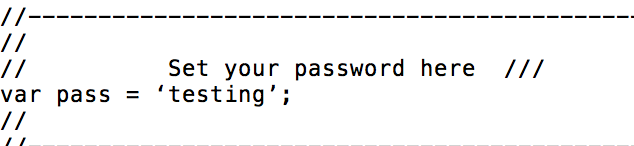
Nice script! But I have a problem when I change the word pink to my own password. It gives a syntax error 8; -> var pass = 'mypass';
What am I doing wrong?

Copy link to clipboard
Copied
Can you make a screenshot of the error?
Copy link to clipboard
Copied

Copy link to clipboard
Copied
Aaah forget it, it's already working! 
Copy link to clipboard
Copied
It's because you had pretty quotes instead of basic quotes (') - yours are curly and slanted, but computer code only likes the blocky vertical ones.


Get ready! An upgraded Adobe Community experience is coming in January.
Learn more
 AdChoices