
lalal77725309
Participating Frequently
June 17, 2017
Answered

RGB breakdowns of swatchcolours are inconsistent in different machines

  • June 17, 2017
  • 5 replies
  • 2068 views

Hi guys,

I'm supplied with a colour swatches *.ase file for printing on glass using a large format glass printer with ceramic inks. Colour swatches are set up as process global colours. Printer uses 6 colour inks and prefers files to be set up as RGB.

My issue is, the RGB breakdowns of these colour swatches are inconsistent. The differences are very minor, only 1 or 2 percentages, please see attached screenshot.

The manufacturer is unable to supply the exact colour breakdowns of their colour swatches. And this particular job is a bit complicated, so I need to make sure my files are flawless in every single way.

So my question is

1. is there any way to 'lock' the RGB values on the colour swatches?

2. Are 1 or 2 percentages in RGB breakdowns ever going to make a visual difference in printing?
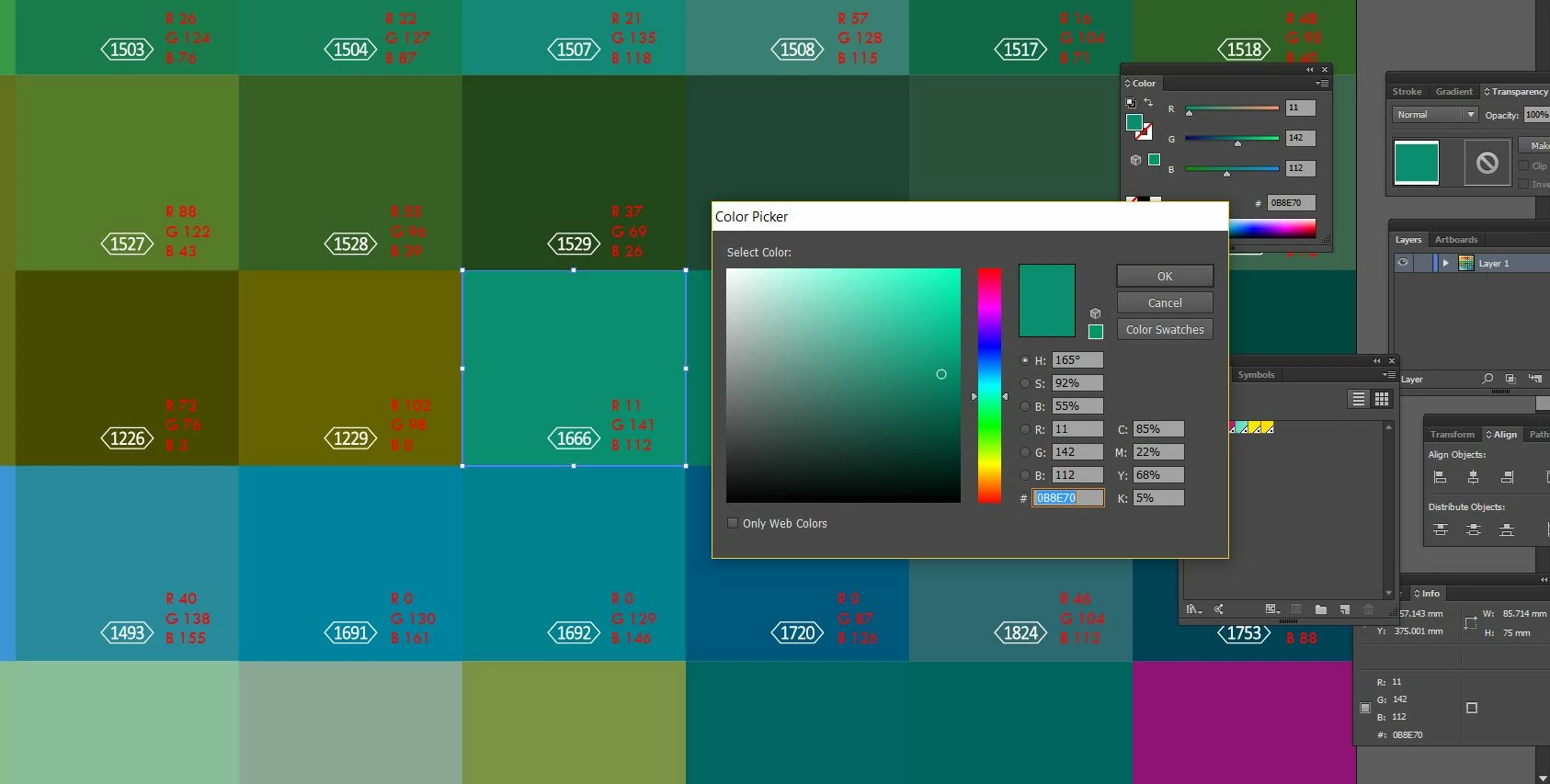
Sorry really silly questions, but I would highly appreciate your thoughts and suggestions:)

Thank you in advance!

This topic has been closed for replies.
Correct answer jdanek

The print vendor should be sending your PDFs directly to the RIP / Printer.  I see no reason to open the file multiple times.  You are working in a semi closed-loop workflow.  Do your PDFs have "Leave Colors Unchanged" selected in the settings?

What you are describing is a big problem and something somewhere is getting nixed along the way.  You should get consistent results if your files honor profiles and you have them setup to concur with the printer's RIP expectations.  When you get deviate color output, something changed.  There is no way for us to know since we cannot investigate every color management setting in both your CPU and the printer's RIP.

The key is establishing a solid workflow where you know the results.  That includes getting specific file prep specs from the printer and using a PDF setup each and every time to send that PDF to that printer.  When you do, you will get and can expect to get, consistency.

5 replies

Inspiring
June 17, 2017

The only machine that matters is the one used to export the job to the RIP / Printer.

"So my question is

1. is there any way to 'lock' the RGB values on the colour swatches?

- the numbers will go with the file to the RIP / Printer Driver.  Like previously mentioned, they will not change en route;

2. Are 1 or 2 percentages in RGB breakdowns ever going to make a visual difference in printing? "

- No.

lalal77725309
Participating Frequently
June 18, 2017

Thank you! So as long as I use the machine that got the same RGB readings as the printer's machine to save all my final files, the values are not going to be changed again mysteriously being reopened a couple of times by the printer etc? And can I please ask another question, if the ripped files are reading the same (being checked a couple of the times, eg. ripping results in two files came out the same, but printed results on a few of the colours(not all of them, most are correct) especially when there's a large quantity of red ink, another round of testings happened on blue ink, printed results look obviously very different say too much ink or not vibrant enough, what do you think could be the reason? I've been scratching my head on this one...

Monika Gause
Community Expert
Community Expert
June 18, 2017

Please read about color management. This is just an introduction: Set up color management  There's no excuse anymore to not learn it. This stuff has been around for at least 15 years now.

Different setups of color management in your different AI versions can of course cause changes in the file.

Do you print that PDF? Or do you save it?

Without any knowledge about color management anything might happen here. Ask the printer for more details. "Acrobat 8" is just not enough to get decent files.

Which RGB color profile is set up in your color settings in Illustrator right now?

Ton Frederiks
Community Expert
Community Expert
June 17, 2017

In what program was the file made that you show in your screenshot?

That is not an .ase file.

Where was the .ase file made?

There can be little differences caused by rounding the numbers.

In your case I would not worry about the difference between an RGB value of 141 and 142, nobody will be able to tell the difference.

lalal77725309
Participating Frequently
June 18, 2017

Thank you Ton. Not sure which illustrator version is used to create the *.ase file, it's supplied by the manufacturer, I'm using cc 2017 to open it up. "There can be little differences caused by rounding the numbers.", do you think the illustrator versions could be a factor?

Ton Frederiks
Community Expert
Community Expert
June 18, 2017

The RGB values in an .ase file are locked.

Whatever RGB profile is used in your Color Settings > RGB Working Space does not change the values you see when you doubleclick  your .ase swatches in the Swatches Panel.

I am not sure where the file originates that has the different color values.

As long as you use the Color Settings file (.csf) file provided by your printer and use the swatches values from your .ase file you should be fine.

Monika Gause
Community Expert
Community Expert
June 17, 2017

You've got an RGB file with process swatches (not spot swatches) and the specifications in that file don't match the swatches settings? Your screenshot doesn't show such a file BTW. There are no swatches in that file.

But if you have such a file: maybe whoeever created those swatches didn't read the specifications?

Provided that this RGB file never got converted to CMYK and back and also never got converted by assigning wrong color profiles and/or wrong color management settings, then the swatches will never change on their own.

Also: to check what is set up in the swatches: don't use the color picker. Double click the swatch in the swatches panel and read what's inside.

lalal77725309
Participating Frequently
June 18, 2017

Thank you Monika, attached is the screenshot of the colour swatches. I got supplied with the colour profile at the last minute after the design is all finished, printer then said they forgot to mention there's  specific colour profile... So yes, I have to change the colour profile at the end, didn't seem to affect the RGB reading on my computer but on another computer the readings are different, maybe it's the reason, I'll dig into it! So the colour management, is it the one under Print? Are my settings at the moment correct? Should the printer supply the colour management setting, coz later on they'll have to send it to print and it has to match with their print setting?

Mylenium
Legend
June 17, 2017

There is nothing to lock. Such a behavior is a typical sign of color management not beiung set up consistently across different machines. You need to straighten out that more than anything else.

Mylenium

lalal77725309
Participating Frequently
June 17, 2017

Colour management is not my strength. Where else should I setup/check across the machines? At the moment, I have loaded in the supplied colour profile in colour settings,  assigned profiles to Adobe RGB(1998), I can see there's a colour management setting under Print, but I'm not going to send to print using any of these machines...sorry, any advice on this would be super helpful!

Willi Adelberger
Community Expert
Community Expert
June 17, 2017

If you have set up different output profiles for print you will get different results.

Willi Adelberger
Community Expert
Community Expert
June 17, 2017

Do both computers have the same color management settings and use both the same color profile?

lalal77725309
Participating Frequently
June 17, 2017

Yes, both are using the same colour profile(supplied by printer *csf file, assigned profile to Adobe RGB(1998), as advised by printer) and the same colour swatches .ase file, documents are set up in RGB, Illustrator versions are a bit different(cc 2017 vs. cc), I'm using CC 2017, the screenshot is from another machine using CC, but have tried a 3rd machine with only CC installed, the result is consistent with my CC 2017