
vincentm90158818
Participant
November 22, 2017
Answered

RGB to RGB color shift

  • November 22, 2017
  • 2 replies
  • 1043 views

     I have two documents open...Doc A and Doc B.  Both are RGB and, as far as I can tell, are set exactly the same.  I have a blue square shape on Doc A that has the fill color I need on Doc B.  RGB = 45, 77, 146 (or 2d4d92).  When I copy from Doc A and paste on Doc B, the RGB values change to 11, 56, 130 (or 0b3882).  WTF?  So, I go the long route and manually type in the RBG values I want into Doc B.  The result is a much duller blue that in no way matches the blue I need.  This blue is just one instance of the problem.  It's a constant problem I'm having when working between 2 documents (which in unavoidable). 

     Is there a hidden color mode setting?  It's like I'm switching between a CMYK and RGB color mode, but everything is set to RGB.  I see a lot of similar issues with color shifts, but they all seem to be caused by Ai trying to interpret CMYK when exporting or saving.  I'm just trying to be consistent between two RGB docs.
This topic has been closed for replies.
Correct answer Ton Frederiks

Monitor color is a bad working space, you are probably better off with one of the General Purpose settings.

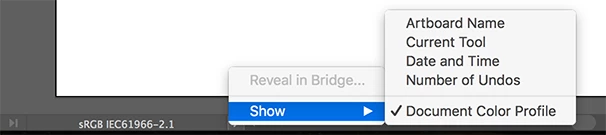
Is there a difference you can see at the bottom when you set it to show the Document Color Profile?

2 replies

Mike_Gondek10189183
Community Expert
Community Expert
November 22, 2017

Make sure you are set to File >> Document Color Mode >> RGB

You can confirm by looking to the right of you filename.

Then enter your values only in RGB or Hex color in the color panel. Now the colors should stick.

Monika Gause
Community Expert
Community Expert
November 22, 2017

Which color profile is assigned to the documents?

How is color management set up for non matching profiles?

vincentm90158818
Participant
November 22, 2017

Monika,

I've never worked with specific color profiles.  When I go to color settings, it's set to "Monitor Color" on both of them.

I'm not sure how to check the non matching profile setting.

Thanks

vincentm90158818
Participant
November 22, 2017

vincentm90158818  schrieb

Monika,

I've never worked with specific color profiles.  When I go to color settings, it's set to "Monitor Color" on both of them.

I'm not sure how to check the non matching profile setting.

Thanks

As Ton already wrote, this is bad.

Please learn about color management.

But it stil doesn't explain your different colors.

Can you check if one of the documents is set up to soft proof your document?

This is in the View menu.


View -> Proof Setup ->

both are set to "Working CMYK: U.S. Web Coated (SWOP) v2