
Question
Smart Guides doesn't show up in Adobe Illustrator CC 2017
Hello, I just got this new machine (windows 10) and reinstalled Adobe cc 2017 and today was the first time I launched Illustrator CC 2017 on this machine. I am also a beginner of Illustrator. Speaking of that, I did the following before I came to post my question:
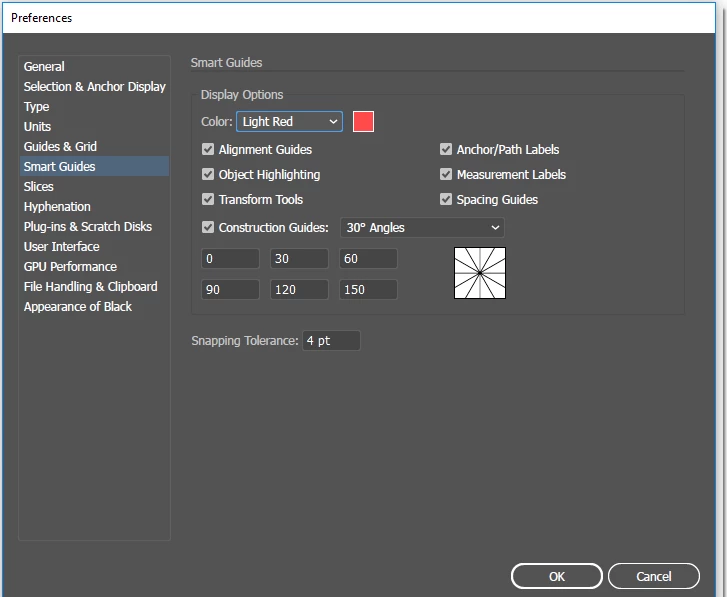
- I checked "Construction Guides -> 30 angels" under Edit -> Preferences -> Smart Guides
- Based my reading on similar questions on the Internet about Smart Guides not working, I made sure the following:
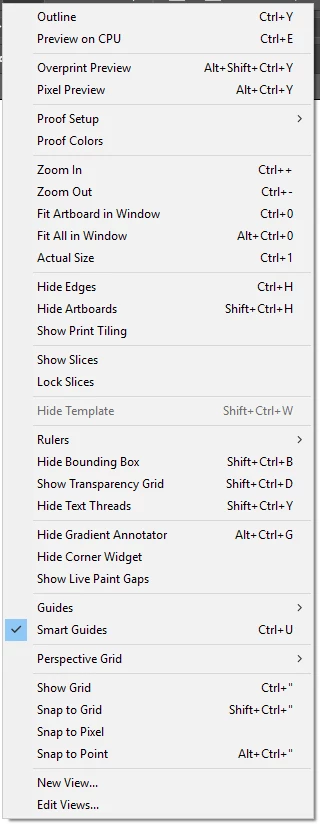
- Under "View"
- "Smart Guides" is checked (Ctrl+U)
- "Snap to Grid" is turned off
- "GPU Preview" is turned off
- "Pixel Preview" is turned off
- I also reset preferences, according other posts' advice, by pressing (Ctrl+Alt+Shift) during start of Adobe Illustrator for several times.
- Under "View"
The reason that I need to use Smart Guides is that I need to draw a chevron with precise angle of 120 degrees. After reading posts, I feel that using Smart Guides is the easiest way for me to do that.
Below are screenshots of Preferences and View:
Thanks for any help.
 AdChoices